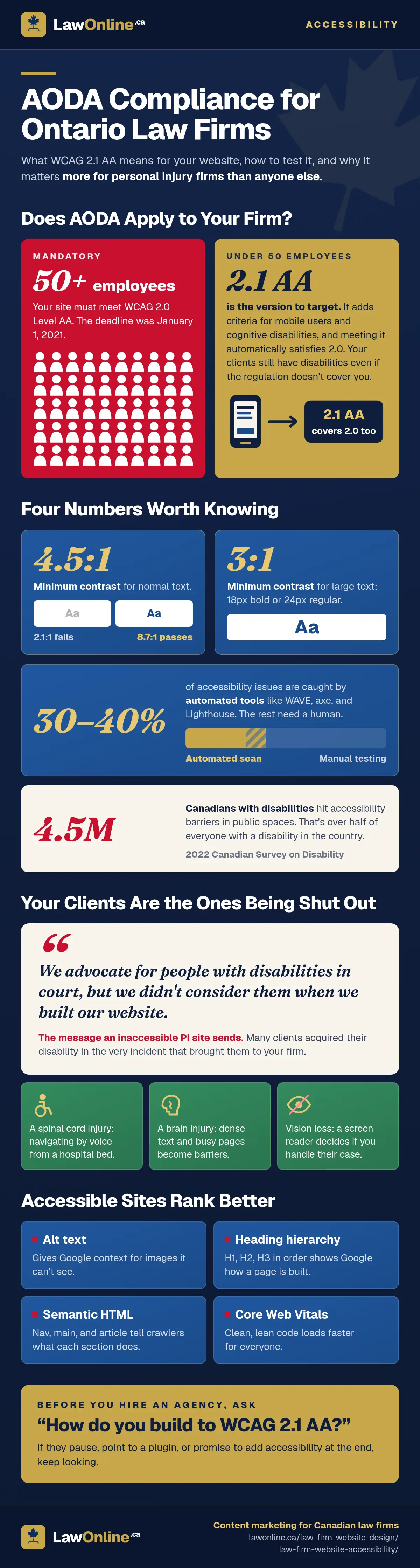
If your law firm has a website in Ontario, accessibility isn't a nice-to-have. It's a legal requirement for many firms, and a practical necessity for all of them. The 2022 Canadian Survey on Disability found that 4.5 million Canadians with disabilities experienced barriers to accessibility in public spaces, and those barriers extend to digital spaces, including your website.
The Accessibility for Ontarians with Disabilities Act (AODA) sets specific standards for how websites must function for people with disabilities, and AODA website compliance is something most law firm websites don't meet. The violations are predictable: missing image alt text, forms that can't be completed with a keyboard, videos without captions. Each one shuts out potential clients who can't navigate your site the way it was designed.
For personal injury firms, this isn't abstract. Your prospective clients include people with acquired disabilities, traumatic brain injuries, and vision loss. If your website fails the population you serve, it's not just a compliance problem. It's a credibility problem.
This guide covers what AODA requires, the most common violations on law firm websites, and exactly how to test whether your site passes.
What Is AODA and Does It Apply to Your Law Firm Website?
AODA is Ontario's accessibility legislation, and it probably applies to your firm. The act created the Integrated Accessibility Standards Regulation (IASR), which includes specific requirements for websites and web content.
Here's the threshold: AODA website requirements apply to private sector organizations with 50 or more employees, which must make their websites conform to WCAG 2.0 Level AA. That deadline was January 1, 2021. If your firm has 50+ employees and your website hasn't been audited for accessibility since then, you're overdue.
The government actively enforces these requirements. Ontario's AODA framework covers approximately 444,000 organizations that serve the public, and the 2024 AODA Annual Report shows the enforcement machinery in action: 772 business audits covered 75 accessibility requirements that year, and 871 verification audits were completed. While 99% of those verification audits were eventually resolved as compliant, "resolved" doesn't mean firms passed on the first try. Most required corrective action before reaching compliance. The audit program catches violations and expects you to fix them.
Law firms below the 50-employee threshold aren't subject to the mandatory IASR web requirements. But that doesn't mean accessibility is irrelevant. A firm with 15 people still serves clients with disabilities, still benefits from the SEO improvements that come with accessible design, and still risks losing prospective clients who can't use the website. Accessibility is a baseline of a good law firm website, not a regulatory checkbox.
If you've encountered references to the ADA (Americans with Disabilities Act) while researching website accessibility, that's the US equivalent and it doesn't apply to Ontario law firms. AODA is the provincial legislation that governs your obligations. Federally regulated organizations in Canada are subject to the Accessible Canada Act instead, but most Ontario law firms fall under provincial AODA jurisdiction.
One important distinction: AODA compliance is the legal minimum, not the ceiling. Meeting the mandatory standard means your website doesn't violate the regulation. It doesn't mean your site is genuinely usable for everyone who visits. Think of AODA as the floor that keeps your firm out of regulatory trouble, and actual accessibility as the standard that keeps clients from leaving.
WCAG 2.1 AA: The Technical Standard Your Website Must Meet
AODA's web requirements reference WCAG 2.0 Level AA as the legal standard. But WCAG 2.1, published by the W3C Web Accessibility Initiative in 2018, is the version your firm should actually target. It's fully backward-compatible with 2.0 (meeting 2.1 automatically satisfies 2.0), and it adds criteria that matter specifically for mobile users and people with cognitive disabilities. Given that most law firm website traffic comes from phones, 2.1 AA is the practical standard.
WCAG is built on four principles, known by the acronym POUR:
- Perceivable. All content must be presentable in ways users can perceive. This means providing text alternatives for images, captions for videos, and sufficient colour contrast between text and backgrounds.
- Operable. Users must be able to navigate and interact with the site using different input methods. Keyboard-only navigation is the most common requirement, but this also covers touch interfaces and voice control.
- Understandable. Content and interface behaviour should be predictable and readable. Forms need clear labels, error messages should explain what went wrong, and the language of the page should be declared in the HTML.
- Robust. The website should work reliably across different assistive technologies, including screen readers, magnification software, and alternative input devices.
What does this mean in concrete terms? Every visitor, whether they're using a screen reader, navigating by keyboard, or relying on voice control, must be able to access your content and contact your firm. For a personal injury practice, this isn't hypothetical. A client with a spinal cord injury navigating with a mouth-operated joystick needs to reach your intake form. An older client with macular degeneration needs to read your fee information with a screen magnifier. A Deaf client needs captions on your testimonial video. These are people your firm already represents, and they're trying to hire you through a website that may be shutting them out.
The 5 Most Common AODA Violations on Law Firm Websites
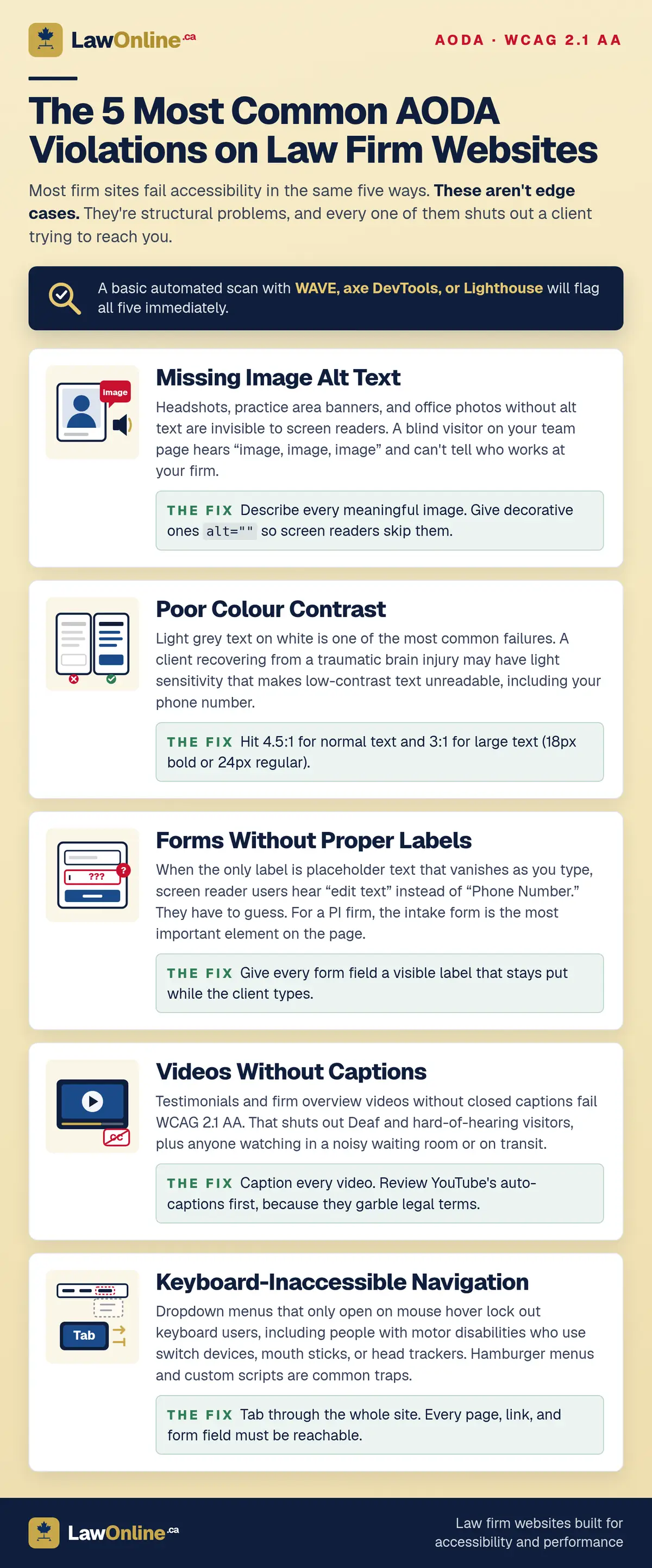
Most law firm websites fail accessibility in the same five ways. These aren't edge cases. They're structural problems that a basic automated scan will flag immediately.
1. Missing Image Alt Text
Practice area banner images, attorney headshots, and office photos without alt text are invisible to screen reader users. When a blind visitor reaches your "Our Team" page and hears nothing but "image, image, image" from their screen reader, they have no idea who works at your firm.
Every meaningful image needs descriptive alt text. A headshot's alt should identify the person and their role, not repeat the filename. Decorative images that add no information can use an empty alt attribute (alt=""), which tells screen readers to skip them entirely.
2. Poor Colour Contrast
Light grey text on white backgrounds is one of the most common failures on law firm websites. WCAG requires a minimum contrast ratio of 4.5:1 for normal-sized text and 3:1 for large text (18px bold or 24px regular).
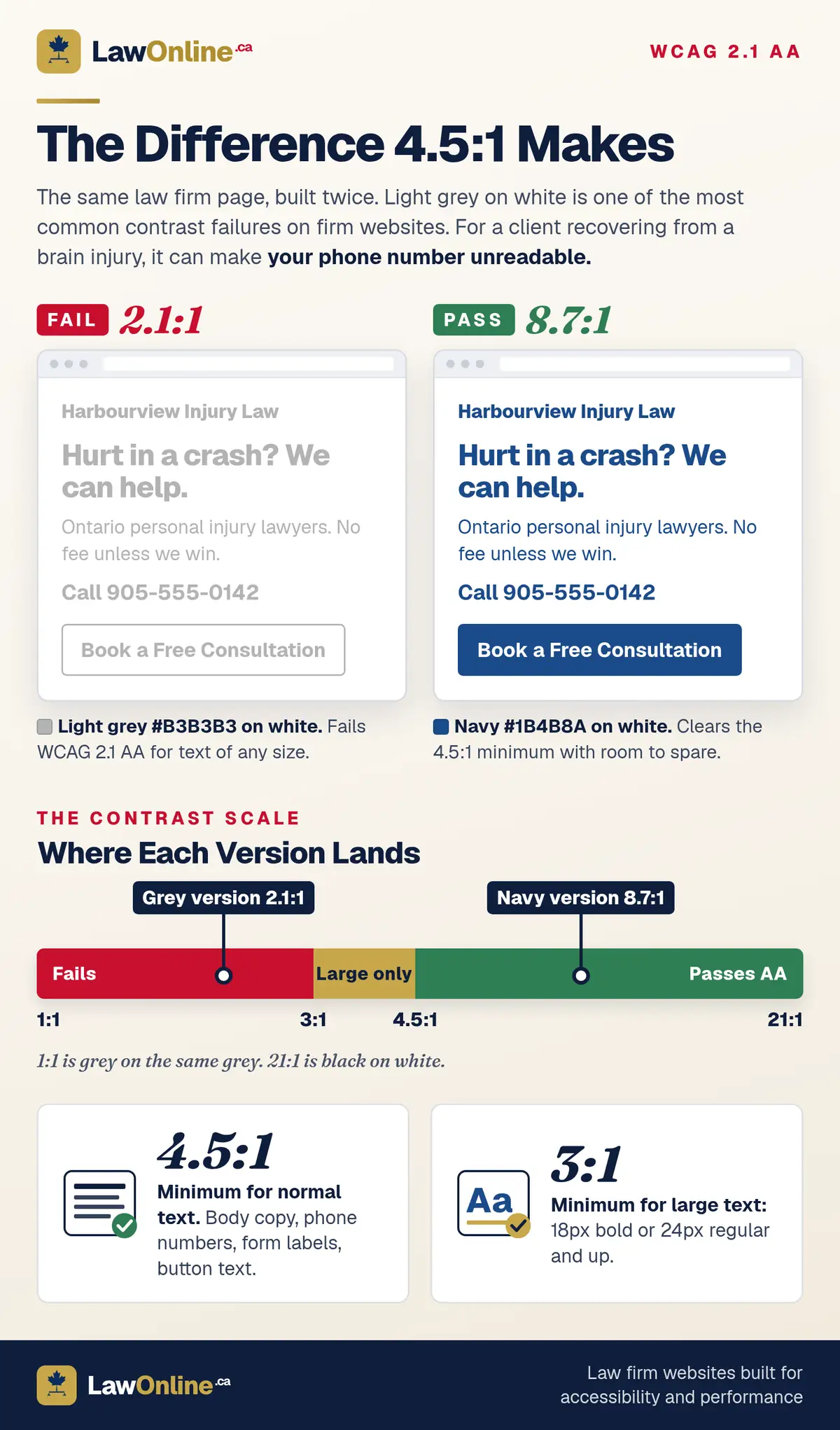
This matters more than firms realize. A personal injury client recovering from a traumatic brain injury may have light sensitivity or visual processing difficulties that make low-contrast text unreadable. If your contact number blends into the background, they can't call you.
3. Forms Without Proper Labels
Contact forms and intake forms where the label is a placeholder that disappears when you start typing are inaccessible. Screen reader users hear "edit text" instead of "Phone Number" or "Describe Your Case." They can't complete the form without guessing which field is which.
For a personal injury firm, the intake form is often the single most important page element. A client with a disability who can't submit it will contact the next firm whose form actually works.
4. Videos Without Captions
Client testimonials, firm overview videos, and explainer content without closed captions fail WCAG 2.1 AA. This isn't just about Deaf or hard-of-hearing visitors. Captions help anyone watching in a noisy waiting room, on public transit, or in a situation where they can't turn on audio.
If your firm has video content on your site, every video needs accurate captions. Auto-generated captions from YouTube are a starting point but frequently garble legal terminology. Review and correct them before embedding.
5. Keyboard-Inaccessible Navigation
If your website's dropdown menus require a mouse hover to open, keyboard-only users can't reach your practice area pages. This includes people with motor disabilities who use switch devices, mouth sticks, or head trackers to navigate.
Tab through your website using only the keyboard. If you can't reach every page, every link, and every form field, the site fails. Pay special attention to mobile hamburger menus and custom JavaScript components, both of which are common sources of keyboard traps.
Why Accessibility Matters for Personal Injury Law Firms Specifically
Every law firm benefits from an accessible website, but personal injury practices have a unique obligation. Your clients are disproportionately likely to have disabilities, and many acquired those disabilities in the very incident that brought them to your firm.
A client with a spinal cord injury from a car accident may be navigating your website from a hospital bed using voice commands. Someone with a traumatic brain injury may struggle with dense paragraphs, complex navigation, and rapidly changing visual elements. A client who lost vision in a workplace accident relies entirely on a screen reader to evaluate whether your firm handles their type of case.
These aren't hypothetical scenarios. They represent a significant share of PI caseloads across Ontario. A 2021 Department of Justice Canada study on people with disabilities in the criminal justice system found that many participants experienced the legal process as inaccessible because of systemic barriers and their distinctive circumstances. The barriers weren't limited to courtrooms. They started with the first point of contact.
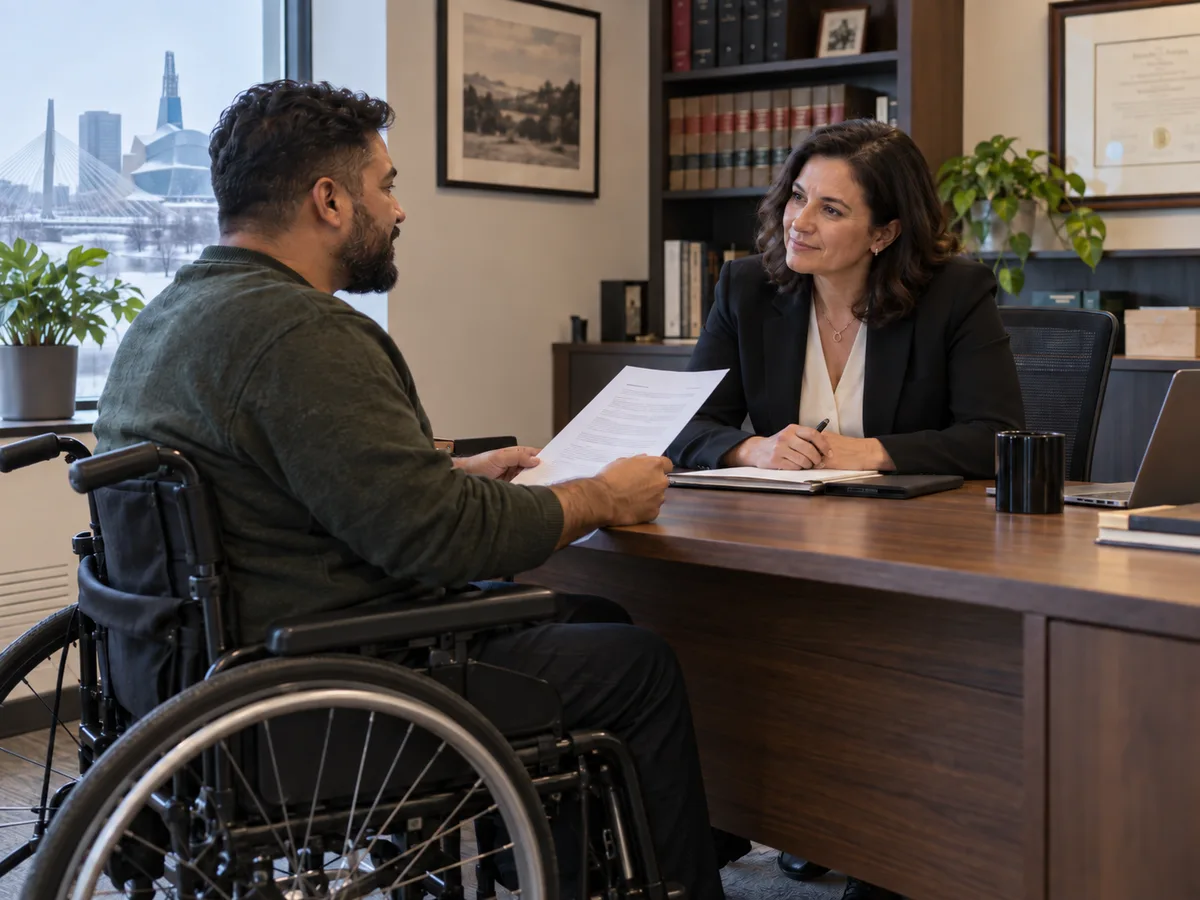
The Federation of Law Societies' Model Code of Professional Conduct speaks to this directly. Rule 3.2-9 requires lawyers to maintain a normal lawyer-client relationship as far as reasonably possible when a client's decision-making ability is impaired. Accessibility isn't a courtesy extended at the lawyer's discretion. It's a professional obligation, and it starts with how a client reaches you in the first place.
When a PI firm's website fails accessibility, the message is unmistakable: we advocate for people with disabilities in court, but we didn't consider them when we built our website. That disconnect between your advocacy and your digital presence costs you clients, because the firms that get accessibility right are the ones those clients can actually reach.
The SEO Upside of Accessibility (It's Measurable)
Accessible websites tend to rank better, and it's not a coincidence. Search engines and screen readers parse web content in remarkably similar ways, so the improvements you make for accessibility directly benefit your search visibility.
Alt text gives Google context about images it can't interpret visually. A personal injury firm with properly described case result images and infographics provides more content for Google to index and more opportunities to appear in image search.
Heading hierarchy (H1, H2, H3 in logical order) helps Google understand the structure and topics on each page. Skipping heading levels or using headings purely for visual styling confuses both screen readers and search crawlers.
Semantic HTML replaces generic containers with meaningful elements like <nav>, <main>, and <article>. These tell both assistive technologies and search engines what role each section serves on the page.
There's also a performance connection. Accessible websites tend to load faster because accessibility best practices, like proper markup, reduced JavaScript reliance, and clean DOM structure, overlap with the techniques that improve Core Web Vitals scores. Google's page experience signals reward exactly this kind of clean, well-structured code.
How to Test Your Law Firm Website for AODA Compliance
You don't need a consultant to run a first-pass accessibility audit. Three free website accessibility checkers will catch the majority of WCAG violations on your site.
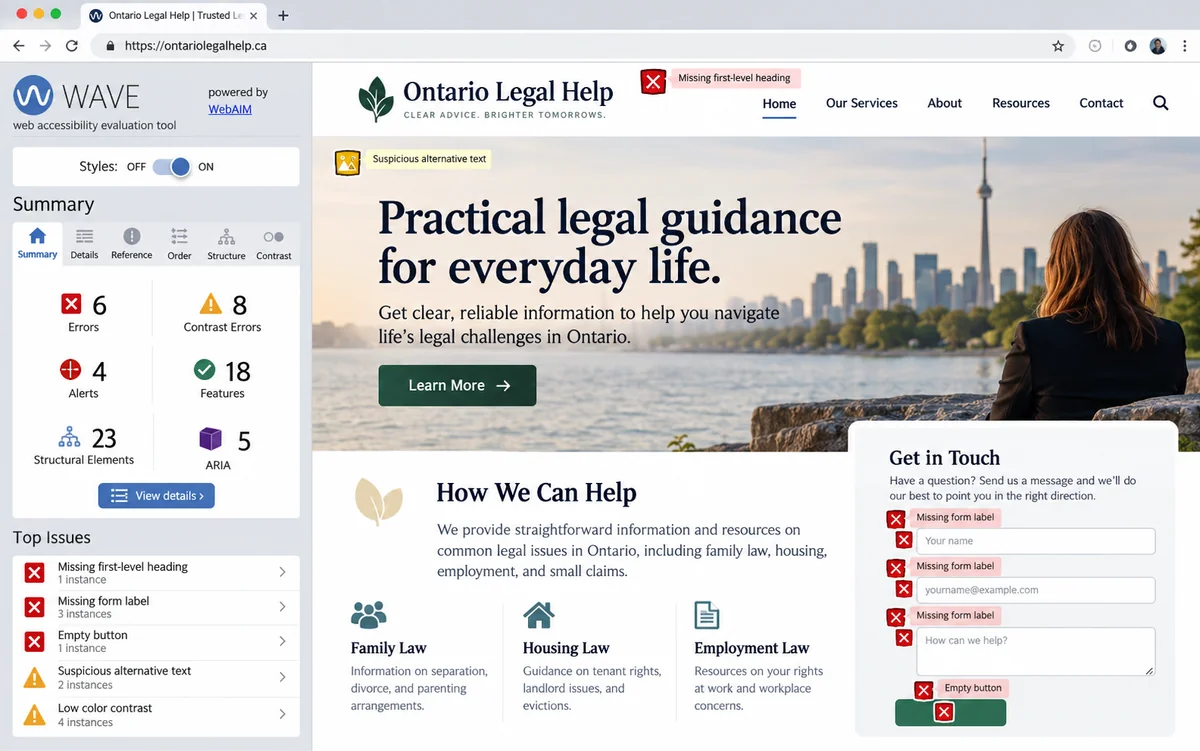
WAVE (Web Accessibility Evaluation Tool) is the simplest starting point. Enter your URL and it highlights every accessibility error, from missing alt text to empty form labels, directly on the page. It also flags contrast failures and structural issues with heading levels.
axe DevTools is a browser extension that runs a more technical audit within Chrome or Firefox DevTools. It groups violations by severity and links to the specific WCAG success criterion each one fails.
Google Lighthouse includes an accessibility audit alongside its performance, SEO, and best practices checks. Run it from Chrome DevTools or PageSpeed Insights and you'll get a score out of 100 with specific failures listed.
What to Check Manually
Automated tools catch roughly 30% to 40% of accessibility issues. The rest require human testing.
The most important manual test is simple: tab through your entire website using only your keyboard. Start at the homepage. Press Tab repeatedly and watch the focus indicator move through links, buttons, and form fields. If you can't see where the focus is, that's a failure. If you can't reach the contact form, that's a failure. If a dropdown menu traps your keyboard and you can't escape, that's a critical failure.
At minimum, test these four pages:
- Homepage
- One practice area page (personal injury, if applicable)
- Attorney biography page
- Contact form or intake form
Your AODA Compliance Checklist
Use this as a quick reference after running your automated scan and manual tests:
- Every meaningful image has descriptive alt text (decorative images use
alt="") - Text and background colour combinations meet the 4.5:1 contrast ratio for normal text and 3:1 for large text
- All form fields have visible, persistent labels, not just placeholder text
- Videos include accurate closed captions (review auto-generated captions for legal terminology errors)
- Every page, link, and form field is reachable and operable by keyboard alone
- Heading hierarchy follows a logical sequence (H1, H2, H3) with no skipped levels
- The page language is declared in the HTML (
lang="en") - Focus indicators are visible when tabbing through interactive elements
If your site passes all eight points, you've covered the most common AODA violations and built a solid accessibility baseline. Anything you catch beyond these is a refinement, not a structural failure.
When to Rebuild vs. Retrofit
If your audit returns fewer than 20 errors, targeted fixes are usually cost-effective. But when a scan flags 50+ errors across multiple pages, the problems are structural, baked into the theme or framework rather than individual content mistakes. At that point, retrofitting costs more than building accessibility into a new law firm web design from the ground up.
Accessibility as a Design Standard, Not an Afterthought
The right time to build for accessibility is before the site goes live, built into the law firm website design process from day one. When a web design agency proposes a project and never mentions accessibility, that tells you they plan to retrofit later, or more likely, not address it at all.
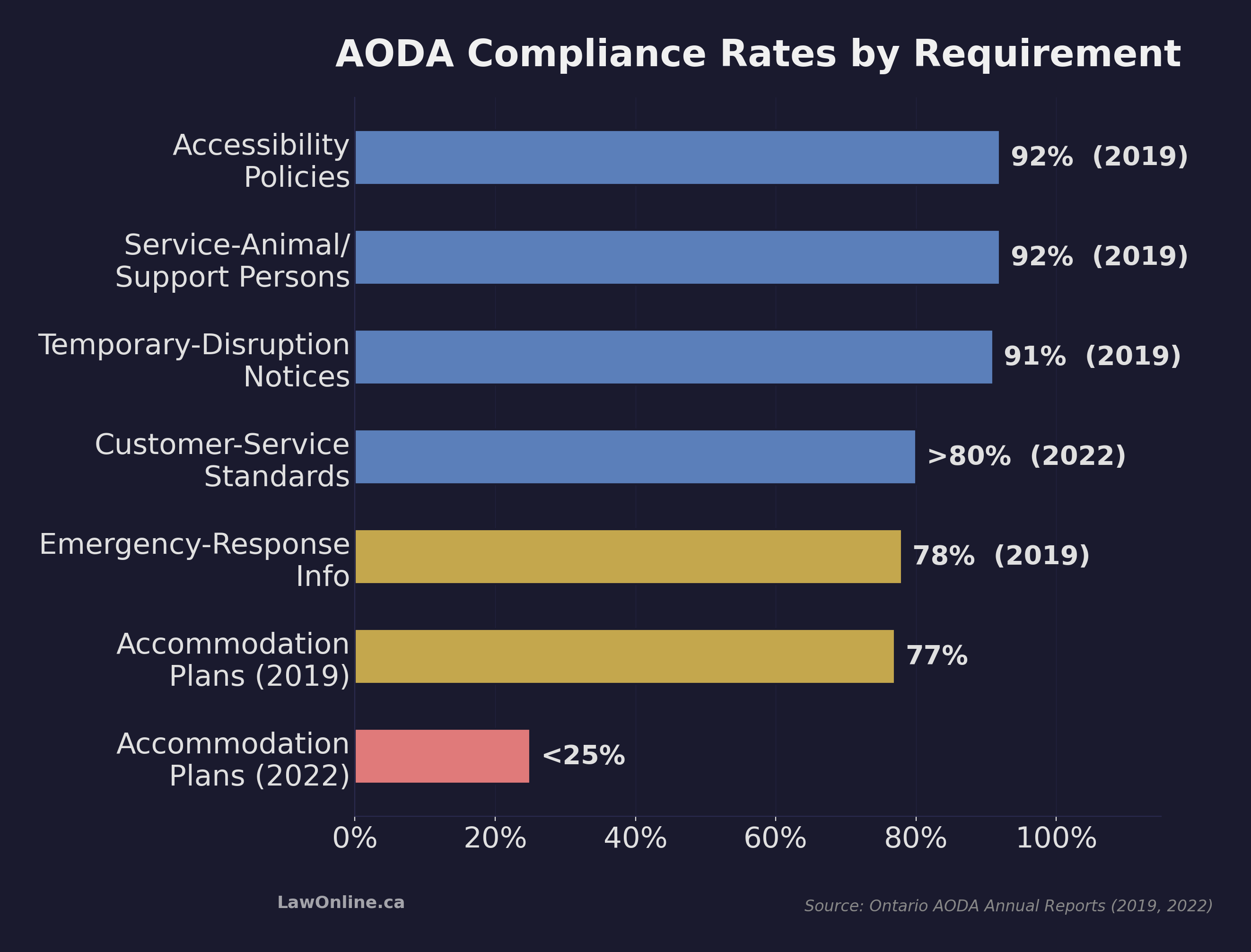
Ontario's own audit data illustrates why this matters. In 2019, 92% of audited organizations had accessibility policies in place, and compliance with visible, customer-facing requirements like service-animal accommodations and temporary-disruption notices ran above 90%. But by 2022, fewer than 25% of audited businesses and nonprofits had properly documented individual accommodation plans, even though more than 80% met basic customer-service accessibility standards. In the 2019 audits, 77% had met that same accommodation-plan requirement. Having a policy on paper doesn't mean your organization has a working compliance system. The pattern holds at the federal level too: a 2024 review of 117 federally regulated entities found that 109 of them identified at least one accessibility barrier.
When evaluating agency proposals, ask one specific question: "How do you build to WCAG 2.1 AA?" If the agency pauses, deflects to a plugin, or says they'll "add accessibility" at the end, keep looking. Accessibility that gets bolted on after the fact costs more and works worse than accessibility designed into the structure from day one.
Accessibility compliance protects your firm from regulatory risk, improves your search rankings, and signals professional credibility to the clients who need it most. For a personal injury practice, it's even simpler than that: the people your firm exists to serve need to be able to use your website. Building to that standard isn't charity or legal exposure management. It's just good practice.