
Moving a law firm's website to a new platform, new host, or new agency is one of the highest-risk technical projects a firm can undertake. Done well, it's invisible. Done poorly, it costs the firm months of search visibility and the client inquiries that come with it. This page covers why firms migrate, what can go wrong, what a proper migration looks like, hosting decisions, platform choices, and how we handle the process for Canadian law firms.
Table of Contents
- Why Do Law Firms Migrate Websites?
- What Happens When a Migration Goes Wrong?
- What Does a Proper Migration Cover?
- How Do You Choose Hosting for a Law Firm Website?
- WordPress vs. Static: Which Platform Fits Your Firm?
- Our Migration Process
- Why Migrations Matter More for Personal Injury Firms
- Website Migration by the Numbers
- Ready to Move Your Website?
- Frequently Asked Questions
Why Do Law Firms Migrate Websites?
There are four common reasons a law firm moves its website, and all of them are valid.

Changing agencies. The most common trigger. The previous agency built the site on their proprietary platform, or the relationship ended and the firm needs to move everything to infrastructure it controls. This is also one of the riskiest migration scenarios, because the outgoing agency may not be cooperative with the transition.
Platform upgrades. The firm has outgrown its current platform. A WordPress site built five years ago on shared hosting may be slow, insecure, and difficult to maintain. A move to managed hosting or a static site generator can solve performance, security, and maintenance problems simultaneously.
Performance problems. The site is slow. Core Web Vitals scores are poor. Pages take four or five seconds to load on mobile. Google has been using page speed as a ranking factor through Core Web Vitals since 2021, and a slow site directly affects search visibility. Sometimes the fastest path to fixing performance is moving to better infrastructure.
Ownership recovery. The firm discovers it doesn't own its domain, its hosting account, or its website files. This happens more often than it should. A previous vendor registered the domain in their name, or the hosting account is tied to an employee who left. Migration becomes a recovery project.
Regardless of the reason, every migration carries the same core risk: losing the search rankings, traffic, and client inquiries the firm has built over months or years. If you're weighing a move right now, our guide to switching law firm website providers without losing SEO covers the domain transfer, the contract terms worth reading before you give notice, and what to watch in the first weeks after launch.
What Happens When a Migration Goes Wrong?
A poorly managed migration can erase years of SEO work in a single afternoon. The damage is usually silent. The firm doesn't see a dramatic crash. It sees a slow decline in search impressions, then organic traffic, then consultations, over a period of weeks.
The most common failures:
Missing redirects. Every URL on the old site needs a permanent (301) redirect to the corresponding page on the new site. If someone bookmarked your motor vehicle accident practice area page, or if Google has that page indexed, the redirect tells both the browser and the search engine where the content moved. Without 301 redirects, those URLs return 404 errors. Google drops the pages from its index. The search equity those pages accumulated over years disappears.
Broken internal links. The new site launches with links pointing to old URLs that no longer exist. Every broken link is a dead end for visitors and a negative signal for search engines. On a law firm site with 50 practice area pages, service area pages, and blog posts linking to each other, a single URL structure change can break dozens of internal links.
Lost tracking. Google Analytics, Google Search Console, conversion tracking, and call tracking all need to be reconfigured for the new site. If the GA4 property isn't connected, the firm loses visibility into traffic patterns. If Search Console isn't updated, the firm can't monitor indexing issues. If conversion tracking breaks, no one knows whether the new site is generating leads.
DNS misconfiguration. The domain's DNS records point traffic to the server. A mistake during DNS migration can take the entire site offline. For a law firm that receives consultation requests through its website, even a few hours of downtime means missed inquiries.
SSL certificate issues. The new hosting environment needs a valid SSL certificate configured before launch. A site that loads without HTTPS triggers browser security warnings that drive visitors away and signal untrustworthiness to search engines.
These aren't edge cases. They're the standard failure modes when a migration is handled carelessly or by someone who doesn't understand how search engines process site changes.
What Does a Proper Migration Cover?
A proper law firm website migration is a structured technical project with a checklist that covers every component that could break. Nothing about it should be improvised.
Full URL audit. Before anything moves, every page on the current site is crawled and documented. URLs, canonical tags, meta titles, meta descriptions, internal links, and backlinks. This is the baseline that the redirect map and post-launch verification are built from.
301 redirect map. Every old URL gets a permanent redirect to the correct new URL. Not a blanket redirect of everything to the homepage. A one-to-one map that preserves the search equity each page has accumulated. 301 redirects preserve 90-99% of a page's ranking equity when implemented correctly.
Content transfer. All pages, images, PDFs, and downloadable files move to the new platform. Nothing gets left behind on the old server. Content that existed on the old site but doesn't exist on the new site creates orphaned redirects and lost value.
DNS migration. Domain name server records are updated to point to the new hosting environment. TTL (time to live) values are reduced in advance so the switch propagates quickly. The cutover is planned for a low-traffic period.
Analytics and tracking reconfiguration. Google Analytics 4 is connected and verified. Google Search Console is updated with the new sitemap and any property changes. Conversion tracking, call tracking, and form tracking are all tested before and after launch.
Post-launch monitoring. For the first 30 days after migration, search performance is monitored daily. Crawl errors in Search Console are resolved immediately. Indexing status is checked for all key pages. Any ranking drops are investigated and addressed before they compound.
How Do You Choose Hosting for a Law Firm Website?
Hosting is the infrastructure that keeps the website online and determines how fast it loads. For law firms, hosting needs to be reliable, fast, secure, and appropriate for the firm's technical capacity.

Shared Hosting
The cheapest option. The firm's website shares server resources with hundreds of other sites. Performance is unpredictable, security is only as strong as the weakest site on the server, and downtime from neighbouring sites can affect yours. Shared hosting is adequate for a brochure site that gets minimal traffic. It's inadequate for a law firm that depends on its website for client acquisition.
VPS and Cloud Hosting
A virtual private server or cloud instance gives the firm dedicated resources. Performance is consistent, security is stronger, and the hosting scales with traffic. For most law firms, a VPS or cloud plan in the $30-100/month range provides the performance and reliability needed. Canadian hosting providers with data centres in Toronto, Montreal, or Vancouver keep data within Canadian jurisdiction, which matters for firms that handle sensitive client information.
Managed WordPress Hosting
If the firm runs WordPress, managed hosting handles updates, security patches, backups, and performance optimization. Providers like WP Engine and Kinsta offer managed WordPress plans specifically designed for high-performance sites. The cost is higher than generic hosting ($30-100/month), but the reduced maintenance burden and stronger security make it worthwhile for firms that don't have in-house technical staff.
Static Site Hosting
Static sites (built with generators like Hugo, Eleventy, or Next.js) can be hosted on CDN platforms like Cloudflare Pages, Netlify, or DigitalOcean. Static hosting is extremely fast, inherently secure (no server-side code to exploit), and inexpensive. The tradeoff is that content updates require a build process rather than a CMS login. For firms that don't need to make frequent updates themselves, static hosting is the highest-performance option available.
What to Look For
Regardless of hosting type, a law firm should confirm:
- Uptime guarantee. 99.9% uptime is the baseline standard. Anything less means the site goes down for nearly nine hours a year.
- SSL included. HTTPS is required for security and SEO. SSL certificates should be included and auto-renewed.
- Automatic backups. Daily backups with at least 30 days of retention. The firm should be able to restore from a backup without calling the hosting provider.
- Canadian data centre option. Not legally required for all firms, but keeping data in Canada is a reasonable precaution for any practice that handles sensitive client information.
- Speed. PageSpeed Insights scores above 90 on mobile. If the hosting provider can't deliver that, the provider is the bottleneck.
Platforms we build and host on
 DigitalOcean
 Cloudways
 WordPress
WordPress vs. Static: Which Platform Fits Your Firm?
The platform decision shapes the firm's maintenance burden, security posture, performance ceiling, and long-term flexibility. There are two realistic options for law firms in 2026: WordPress (the dominant CMS) and static site generators.
| Factor | WordPress | Static Site |
|---|---|---|
| Content updates | CMS dashboard; non-technical staff can edit | Build process; requires developer or CI pipeline |
| Performance | Good with optimization; plugin-dependent | Excellent by default; no server-side processing |
| Security | Requires ongoing patching; plugin vulnerabilities common | Minimal attack surface; no database to breach |
| Maintenance | Ongoing: core updates, plugin updates, security patches | Low: static files; updates only when content changes |
| Flexibility | Thousands of plugins; can do almost anything | Purpose-built; less plugin ecosystem, more control |
| Cost range | $30-200/month (hosting + maintenance) | $0-50/month (hosting); developer cost for changes |
WordPress is the right choice for firms that need their staff to make frequent content updates without involving a developer. It's the most widely supported CMS, with a large ecosystem of themes, plugins, and developers. The tradeoff is maintenance. WordPress sites that aren't regularly updated become security liabilities. Plugin conflicts, slow load times, and database bloat are common in sites that haven't been maintained.
Static sites are the right choice for firms that prioritize speed, security, and low maintenance, and are comfortable with content updates going through a developer or a simple git-based workflow. Static sites load faster, have virtually no security vulnerabilities (there's no database or server-side code to exploit), and cost less to host. The tradeoff is that non-technical staff can't log in and edit pages directly.
For a detailed comparison of these platforms in a law firm context, see our law firm web design page.
Most firms don't need to make this decision alone. The right platform depends on how the firm operates, how often content changes, and who's responsible for updates. We help firms evaluate the tradeoffs and choose the option that fits their workflow.
Our Migration Process
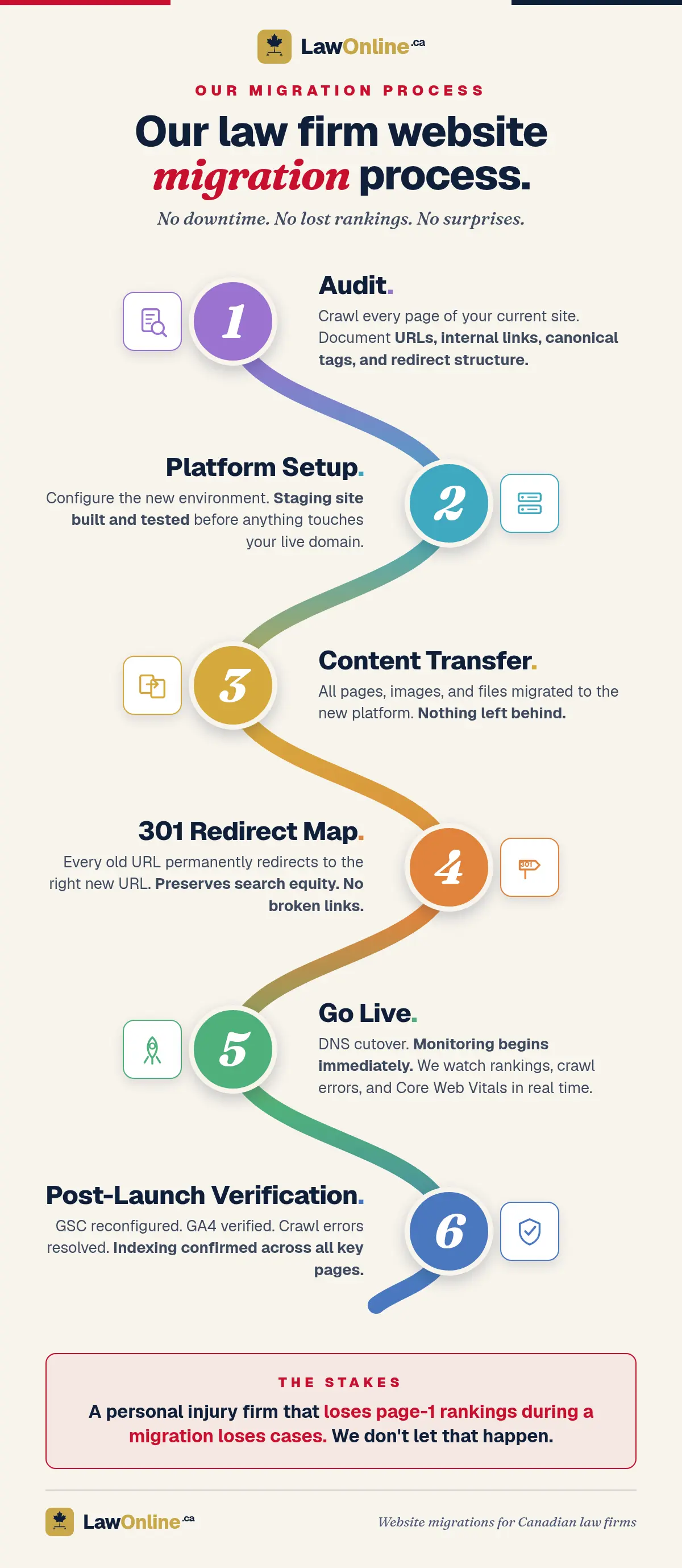
We run every migration through a six-stage process. Each stage has a checklist, a verification step, and a rollback plan.
- Audit. We crawl every page on the current site. Document URLs, internal links, canonical tags, backlinks, and redirect structure. This is the baseline everything else is measured against.
- Platform setup. The new environment is configured and a staging site is built. The staging site is tested for speed, functionality, and content accuracy before anything touches the live domain. The firm reviews and approves the staging site.
- Content transfer. All pages, images, files, and metadata are migrated to the new platform. Nothing is left behind. Every page on the staging site is compared against the source to confirm accuracy.
- 301 redirect map. Every old URL is mapped to its new URL with a permanent 301 redirect. The map is tested against the full URL audit from Stage 1. Any URL that doesn't have a valid redirect is flagged and resolved before launch.
- Go live. DNS cutover happens during a planned low-traffic window. Monitoring begins immediately. We watch rankings, crawl errors, and Core Web Vitals in real time for the first 48 hours.
- Post-launch verification. Google Search Console is reconfigured and the new sitemap is submitted. GA4 is verified. Crawl errors are resolved. Indexing is confirmed for all key pages. We monitor search performance daily for the first 30 days.
The goal is a migration where nobody outside the firm notices anything changed. Rankings stay stable, traffic continues, and the intake pipeline isn't interrupted.
Why Migrations Matter More for Personal Injury Firms
For personal injury firms, website migration carries disproportionate risk. PI firms depend more heavily on organic search traffic than almost any other practice area. A first-page ranking for "personal injury lawyer [city]" or "car accident lawyer [city]" can generate multiple consultations per week. Losing that ranking, even temporarily, means losing signed cases.
The economics are stark. If a PI firm's website generates five consultation requests per week from organic search, and 20% of those convert to signed cases, that's one new case per week. At an average case value of $50,000 or more, a migration that drops the site out of the first page of results for even four weeks costs the firm $200,000 or more in potential revenue.
This is why PI firms need to be especially careful about who handles their migration. The technical requirements are the same as any other law firm migration, but the cost of failure is higher. A family law firm that loses rankings for a month has a bad month. A PI firm that loses rankings for a month may not recover that lost caseload.
We approach PI firm migrations with additional safeguards: more granular pre-migration benchmarking, tighter post-launch monitoring windows, and faster response protocols for any ranking movement outside expected ranges.
Website Migration by the Numbers
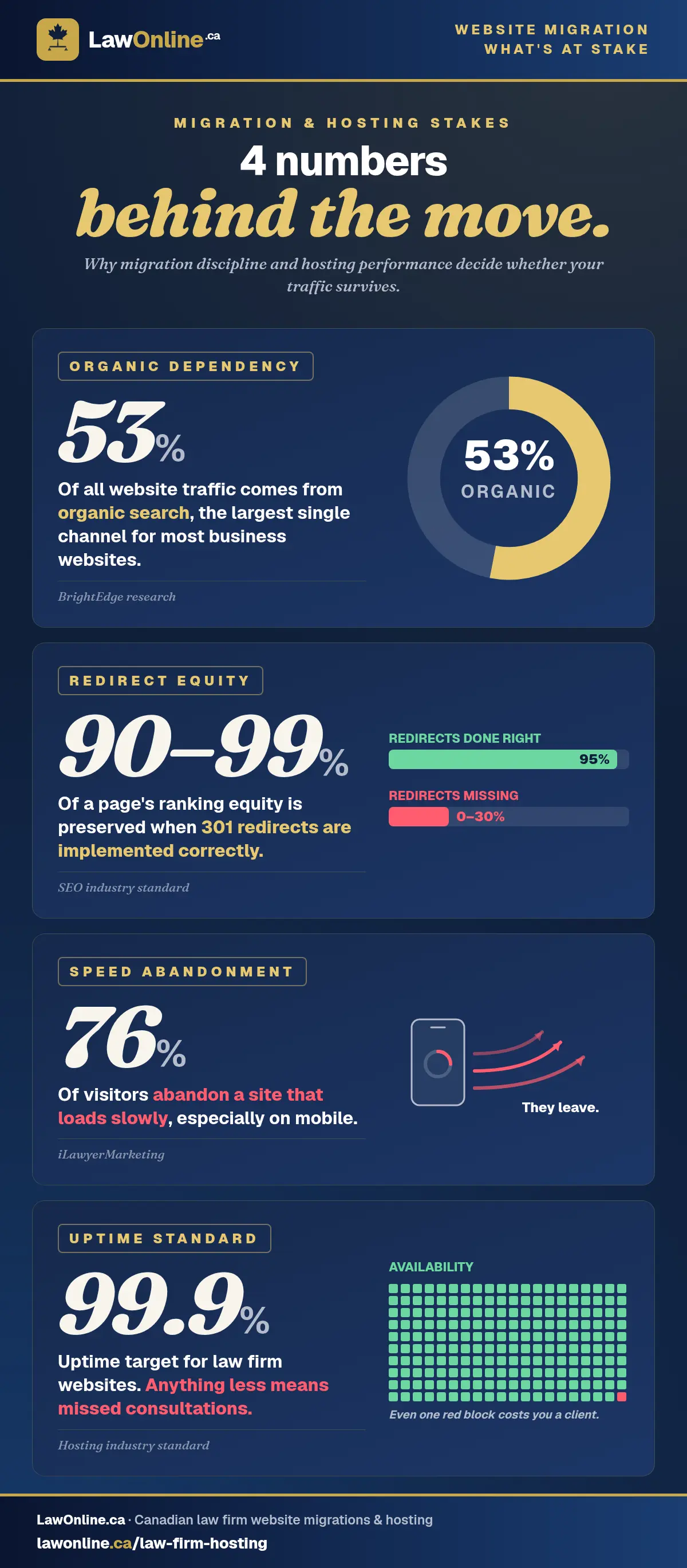
- Organic search drives 53% of all website traffic, the largest single channel for most business websites (BrightEdge research)
- 301 redirects preserve 90-99% of a page's ranking equity when implemented correctly (SEO industry standard)
- 76% of visitors abandon a site that loads slowly, especially on mobile (iLawyerMarketing)
- 99.9% uptime is the baseline standard for law firm hosting; anything less means missed consultations
Ready to Move Your Website?
If your firm is planning a platform move, switching agencies, or needs to recover ownership of its website, we'll walk you through what a proper migration looks like for your specific situation. We'll assess your current hosting, evaluate platform options, and provide a migration plan that accounts for every page, redirect, and tracking configuration.
No downtime. No lost rankings. No surprises.
Frequently Asked Questions
How long does a law firm website migration take?
Most migrations take two to six weeks from audit to launch, depending on the size of the site and the complexity of the platform change. A simple hosting move for a 20-page site can be done in under two weeks. A full platform migration for a 100+ page site with complex URL structures, multiple practice areas, and integrated intake systems takes closer to six weeks. The timeline includes staging, review, and post-launch monitoring.
Will my search rankings drop during a migration?
With proper 301 redirects and a structured migration process, rankings should remain stable. Minor fluctuations in the first two to four weeks are normal as Google recrawls and reindexes the new URLs. Significant drops indicate a problem, most commonly missing redirects, broken internal links, or pages that weren't migrated. Our post-launch monitoring catches these issues within hours, not weeks.
Can I migrate from one platform to another without losing content?
Yes. Content transfer is a standard part of any migration. All pages, images, PDFs, blog posts, and downloadable files are moved to the new platform. The key is a thorough audit before migration so nothing is missed. We crawl the entire current site, document every asset, and verify completeness on the staging site before launch.
What's the difference between website migration and a website redesign?
Migration moves the site to a new platform or hosting environment while preserving the existing design and content. A redesign changes the look, structure, and sometimes the content of the site. The two often happen together, but they don't have to. A firm that's happy with its website design but needs better hosting can migrate without redesigning. A firm that needs both a new design and a new platform does a combined migration and redesign. See our website design page for details on the redesign process.
Do I own my website after migration?
If you didn't own it before, migration is the opportunity to fix that. We ensure the domain is registered in the firm's name, the hosting account belongs to the firm, and the firm has full access to all website files, content, and data. You own everything. If ownership is a concern, raise it at the start of the migration process so we can resolve it before the technical work begins.
What hosting should a law firm use?
It depends on the platform and the firm's technical capacity. WordPress sites perform best on managed hosting ($30-100/month). Static sites can run on CDN platforms for $0-50/month with superior speed and security. Shared hosting is inadequate for any firm that depends on its website for client acquisition. The most important factors are uptime (99.9%+), speed (PageSpeed score above 90 on mobile), SSL, automatic backups, and ideally a Canadian data centre.