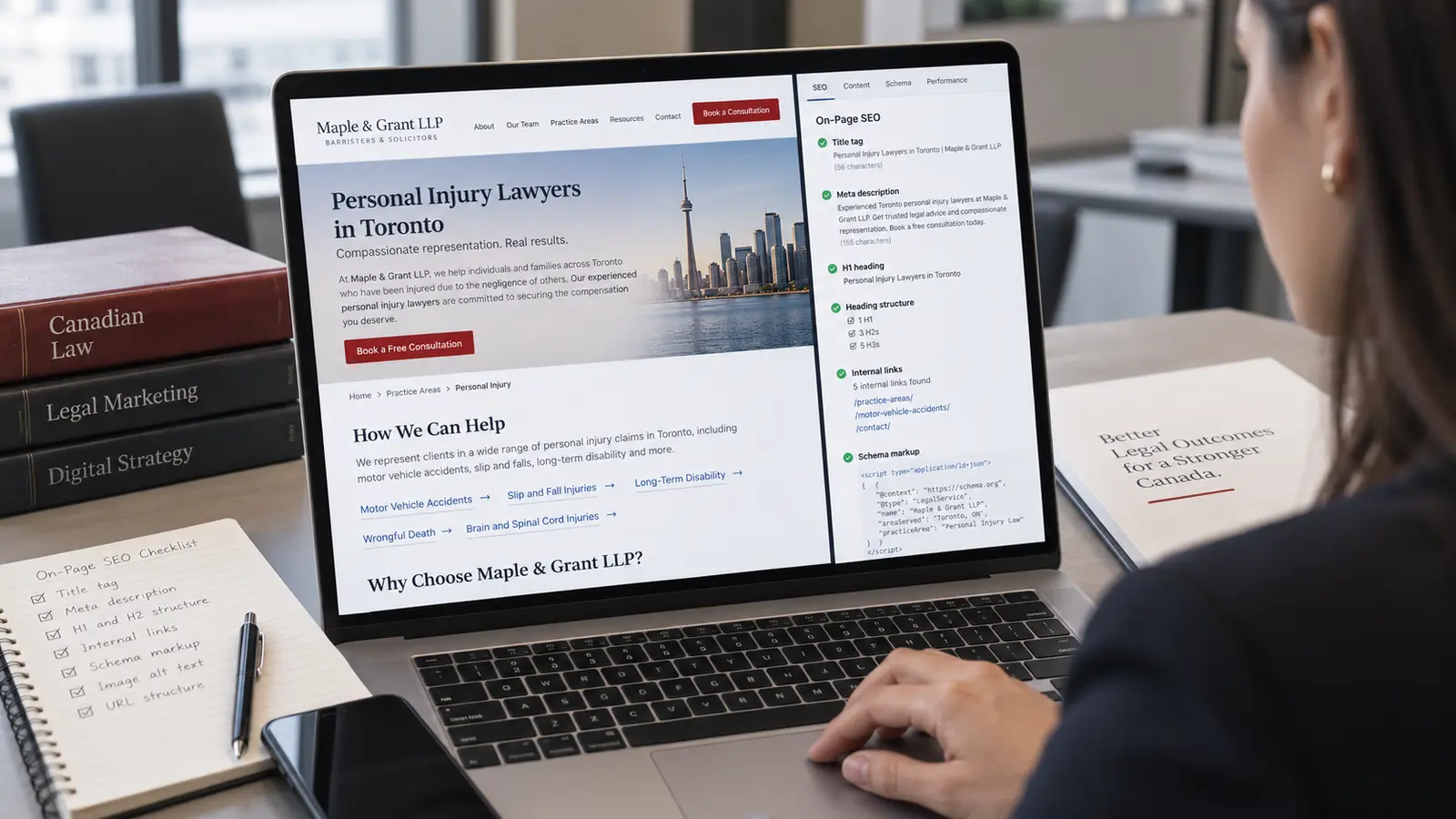
You've invested in a professional website. You've published practice area pages, maybe started a blog. But when you search for your own firm's key terms, "personal injury lawyer Toronto" or "family law firm Ottawa," you're nowhere near the first page.
The problem usually isn't what's on your pages. It's how it's structured. On-page SEO, the way you format title tags, headings, internal links, and structured data on each individual page, is what tells Google what your content is about and whether it deserves to rank. Most law firm websites get this wrong because the developer who built the site didn't think about search and the lawyer who wrote the copy didn't think about how Google processes it.
The stakes are higher than most firms realize. Canadian Forum on Civil Justice research found that roughly half of adult Canadians experience at least one serious legal problem over any three-year period. Those people search for help online, and your site's on-page structure determines whether they find your firm or a competitor's.
This guide covers every on-page SEO element that matters for Canadian law firm websites, with specific examples you can check against your own site today.
What Is On-Page SEO for Law Firms?
On-page SEO refers to the optimization you apply directly to the content and HTML source code of individual pages on your website. It's distinct from off-page SEO (backlinks, citations, directory listings) and technical SEO (site speed, crawlability, mobile responsiveness), though all three work together.
For law firms, on-page optimization is the most controllable part of your website's search performance. You don't need to wait for someone to link to you or for Google to re-crawl your site architecture. You can fix your title tags, restructure your headings, and add schema markup this afternoon and start seeing indexing changes within days.
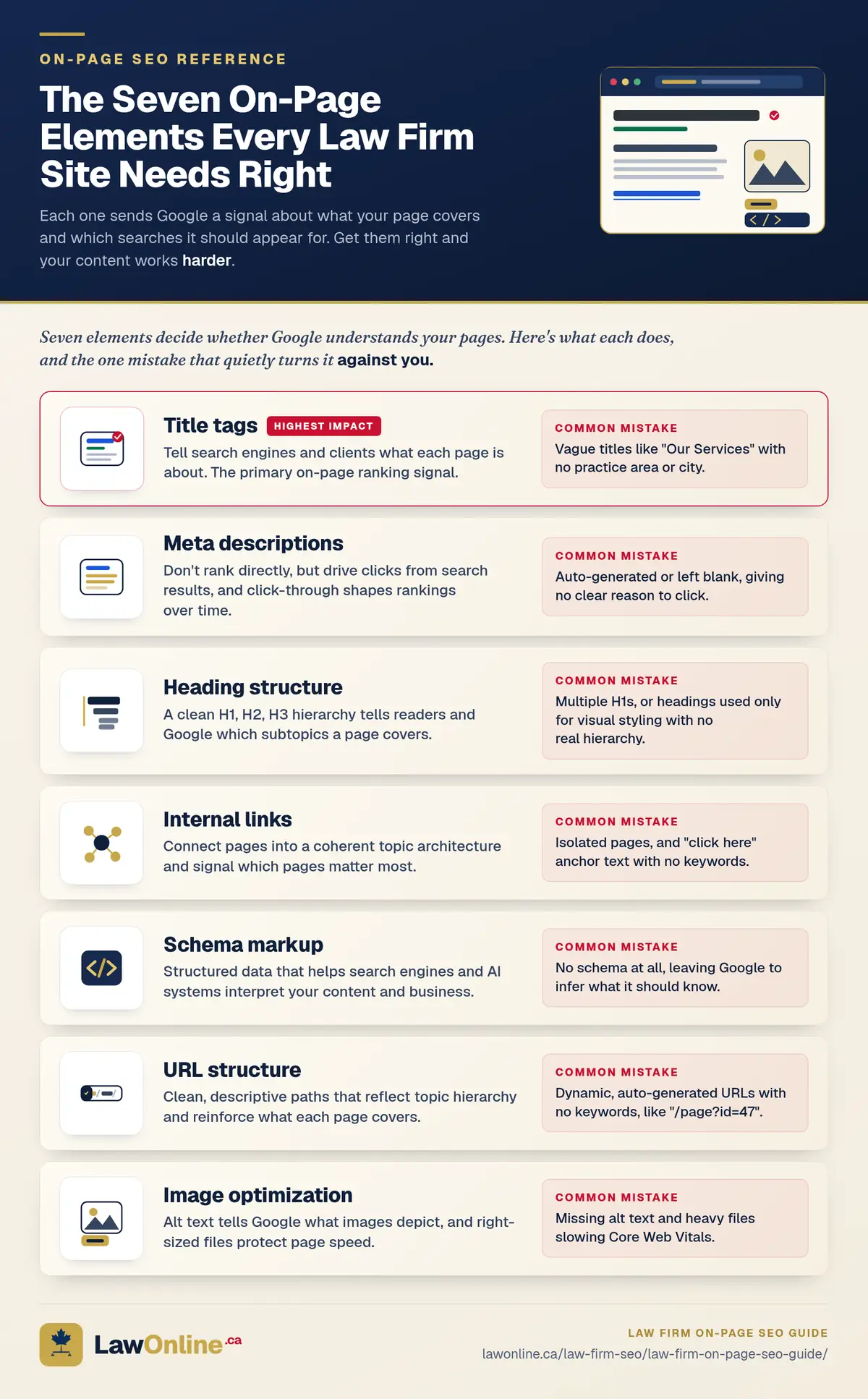
The core on-page elements for law firm websites include:
- Title tags that tell search engines and potential clients what each page is about
- Meta descriptions that drive clicks from search results
- Heading structure using a proper H1, H2, and H3 hierarchy
- Internal links connecting your pages into a coherent topic architecture
- Schema markup that helps search engines and AI systems interpret your content
Each of these elements sends signals to Google about what your page covers, how authoritative it is, and which searches it should appear for. Get them right and your existing content works harder without writing a single new word.
This guide focuses on on-page elements specifically. It doesn't cover Google Business Profile optimization, local citations, or other local SEO tactics that operate outside your website, though those work alongside everything described here.
The data backs this up. A 2026 study published in the National Law Review analyzed nearly 16,000 law firm websites and confirmed that entities on the page, entities in the title tag, user experience, and link patterns are among the most important factors driving Google rankings for competitive legal searches. The on-page elements listed above aren't just best practices. They're the specific signals Google weighs when deciding which law firm pages deserve to rank.
How Should Law Firms Optimize Title Tags?
The title tag is the single most important on-page ranking signal. It's the blue clickable link in search results and the text that appears in your browser tab. Google reads it first when evaluating what a page is about, and searchers read it first when deciding whether to click.
The business impact is significant. In one published case study, a U.S. personal injury firm moved from page four to the number-one position for its primary local keyword, resulting in a 312% increase in organic consultations and $2.8 million in attributed fees over roughly 11 months. While that's an American example, the mechanics are the same in Canada: the title tag is a core input to ranking decisions, and ranking position has a direct, measurable effect on client inquiries.
Most law firm websites waste this opportunity. The typical practice area page has a title tag like "Personal Injury | Smith & Associates LLP" or, worse, "Our Services | Our Firm." Neither tells Google what the page is about or where the firm operates.
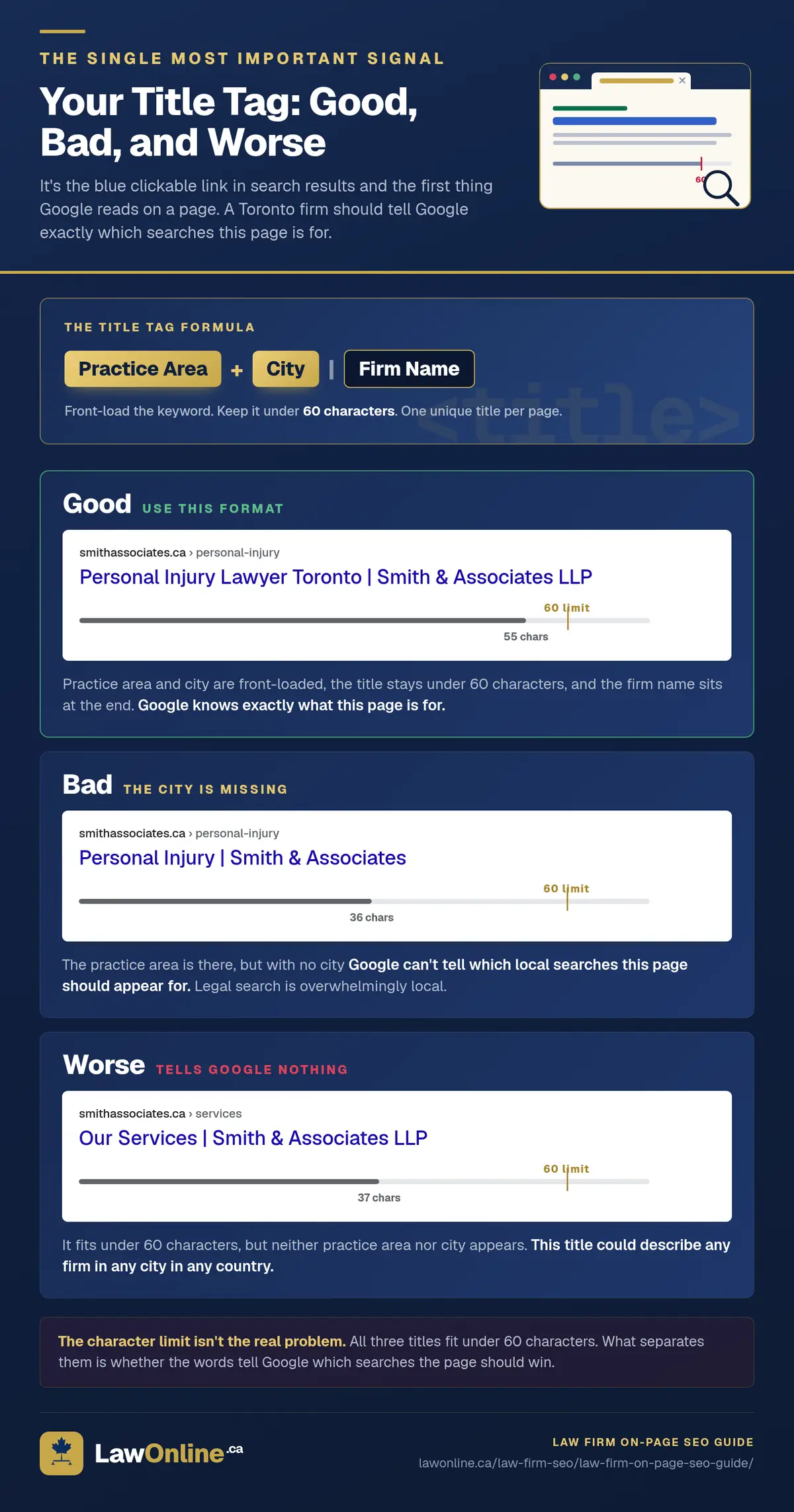
A strong title tag for a law firm page follows a simple formula: [practice area + location] | [firm name]. For a personal injury firm in Toronto, that looks like:
- Good: "Personal Injury Lawyer Toronto | Smith & Associates LLP"
- Bad: "Personal Injury | Smith & Associates"
- Worse: "Our Services | Smith & Associates LLP"
Key principles for law firm title tags:
- Front-load the keyword. Google gives more weight to words that appear earlier in the title tag. Put your practice area and city before the firm name.
- Include the city. Legal search is overwhelmingly local. "Divorce lawyer Calgary" tells Google exactly which searches this page should appear for, and "divorce lawyer" alone leaves it guessing.
- Stay under 60 characters. Google truncates titles longer than about 60 characters on desktop. If your title reads "Full-Service Personal Injury and Accident Lawyers Serving the Greater Toronto Area | Smith & Associates LLP," searchers see about half of it.
- One unique title per page. Every practice area page, location page, and blog post should have its own title tag targeting its own keyword. Duplicate titles confuse Google about which page to rank and dilute your authority across all of them.
If your site runs on WordPress, most SEO plugins (Yoast, Rank Math, All in One SEO) let you set the title tag directly. On a custom-built site, your developer sets the <title> element in the <head> of each page. For guidance on how title tags interact with Google's display algorithms, the Google Search Central documentation on title links explains the specifics.
What Makes a Good Meta Description for a Law Firm Page?
The meta description is the two-line snippet beneath your title tag in search results. Google doesn't use it as a direct ranking signal, but it has a significant effect on click-through rate, and click-through rate does influence rankings over time.
Most law firm meta descriptions fall into one of two failure modes: auto-generated (pulling the first sentence of the page, which usually isn't compelling) or left blank entirely (letting Google choose a random passage). Both waste the opportunity to sell the click.
A good meta description for a law firm practice area page:
- Answers the searcher's implied question. Someone searching "car accident lawyer Brampton" wants to know if you handle car accident cases in Brampton. Say so explicitly.
- Includes the location and practice area. Reinforce the same geographic targeting from your title tag.
- Highlights a differentiator. Free consultations, decades of experience, specific case types you handle. Whatever distinguishes your firm. Keep in mind that the Law Society of Ontario and other provincial regulators restrict certain claims about outcomes and specializations, so make sure your description stays within advertising rules.
- Stays under 160 characters. Google truncates around 160 characters on desktop and about 120 on mobile. Front-load the most important information.
Example for a personal injury page:
Injured in a car accident in Brampton? Our personal injury lawyers have recovered millions for Ontario accident victims. Free consultation, no fees until you win.
Compare that with what most firms have:
Smith & Associates is a personal injury law firm. We are committed to providing excellent legal services to our clients. Contact us today.
The first version tells the searcher exactly what the firm does, where, and why they should click. The second could describe any firm in any city in any country.
How Should Law Firms Structure Headings on Practice Area Pages?
Heading tags (H1, H2, H3) serve two purposes: they create a visual hierarchy for human readers, and they signal topic structure to search engines. Google uses headings to understand what subtopics a page covers and how they relate to each other.
The most common heading mistakes on law firm websites are using multiple H1 tags (there should be exactly one per page), using headings for visual styling rather than structural hierarchy, and having no headings at all below the H1. That last problem makes the page look like a single undifferentiated block of text to search engines.
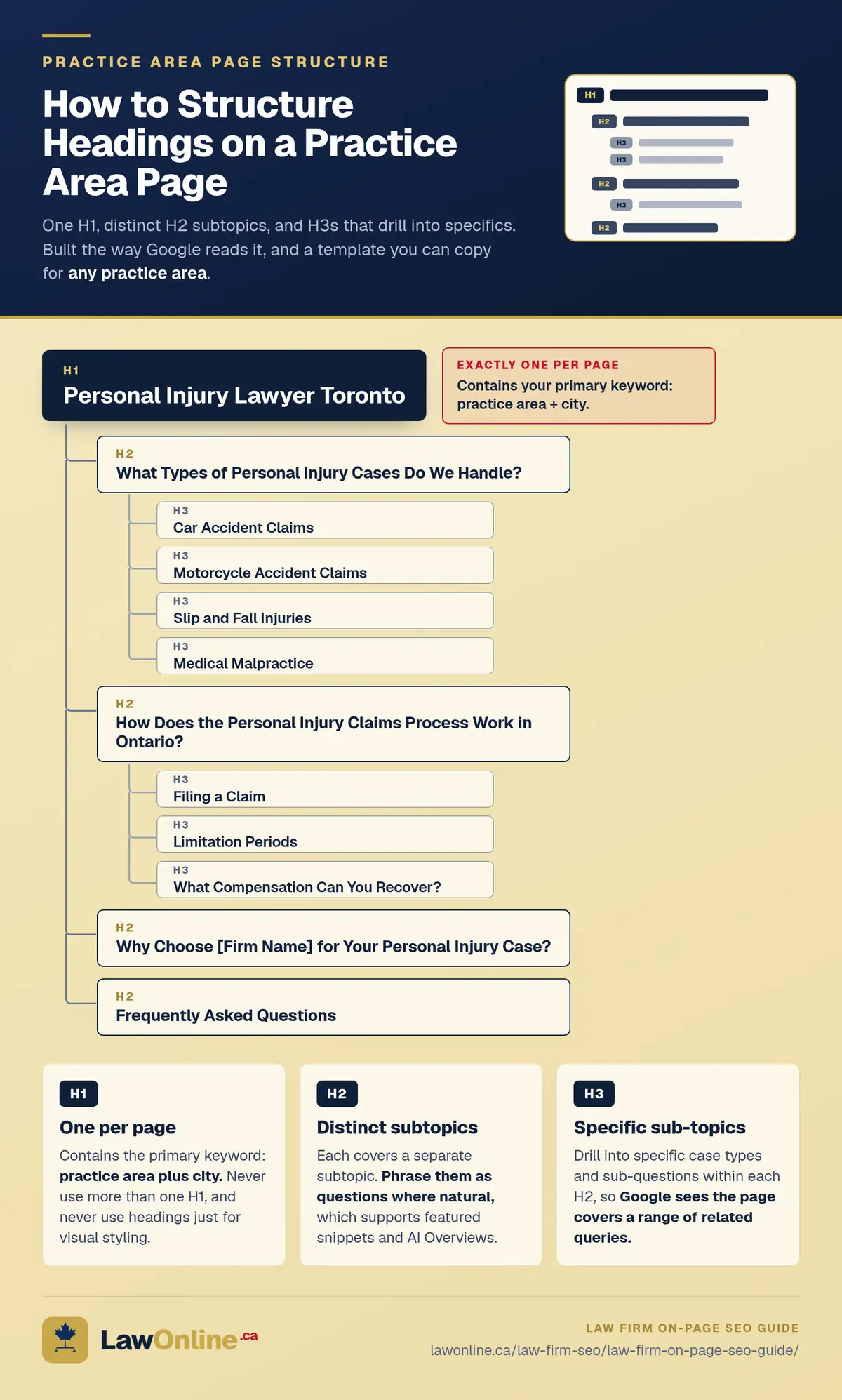
A well-structured personal injury practice area page follows a clear hierarchy:
H1: Personal Injury Lawyer Toronto
- H2: What Types of Personal Injury Cases Do We Handle?
- H3: Car Accident Claims
- H3: Motorcycle Accident Claims
- H3: Slip and Fall Injuries
- H3: Medical Malpractice
- H2: How Does the Personal Injury Claims Process Work in Ontario?
- H3: Filing a Claim
- H3: Limitation Periods
- H3: What Compensation Can You Recover?
- H2: Why Choose [Firm Name] for Your Personal Injury Case?
- H2: Frequently Asked Questions
Each H2 covers a distinct subtopic and each H3 drills deeper within that subtopic. This structure helps Google understand that the page comprehensively covers personal injury law in Toronto and should rank for a range of related queries, not just the exact H1 keyword.
For practice area pages, aim for 3 to 5 H2 sections with 2 to 4 H3 subsections under each major topic. Phrase headings as questions where it feels natural. This aligns with how potential clients actually search and improves your chances of appearing in Google's featured snippets and AI Overviews.
Why Is Internal Linking Critical for Law Firm SEO?
Internal linking is the most underused on-page SEO tactic on law firm websites. Most firms have isolated pages that don't link to each other at all, which means Google has to discover and evaluate each page independently rather than understanding how they connect.
A strong internal linking structure tells Google two things: which pages are most important on your site (the ones that receive the most internal links) and how topics relate to each other (pages that link together are topically connected).
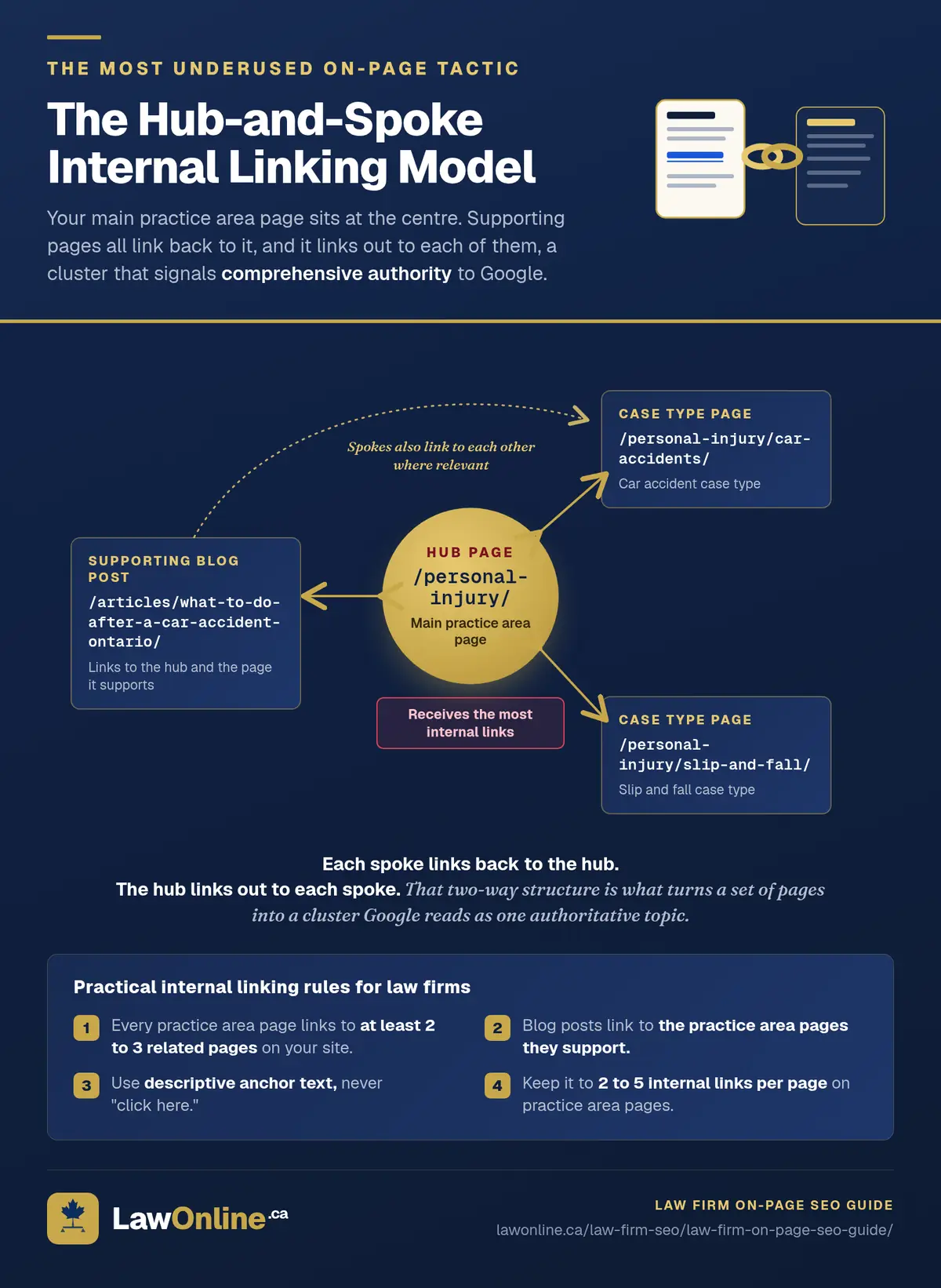
For law firms, the most effective internal linking model is the hub-and-spoke structure:
- Hub page: Your main practice area page (e.g., /personal-injury/) acts as the central authority on that topic.
- Spoke pages: Supporting content like specific case type pages, blog posts, and FAQ pages all link back to the hub and to each other where relevant.
A personal injury firm might have a hub page at /personal-injury/ with spoke pages for /personal-injury/car-accidents/, /personal-injury/slip-and-fall/, and blog posts like /articles/what-to-do-after-a-car-accident-ontario/. Each spoke links back to the hub and the hub links out to each spoke. This creates a topical cluster that signals comprehensive authority to Google.
Practical internal linking rules for law firms:
- Every practice area page should link to at least 2 to 3 related pages on your site. A car accident page should link to your main personal injury page, your page about limitation periods, and possibly a relevant blog post.
- Blog posts should link to the practice area pages they support. A post about Ontario limitation periods should link to every practice area page where limitation periods are relevant.
- Use descriptive anchor text. "Click here" tells Google nothing. "Learn more about personal injury claims in Ontario" tells Google exactly what the linked page covers.
- Don't overdo it. Two to five internal links per page is usually right for practice area pages, and blog posts can go slightly higher. Stuffing twenty links into a single page dilutes the value of each one.
What Schema Markup Should Law Firms Add to Their Pages?
Schema markup is structured data you add to your page's HTML that helps search engines understand your content in a machine-readable format. It doesn't appear on the page itself, but it can trigger rich results in search (review stars, FAQ dropdowns, business information panels) that increase your visibility and click-through rate.
Most law firm websites have no schema markup at all, which is a missed opportunity given how straightforward it is to implement.
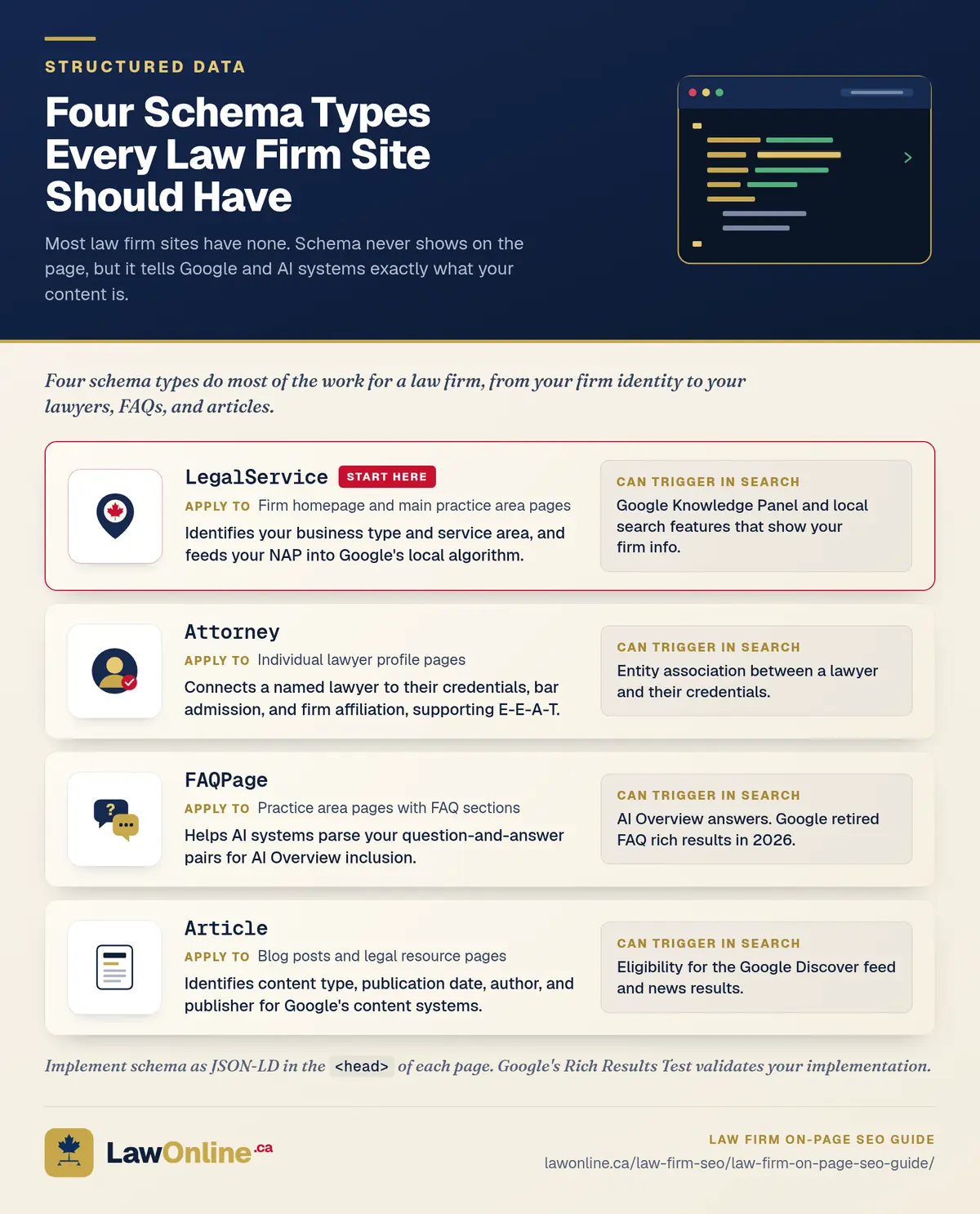
The schema types most relevant to Canadian law firms:
LegalService. The LegalService schema type tells Google your business is a legal services provider. It includes fields for your firm name, address, phone number, areas of practice, and hours of operation. This data feeds directly into Google's Knowledge Panel and local search features.
Attorney. If individual lawyer profile pages exist on your site, Attorney schema identifies each person as a legal professional with their own name, credentials, and affiliation with the firm. This supports E-E-A-T signals by connecting your content to named, qualified authors.
FAQPage. If your practice area pages include an FAQ section, FAQPage schema marks up each question-and-answer pair in a machine-readable format. It used to trigger FAQ rich results, the expandable question-and-answer dropdowns that appeared directly in the search listing, but Google retired those entirely in 2026, so the markup no longer changes how your listing looks. It still earns its place. FAQPage schema helps AI systems, including Google's AI Overviews, parse your questions and answers correctly, and that matters more every year.
Article. For blog posts and legal resource pages, Article schema identifies the content type, publication date, author, and publisher. This data helps Google surface your content in Discover feeds and news results.
Adding schema doesn't require visible changes to your website. Your developer implements it as JSON-LD (JavaScript Object Notation for Linked Data) in the <head> section of each page. Google's Structured Data documentation provides the full specification, and you can validate your implementation with their Rich Results Test tool.
How Does On-Page SEO Relate to Off-Page SEO for Law Firms?
On-page and off-page SEO are complementary, not competing strategies. On-page SEO ensures Google can understand and properly index your content. Off-page SEO, primarily backlinks, citations, and your Google Business Profile, builds the authority signals that determine where your content ranks relative to competitors.
Think of it this way: on-page SEO is the foundation, off-page SEO is the reputation. A personal injury firm with a perfectly optimized website but no backlinks will struggle to outrank competitors who have both. Conversely, a firm with strong backlinks but poorly structured pages is leaving rankings on the table because Google can't properly interpret what each page covers.
Most Canadian law firms underinvest in on-page SEO because it feels like a solved problem. "We already have a website." But a website with weak title tags, no heading structure, and zero internal links is like a well-located office with no signage. The location is right, but nobody can find you because the signals aren't there.
For a comprehensive look at how on-page and off-page work together within a managed engagement, our breakdown of what a law firm SEO proposal should include covers the full picture.
How Should Canadian Law Firms Prioritize On-Page SEO Fixes?
On-page SEO is the most actionable part of law firm website SEO because every fix is within your control. You don't need to wait for backlinks to accumulate or for Google to re-evaluate your domain authority.

If you want a structured approach, start with a quick audit of your highest-priority practice area pages, the ones targeting the keywords that would bring in the most valuable clients. Open each page, check the title tag in the browser tab, view the page source for schema markup, and run it through Google's Rich Results Test. Most firms find at least three or four quick wins on every page, and you don't need an expensive consultant to spot them.
Fix the title tags and meta descriptions first (highest impact, lowest effort), then restructure headings, add internal links, and implement schema. Most firms find that on-page optimization alone moves them from deep in the results to the edge of page one, close enough that off-page work and content investment can push them over.
On-Page SEO Checklist for Law Firm Websites
Before you move on to off-page tactics, run through these checks on every priority page:
- Title tag includes the practice area, city, and firm name, and stays under 60 characters
- Meta description is unique, under 160 characters, and names the location and service
- One H1 per page that matches the primary keyword for that page
- H2 and H3 headings create a logical hierarchy covering subtopics and specific case types
- Internal links connect the page to 2 to 5 related pages using descriptive anchor text
- Schema markup (LegalService, Attorney, FAQPage, or Article) is implemented in JSON-LD
- No duplicate content signals, meaning each page has its own unique title, meta description, and H1
The return on this work is well documented. One published case study of a 12-attorney family law firm showed that targeting title tags, content structure, and keywords achieved page-one rankings for 23 high-value terms in six months, driving a fivefold increase in new client leads and $210,000 in additional revenue on an $18,000 investment. A separate engagement for a six-attorney personal injury firm saw monthly case volume jump from three or four to 11 to 13 over eight months, netting $963,800 on a $26,200 spend. Both are U.S. examples, but Canadian law firms operate in the same Google ecosystem, and on-page fundamentals work identically on both sides of the border.
If you've been investing in SEO without seeing movement, the issue might not be your strategy or your content. It might be that the structural fundamentals were never set up properly. An SEO engagement that starts with an on-page audit catches these problems before you spend another dollar on content or link building.