Every law firm website runs on something. There are dozens of platforms to choose from, but most Canadian firms land on one of two: WordPress or a static site. These sit at opposite ends of the spectrum, with options like headless CMS setups, Webflow, and other hybrids in between, and understanding the trade-offs between these two law firm website platforms is the fastest way to figure out where your firm belongs.
This article focuses on WordPress and static sites because they're the two most common starting points. We'll cover the middle-ground options too, but we're going to be direct about which approach works better for which type of firm, based on the actual trade-offs that affect client acquisition, security, and long-term cost of ownership.
What's the Difference Between WordPress and a Static Site?
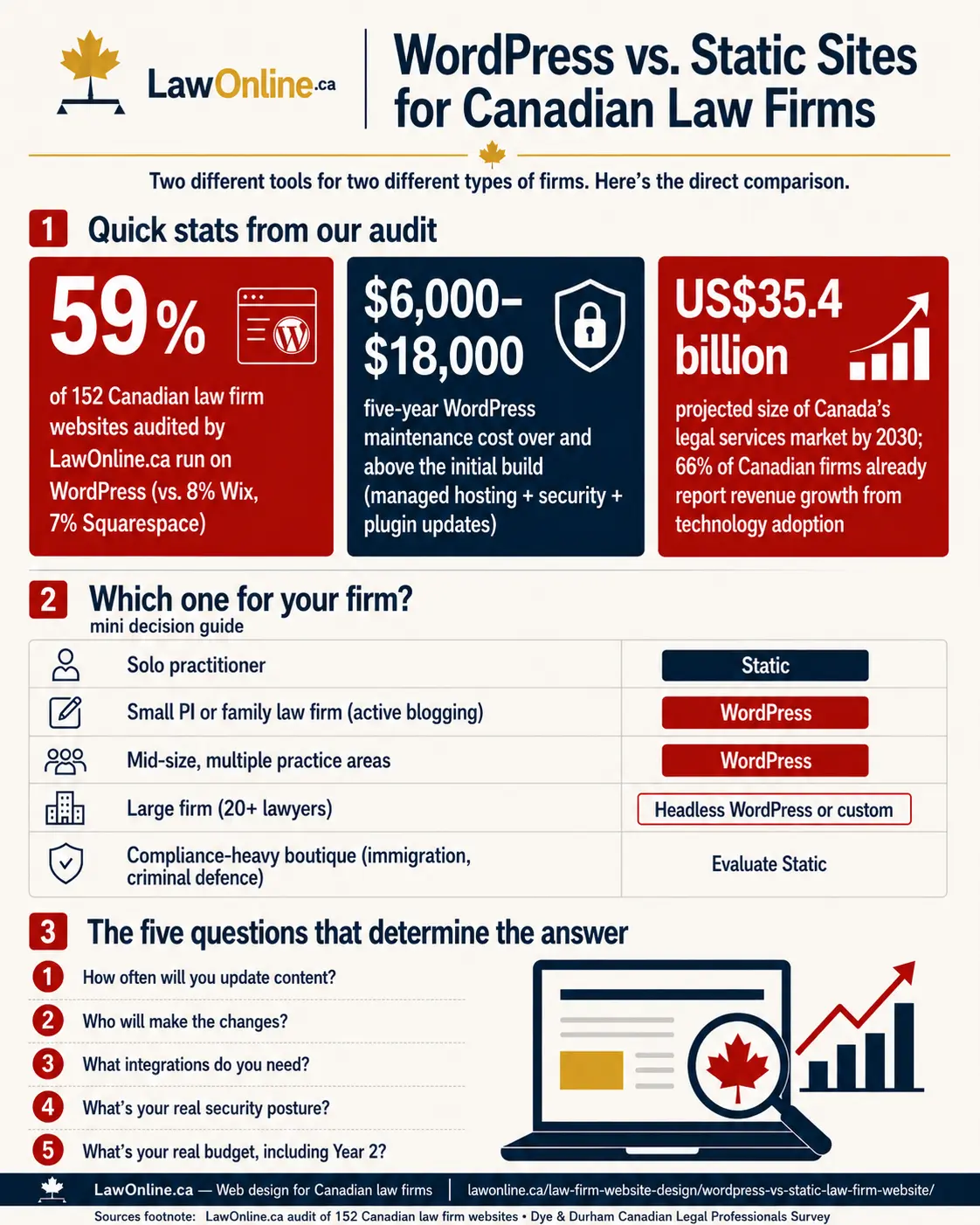
WordPress is a content management system (CMS). It runs on a server, uses a database, and generates pages dynamically every time someone visits your site. You log into an admin panel, click buttons, edit text, and publish. It powers roughly 43% of websites globally. Among Canadian law firms, it's even more dominant. In our own audit of 152 Canadian law firm websites, WordPress powered 59% of them, far ahead of Wix (8%), Squarespace (7%), and enterprise platforms like Sitefinity (5%).
A static site is pre-built. Every page exists as a finished HTML file before anyone visits. There's no database, no server-side processing, no admin panel in the traditional sense. Changes require rebuilding the site, usually through code or a build tool.
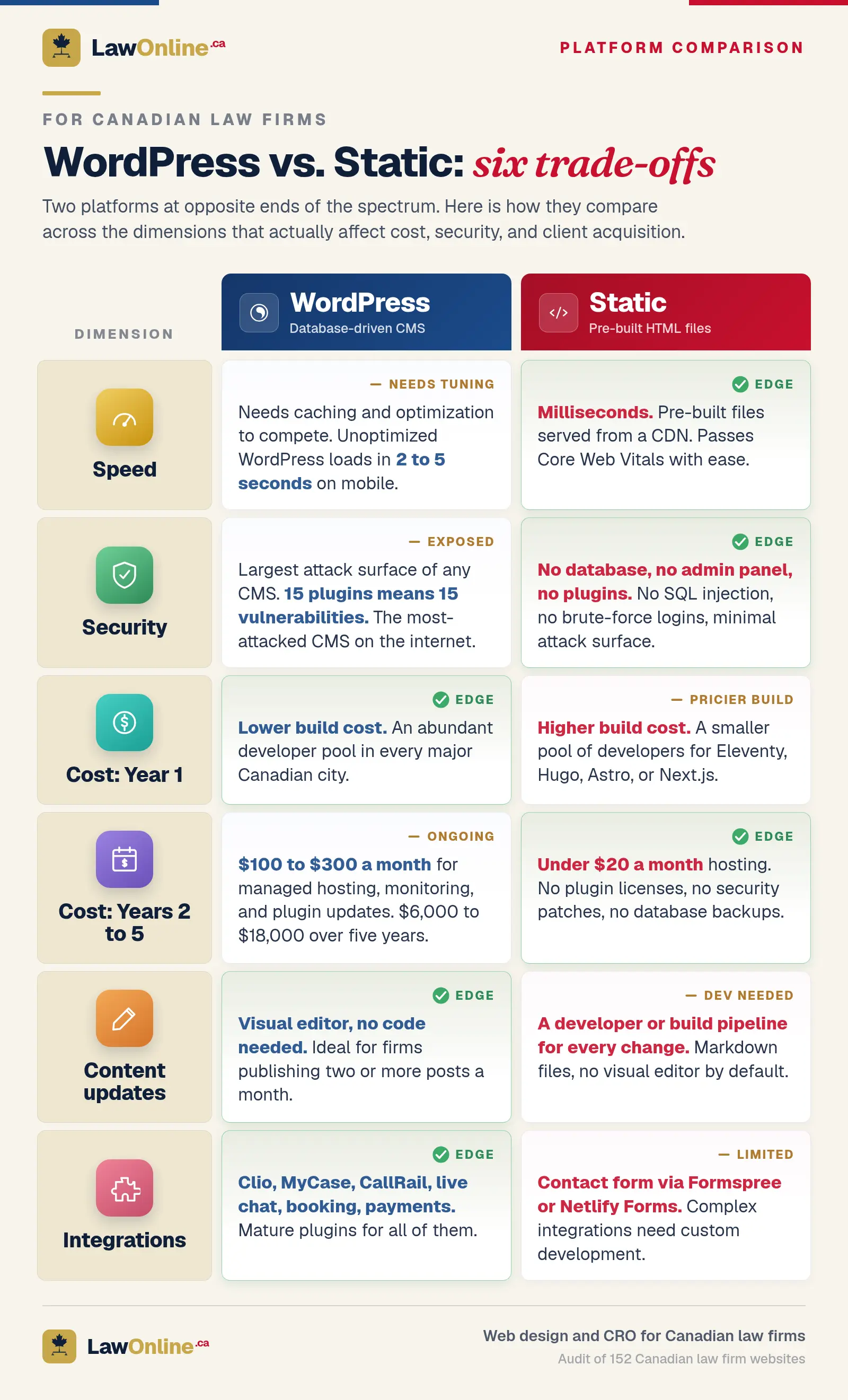
Other platforms (Webflow, Squarespace, Ghost, headless CMS setups) fall somewhere between these two poles, blending elements of both. But WordPress and static represent the clearest trade-off: WordPress lets anyone on your team update the site without technical knowledge, while a static site gives you better performance and security but requires a developer (or a build pipeline) for every change.
Is WordPress the Right Choice for Your Law Firm?
For most small to mid-size Canadian law firms, WordPress is the right choice out of all available platforms. Not because it's the best technology, but because it's the best fit for how law firms actually operate. If you're asking whether WordPress for law firms is the right call, the answer is usually yes.
This isn't a fringe opinion. A Dye & Durham survey found that 77% of Canadian legal professionals believe their industry is overdue for a digital transformation, and 83% agreed that cloud-based solutions improve productivity. WordPress is the lowest-friction path to that transformation for most firms.
Here's why.
You need to publish content regularly. If your marketing strategy includes blogging, updating practice area pages with new case law, or adding attorney bios when you hire, WordPress makes this frictionless. A personal injury firm publishing two posts per month about accident claim deadlines or WSIB updates doesn't want to email a developer every time.
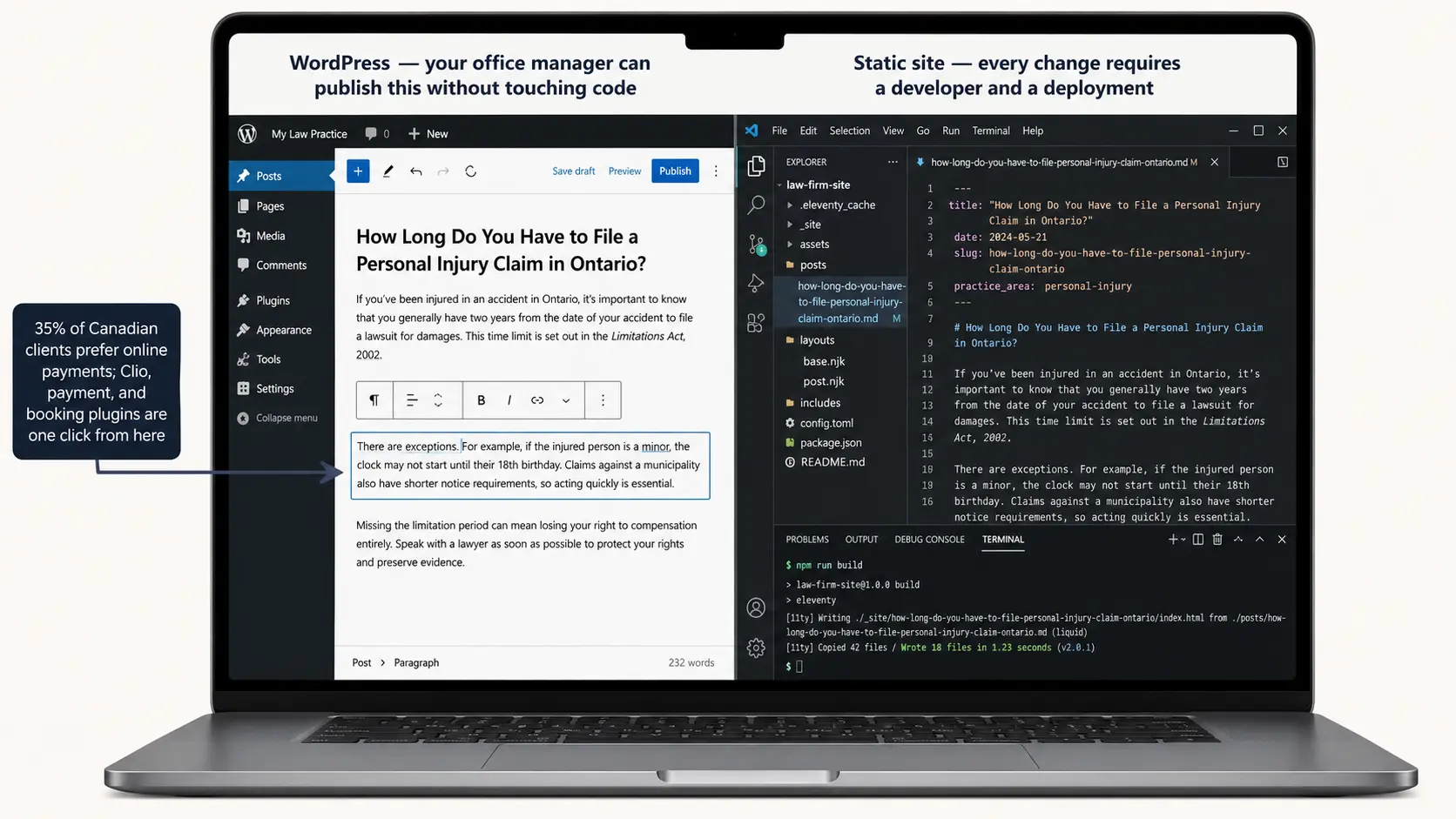
Your staff isn't technical. Most law firms don't have an IT department. They have a managing partner, an office manager, and maybe a marketing coordinator who also handles social media. WordPress's visual editor means these people can make changes without touching code.
You need integrations. Clio, MyCase, PracticePanther, live chat widgets, booking systems, Google Analytics, call tracking. WordPress has plugins for all of them. The ecosystem is enormous. And according to Clio's 2024 Legal Trends Report for Canadian Law Firms, integration is the number one barrier to technology adoption in Canadian firms, ahead of cost or training. WordPress's plugin ecosystem exists to solve exactly that problem.
The same report found that 35% of Canadian clients prefer online payments, the highest rate globally, and firms offering that option see 57% of invoices settled the same day. Canadian clients also prioritize reputation and reviews over responsiveness when choosing a firm. Both online payments and automated review collection are standard WordPress plugins. These aren't nice-to-haves. They're revenue features that most static sites can't replicate without significant custom development.
Budget matters. WordPress developers are abundant. That means competitive pricing for builds, maintenance, and modifications. A personal injury firm in Mississauga can find a dozen qualified WordPress developers within the GTA alone.
Where WordPress Creates Problems for Law Firms
WordPress's flexibility is also its liability.
Security exposure. Law firm website security is a real concern with WordPress. It's the most attacked CMS on the internet. Not because WordPress itself is insecure, but because its plugin ecosystem creates a massive attack surface. Every plugin is a potential vulnerability. A family law firm with 15 plugins (contact form, SEO tool, caching, backup, slider, testimonials, pop-ups, analytics, security scanner, image optimizer, SMTP mailer, schema markup, cookie consent, accessibility checker, speed optimizer) has 15 potential entry points for an attacker.
For firms handling sensitive client information, which is every firm, this isn't theoretical. The Personal Information Protection and Electronic Documents Act (PIPEDA) creates obligations around the security of personal data you collect. A compromised intake form is a privacy breach with real regulatory consequences.
Plugin dependency and rot. Plugins get abandoned. Developers stop maintaining them. WordPress updates break compatibility. A firm that built its site three years ago may find that half its plugins haven't been updated in 18 months. You're running unmaintained code that processes client contact information. This isn't hypothetical. Patchstack's 2024 State of WordPress Security report found that 97% of new WordPress vulnerabilities that year originated in plugins, not in WordPress core. Outdated plugins are the single most common entry point for attackers, and a law firm site left unpatched for even a few months can end up serving malicious scripts to visitors without the firm ever knowing.
Performance overhead. Every WordPress page load involves PHP execution, database queries, and plugin hooks firing in sequence. Without aggressive caching and optimization, page speed suffers. For personal injury firms competing in markets like Toronto or Vancouver where speed directly affects rankings, this overhead matters.
Hosting complexity. Law firm website hosting with WordPress means managing PHP, a MySQL database, adequate memory, and a host that keeps everything updated. Cheap shared hosting ($5 to $10/month) puts your site on a server with hundreds of other sites. One of them gets hacked and the whole server slows down. Our guide to law firm website hosting breaks down how shared, VPS, and managed options compare for Canadian firms.
When Does a Static Site Make More Sense?
A static site for a law firm solves specific problems that WordPress creates. It's not better universally, but it's better in particular situations.
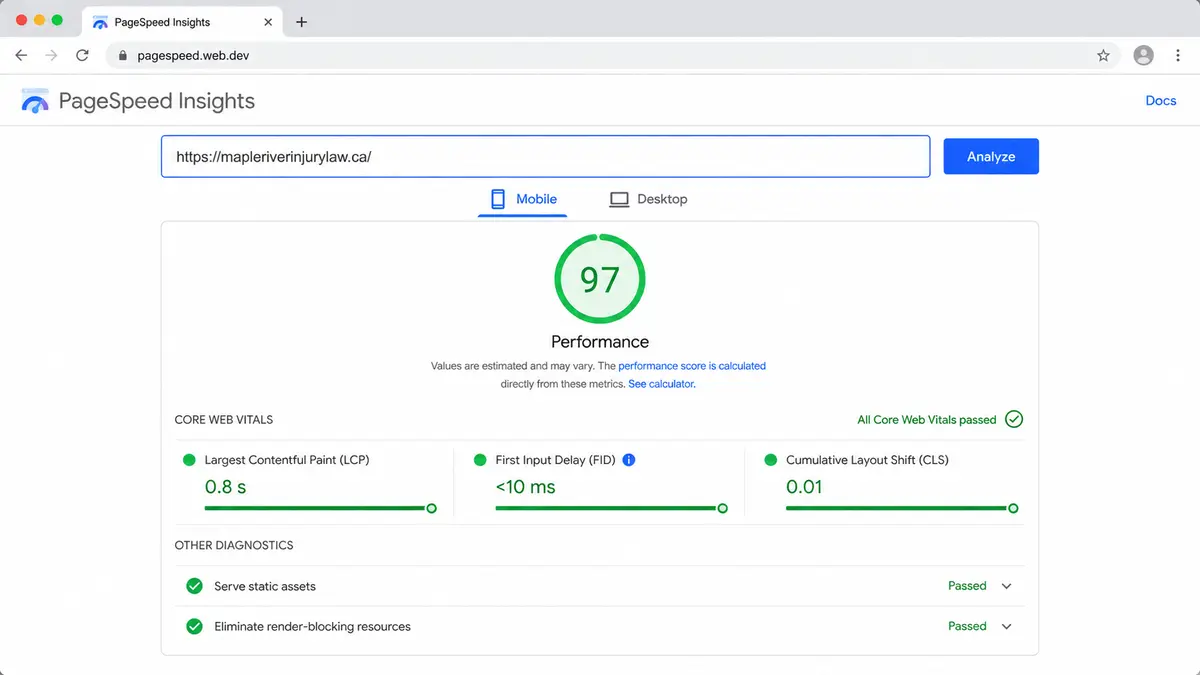
Performance-critical markets. A static site loads in milliseconds because there's nothing to compute. The server just hands over pre-built files. For a personal injury firm competing in the GTA where page speed separates position three from position eight, this edge compounds over time. Google's Core Web Vitals metrics, which directly influence rankings, are trivially easy to ace with a static site and require ongoing work with WordPress. Beyond Core Web Vitals, Google evaluates law firm content against its E-E-A-T framework, a set of quality signals that carry extra weight for YMYL legal content.
Security-first practices. No database means no SQL injection. No admin panel means no brute-force login attempts. No plugins mean no plugin vulnerabilities. For firms in compliance-heavy areas like immigration law (handling passport numbers) or family law (handling custody documents), the reduced attack surface is meaningful.
Long-term cost stability. A static site has almost no ongoing hosting costs. You can host it on a CDN for a few dollars per month. No plugin license renewals, no managed WordPress hosting fees, no emergency security patches at $150/hour. A personal injury boutique spending $200/month on managed WordPress hosting could spend $5/month hosting the same content statically.
Predictable, consistent performance. Traffic spikes don't crash a static site. If a PI firm's blog post goes viral on social media or gets picked up by a news outlet, the static site serves the same speed to visitor one and visitor ten thousand. A WordPress site on shared hosting might buckle.
Where Static Sites Create Problems for Law Firms
Developer dependency for every change. This is the big one. Want to fix a typo? Add a new attorney's bio? Update your phone number? Someone needs to edit a file, rebuild the site, and deploy it. For firms without a developer on retainer or an agency relationship, this creates a bottleneck that kills content velocity.
No visual editor by default. There's no "log in and click." Content updates happen in markdown files or code. You can add a headless CMS layer (Netlify CMS, Forestry, CloudCannon) to provide an editing interface, but that's added complexity and cost that partially negates the simplicity argument.
Limited dynamic functionality. Contact forms need a third-party service. Search requires a JavaScript library or external service. Anything that traditionally uses a database (client portals, gated content, member areas) requires workarounds or separate services.
Smaller talent pool. Finding a WordPress developer is easy. Finding a developer experienced with Eleventy, Hugo, Astro, or Next.js static export is harder and often more expensive. If your agency relationship ends, finding a replacement takes longer.
What About the Options in Between?
We mentioned earlier that WordPress and static sit at opposite ends of a spectrum. Here's a closer look at the platforms that occupy the middle ground.
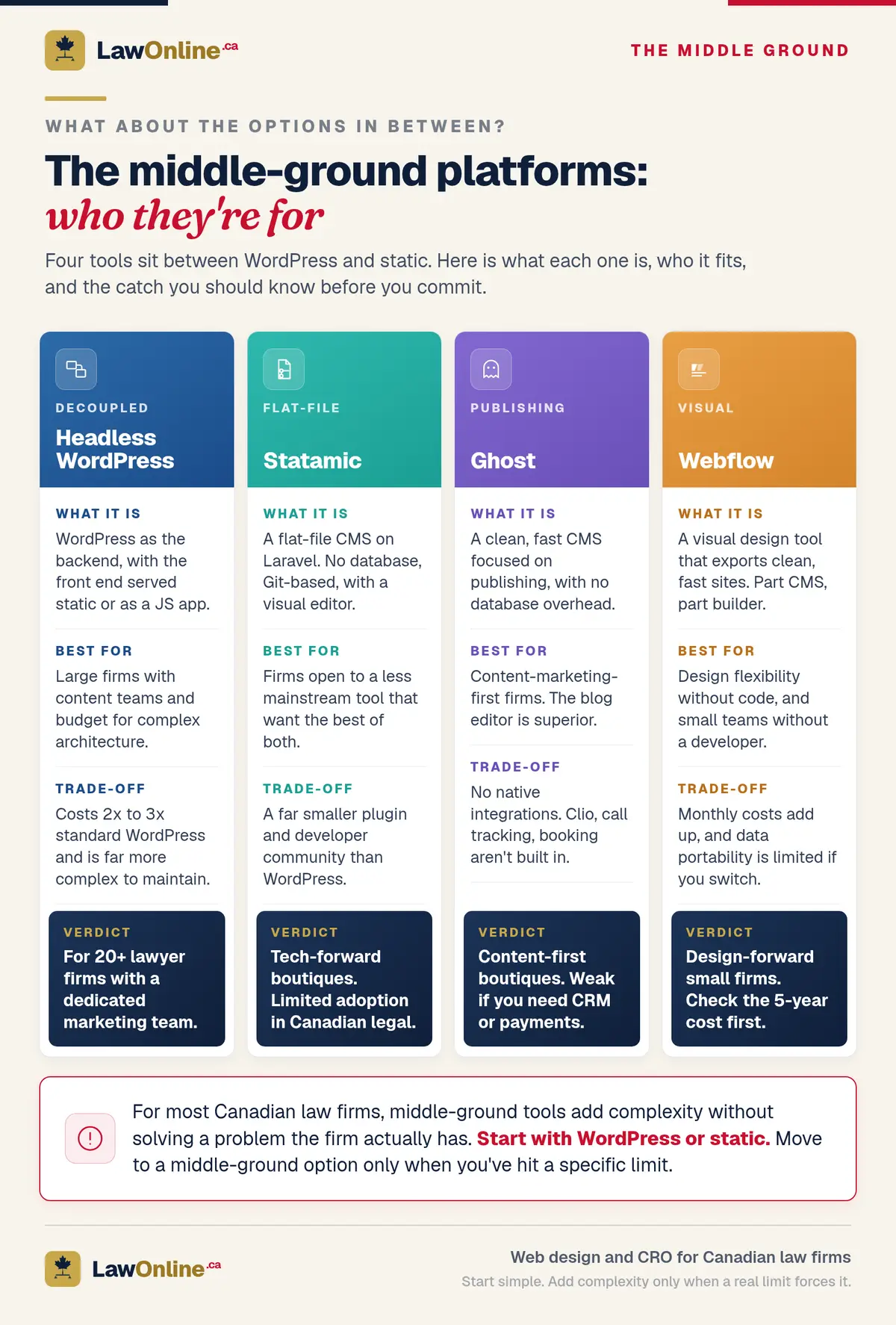
Headless WordPress. You keep WordPress as your content management backend but serve the front end as a static site or a modern JavaScript application. You get WordPress's editing experience with static-level performance. The trade-off: significantly more complex to build and maintain. Development costs are 2x to 3x higher than standard WordPress. This makes sense for large firms with substantial content teams and the budget to support the architecture.
Statamic. A flat-file CMS built on Laravel. No database. Git-based content storage. Visual editing panel. It's essentially the best parts of both approaches for firms willing to use a less mainstream tool. The caveat: much smaller plugin ecosystem and developer community than WordPress.
Ghost. Clean, fast, focused on publishing. Works well for firms whose primary digital strategy is content marketing. Lacks the integration ecosystem WordPress offers, but the content editing experience is superior.
Webflow. Visual design tool that exports clean, fast sites. Sits somewhere between a CMS and a static builder. Good for firms that want design flexibility without code, though the monthly costs add up and data portability is limited.
For most Canadian law firms evaluating these options, the honest answer is that the middle-ground tools add complexity without solving a problem the firm actually has. They're interesting. They're not usually necessary.
How Should You Decide? Five Questions That Determine the Answer
Stop thinking about technology. Start thinking about your firm's actual operational reality. There's no single best CMS for law firms. The best law firm website platform is the one that matches how your team works day to day.

1. How Often Will You Update Content?
If you're publishing blog posts weekly, updating attorney profiles quarterly, and adding practice area pages as you grow, you need a CMS. WordPress wins here. The editing experience is unmatched for non-technical users.
If your site has 8 pages, changes once or twice a year, and exists primarily as a professional credential, static works. You're paying for a developer either way since someone built the site. Paying them for two updates annually is cheaper than maintaining WordPress infrastructure year-round.
2. Who Will Make the Changes?
If your office manager or marketing coordinator handles website updates, they need a visual interface. WordPress provides this out of the box. Static sites require either technical knowledge or a headless CMS add-on.
If you have an agency on retainer handling all web work anyway, the editing interface is less important. Your agency can work with either technology.
3. What Integrations Do You Need?
Make a list. Clio. Calendly. Live chat. Google Analytics. Call tracking. Payment processing. If you need five or more integrations, WordPress's plugin ecosystem gives you a massive head start.
If you need a contact form, analytics, and nothing else, static handles that fine through services like Formspree or Netlify Forms.
4. What's Your Security Posture?
If you handle highly sensitive client data and your firm has been subject to privacy audits, the reduced attack surface of a static site is a genuine advantage. Immigration firms processing biometric data. Family law firms storing financial disclosures. Criminal defence firms where client confidentiality is paramount.
If your security needs are standard (SSL, reasonable hosting, regular updates), WordPress with proper maintenance is perfectly adequate. Most law firms fall here.
5. What's Your Real Budget, Including Year Two?
WordPress is cheaper to build but more expensive to maintain. The law firm website maintenance cost adds up: budget $100 to $300/month for managed hosting, security monitoring, plugin updates, and backups. Over five years, that's $6,000 to $18,000 in maintenance alone on top of the initial build cost.
Static sites cost more to build (because the developer pool is smaller and the initial setup is more involved) but almost nothing to maintain. Hosting is under $20/month. There are no plugins to update, no security patches to apply, no database to back up.
For a personal injury firm planning to invest in content marketing long-term, WordPress's ongoing cost is justified by the editing convenience. For a sole practitioner who wants a professional presence with minimal ongoing expenses, static is more economical over a five-year horizon.
Our Recommendation by Firm Type

We're going to be direct about this. After evaluating every major law firm website builder and CMS option, here's where each approach fits best.
Solo practitioners (1 to 2 lawyers, minimal content updates): Static. Your site is small, changes rarely, and doesn't need a database. Pay a developer once. Host it for almost nothing. Move on with practicing law.
Small PI or family law firms (2 to 5 lawyers, active blogging): WordPress. You need to publish content regularly to compete in local search. Your team needs to make updates without emailing a developer. The editing experience alone justifies the platform.
Mid-size firms (5 to 20 lawyers, multiple practice areas): WordPress. The integration needs alone push you here. Clio integration, multiple intake forms by practice area, attorney directories, event listings, job boards. WordPress handles all of it with mature, tested solutions. These firms are already deep into digital tools: 93% of mid-sized Canadian firms now use AI, up fivefold from the prior year. A static site can't keep pace with that level of technology integration.
Large firms (20+ lawyers, dedicated marketing team): Consider headless WordPress or a custom build. You have the budget and the team to support a more sophisticated architecture. Performance at scale becomes a competitive differentiator worth investing in. Once you've settled on a platform, the design process is where the real differentiation happens.
Compliance-heavy boutiques (immigration, securities, some criminal defence): Evaluate static seriously. If you're handling data subject to enhanced PIPEDA scrutiny or Office of the Privacy Commissioner guidance, reducing your attack surface isn't overcautious. It's proportionate.
The Wrong Choice Costs You Either Way
Choosing WordPress when you don't need it means paying for maintenance you won't use. Choosing static when your firm needs to publish frequently means your content strategy dies because every update requires a developer. Both failures cost client inquiries.

The technology itself doesn't generate leads. The strategy behind it does. A well-optimized WordPress site will outperform a poorly optimized static site every time. And vice versa. With Canada's legal services market projected to reach US$35.4 billion by 2030 and 66% of Canadian firms already reporting revenue growth from technology adoption, getting your digital foundation right isn't optional. Starting with the right foundation for your firm's actual needs means you're not fighting your own infrastructure to execute your marketing plan.
If you're planning a new law firm website development project or rebuilding an existing site, start with the five questions above. The technology should serve your strategy. Not the other way around.