Every Google Ads rule you learned from a YouTube tutorial or agency blog was written for U.S. advertisers. The moment you apply those tactics in Ontario or BC, you're operating under a different set of restrictions that most agencies don't know exist.
The Law Society of Ontario and the Law Society of British Columbia both regulate lawyer advertising, and their rules follow you into Google Ads. Your headlines, descriptions, callout extensions, sitelinks, and landing pages all fall under the same professional conduct standards that govern your website, business cards, and billboards. The difference is that Google Ads compress your message into 30 and 90 characters, which makes it surprisingly easy to cross a line you didn't know was there.
This guide covers the specific rules that matter for pay-per-click (PPC) campaigns on Google Ads, where Ontario and BC differ, and how to write compliant ad copy that still converts. It doesn't cover Google Local Services Ads, which have their own eligibility requirements and work differently from standard search campaigns.
Do Law Society Advertising Rules Apply to Google Ads?
Yes. Both the LSO's Rules of Professional Conduct (Chapter 4) and the LSBC's Code of Professional Conduct (Chapter 4) apply to all forms of marketing, including paid digital advertising. Neither code carves out an exception for character-limited ad formats.

In Ontario, Rule 4.2-1 requires that all marketing be demonstrably true, accurate, and verifiable; not misleading, confusing, or deceptive; and in the best interests of the public. In BC, Rule 4.2-5 covers similar ground and adds that marketing must not exploit a recipient's physical or emotional vulnerability or create unjustified expectations about results.
At the national level, the Canadian Bar Association's advertising toolkit reinforces these standards and explicitly treats websites and social media platforms as forms of advertising. That means every landing page, remarketing display ad, and social post connected to a Google Ads campaign falls under the same professional conduct rules as the search ads themselves.
These standards don't relax because you only have 30 characters to work with. If anything, the compressed format creates more risk because every word carries more weight and there's less room for nuance or context.
What Can You Say in Google Ads Headlines?
Google Ads gives you up to three headlines of 30 characters each and two descriptions of 90 characters each. That's not a lot of space, and the pressure to make every word count is exactly where compliance problems start.
Headlines That Work
You can describe your practice areas, your location, and what a potential client can expect when they contact you. These headlines are compliant in both Ontario and BC:
- "Toronto Personal Injury Firm"
- "Free Initial Consultation"
- "Serving Vancouver Since 2005"
- "No Fee Until You Win"
- "Call for a Case Assessment"
- "Hamilton Family Law Firm"
The key is that each claim is factual and verifiable. "Serving Vancouver Since 2005" works if the firm actually opened in 2005. "Free Initial Consultation" works if you genuinely offer one at no charge.
Headlines That Don't
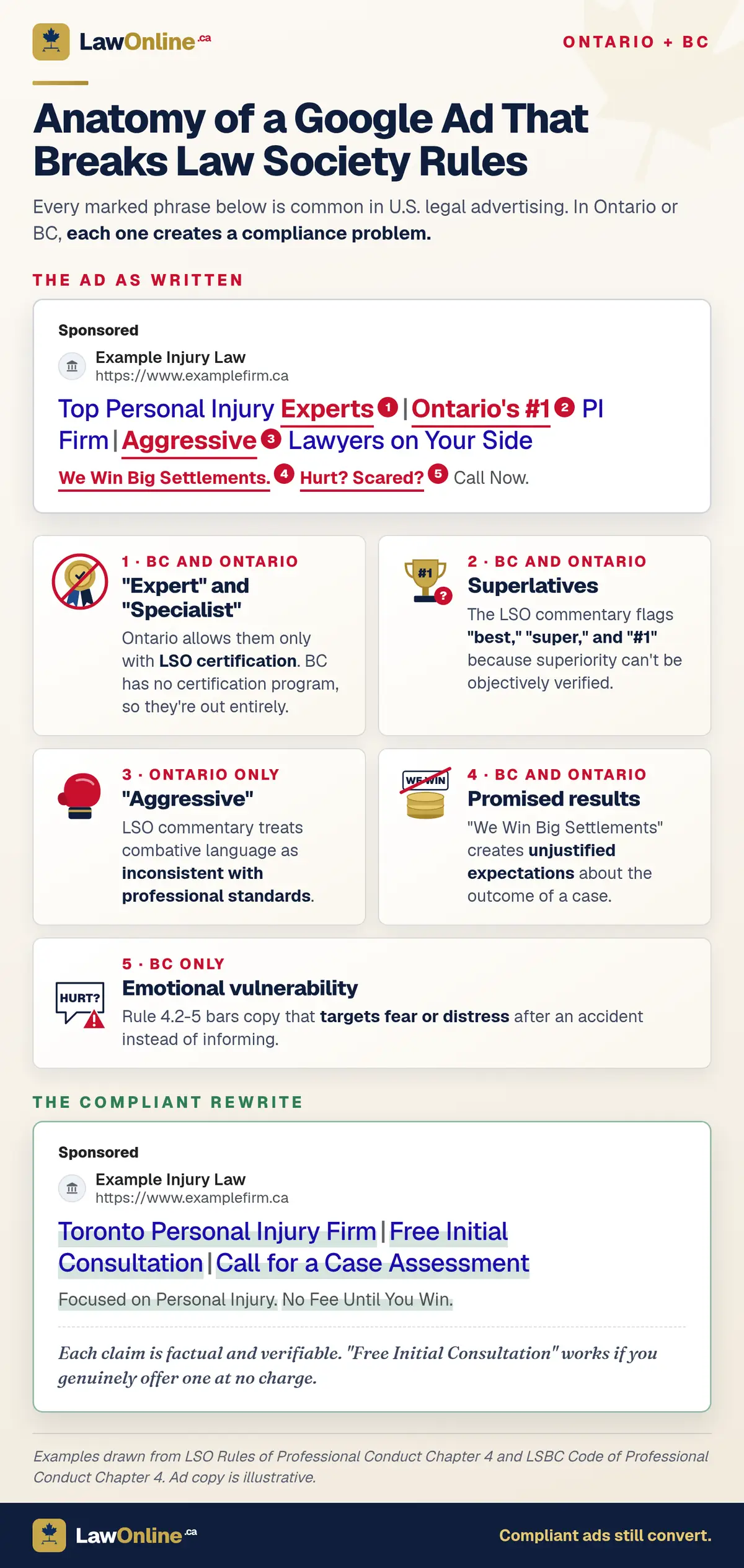
These headlines are common in American legal advertising and would cause compliance problems in Ontario, BC, or both:
| Headline | Problem |
|---|---|
| "Top Personal Injury Experts" | "Expert" restricted in both provinces |
| "Ontario's #1 PI Firm" | Superlative claim, unverifiable |
| "Aggressive Lawyers on Your Side" | "Aggressive" prohibited under LSO rules |
| "Specialists in Car Accident Law" | "Specialist" restricted unless LSO-certified |
| "We Win Big Settlements" | Creates unjustified expectations |
| "Hurt? Scared? Call Now." | Exploits emotional vulnerability (BC) |
In Ontario, the LSO commentary on Rule 4.2-1 specifically flags "best," "super," and "#1" as contravening the rules because they suggest superiority that can't be objectively verified. The same commentary treats "aggressive" and similar combative language as inconsistent with professional standards.
In BC, the vulnerability provision in Rule 4.2-5 adds another layer. Ad copy that targets someone's fear or distress after an accident, rather than informing them about available legal help, crosses the line.
What About the "Specialist" and "Expert" Restriction?
This is the single most common compliance failure in legal Google Ads, and it works differently in each province.
Ontario operates a Certified Specialist Program. If a lawyer has completed that program in a recognized practice area, the firm can use "specialist" in its ads. Everyone else cannot. "Expert" is treated the same way. There is no workaround. Our full guide to Ontario's advertising rules covers the certification path and the exact language the LSO considers equivalent to "specialist."
BC has no specialist certification program at all. Under Rule 4.3-1, no BC lawyer can use "specialist" or any similar designation suggesting a recognized special status. Rule 4.3-0.1 permits stating a "preference for practice," so a headline like "Focus: Personal Injury Law" works, but "Personal Injury Specialist" does not, regardless of how many years the lawyer has been practising. Our BC advertising rules guide covers the full scope of BC's restrictions.
This matters for Google Ads because headline and description character limits push copywriters toward short, punchy terms like "specialist" and "expert."
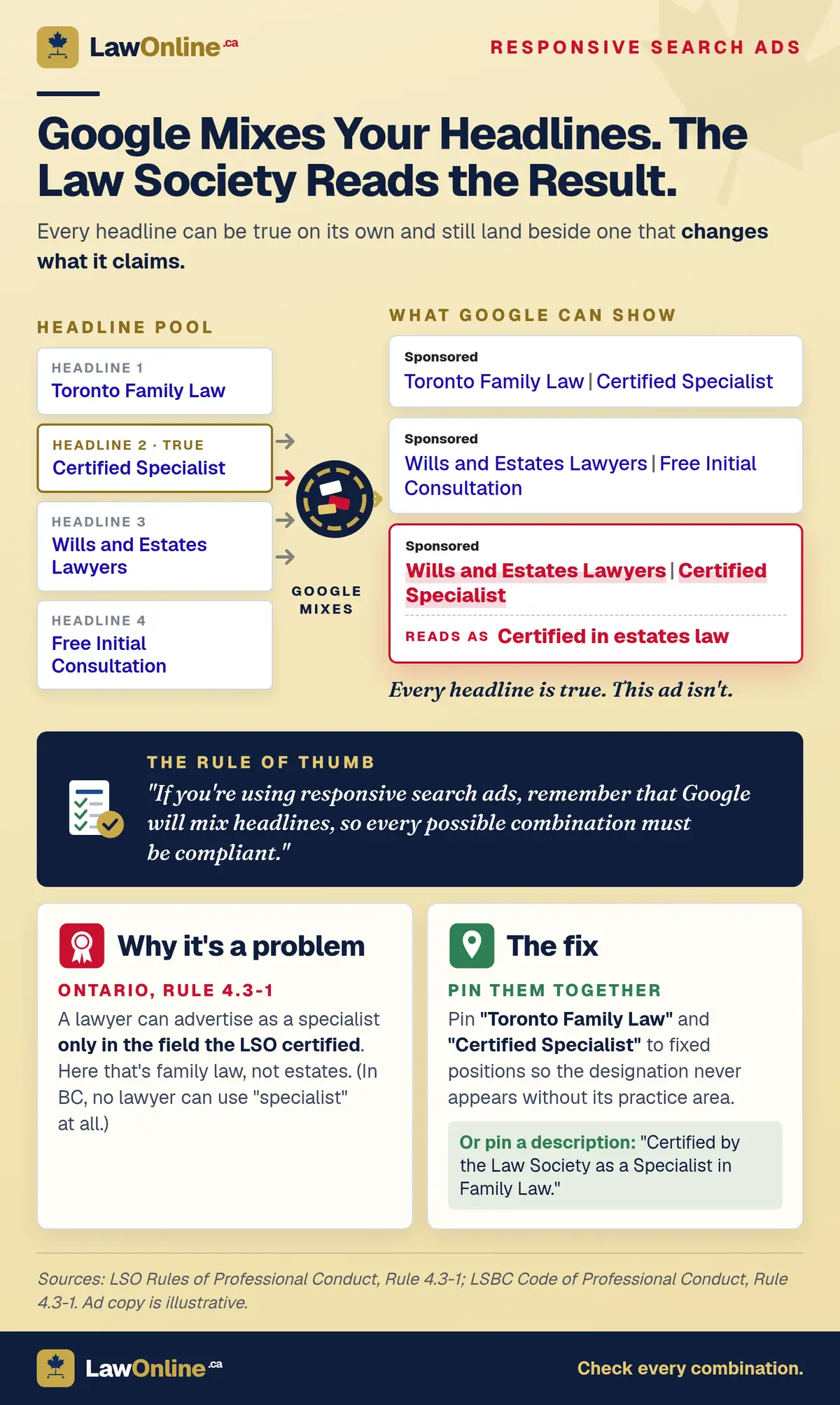
Responsive search ads (RSAs) add a second risk. Google picks two or three of your headlines and shows them in whatever order it predicts will perform best, so a designation can end up beside the wrong practice area. Say a partner is an LSO Certified Specialist in family law, and the firm also handles wills. "Certified Specialist," "Toronto Family Law," and "Wills and Estates Lawyers" are all true headlines. But Google can show "Wills and Estates Lawyers | Certified Specialist," and a reader will take that to mean the certification covers estates work. It doesn't, so the ad now claims a specialty the firm doesn't hold. Pin the designation and its practice area to fixed positions so they always appear together, or put the full wording ("Certified by the Law Society as a Specialist in Family Law") in a pinned description.
How to Say It Instead
Instead of restricted terms, use language that describes what the firm does without implying formal credentials:
| Don't say | Say instead |
|---|---|
| "Personal Injury Specialists" | "Focused on Personal Injury" |
| "Expert Criminal Defence" | "Experienced Defence Counsel" |
| "Immigration Specialists" | "Immigration Law Practice" |
| "Your Family Law Expert" | "Dedicated Family Law Firm" |
Can You Use Client Reviews or Ratings in Google Ads?
Google Ads offers several features that surface reviews and ratings, including seller ratings (the star display beneath ads), review extensions, and callout text referencing review scores. The law society rules apply to each of these differently depending on the province.
Ontario's Approach
Ontario permits client testimonials in marketing if they are true, accurate, and not misleading. That standard extends to Google Ads. You could include a callout like "4.8 Stars on Google" if your actual Google rating is 4.8 or higher. You could reference the number of reviews ("200+ Google Reviews") if that number is accurate.
What you can't do is cherry-pick a review quote that implies a guaranteed outcome ("Got me $500K!") or that makes an unverifiable superlative claim ("Best lawyer in Ontario"). A review quote in an ad becomes part of your marketing and must meet the same standard as any other claim you make.
Google's automated seller ratings display, the star rating that appears beneath some search ads, is generated by Google from third-party sources. Because the firm doesn't control what appears in the seller rating, it sits in a grey area. However, if a firm's seller rating displays and the firm knows the underlying reviews contain misleading content, leaving the feature enabled could create a compliance question. Firms concerned about this can disable seller ratings in their Google Ads account settings.
BC's Stricter Verifiability Standard
BC treats reviews and testimonials more restrictively. Under the LSBC's Ethics Advisory EA-2025-05, every element of a testimonial must be both true and independently verifiable by the lawyer. Subjective praise ("great lawyer," "professional") doesn't meet that standard because the lawyer can't independently verify a subjective opinion.
For Google Ads, this means a BC firm should be cautious about using review quotes in ad copy, callout extensions, or sitelinks. A factual, verifiable quote ("Handled my MVA claim from intake to resolution") is safer than a subjective one ("Amazing service, highly recommend"). Since most Google Reviews lean heavily toward subjective praise, the practical effect is that BC firms have fewer usable review quotes for ads.
The LSBC has indicated that unsolicited reviews on public platforms like Google, left at the client's own initiative and not reproduced by the lawyer in a marketing activity, are unlikely to be considered a marketing activity. The compliance issue arises when the firm pulls a review quote into its own ad copy or landing page.
How Do the Rules Apply to Call-Only Ads?
Call-only ads skip the landing page entirely and prompt the user to call the firm directly from the search result. They're popular with personal injury and criminal defence firms because they eliminate the friction of a website visit.
The same advertising rules apply. The ad's headline, description, and business name must all comply with law society standards. No specialist claims, no superlatives, no emotional manipulation. The fact that there's no landing page doesn't create a compliance gap. It actually narrows the space you have to convey accurate information, because the ad copy is all the prospect sees before calling.
One practical consideration for call-only ads is fee advertising. If your ad promises "Free Consultation" or "No Fee Until You Win," the person who calls expects that to be true. Ontario's rules require fee advertising to be "reasonably precise about the services covered" and to state whether disbursements and taxes are extra. If a caller asks about fees based on what your ad said, your intake team needs to give an answer consistent with the ad copy.
Does Your Landing Page Need to Match Your Ad Copy?
Yes, and this is an area where firms get into trouble even when their ad copy is compliant on its own.
Both the LSO and LSBC require that marketing not be misleading. If your Google Ad says "Free Consultation" but your landing page says "Consultations starting at $250," that's misleading regardless of which statement is accurate. The disconnect between ad and landing page creates the compliance problem.
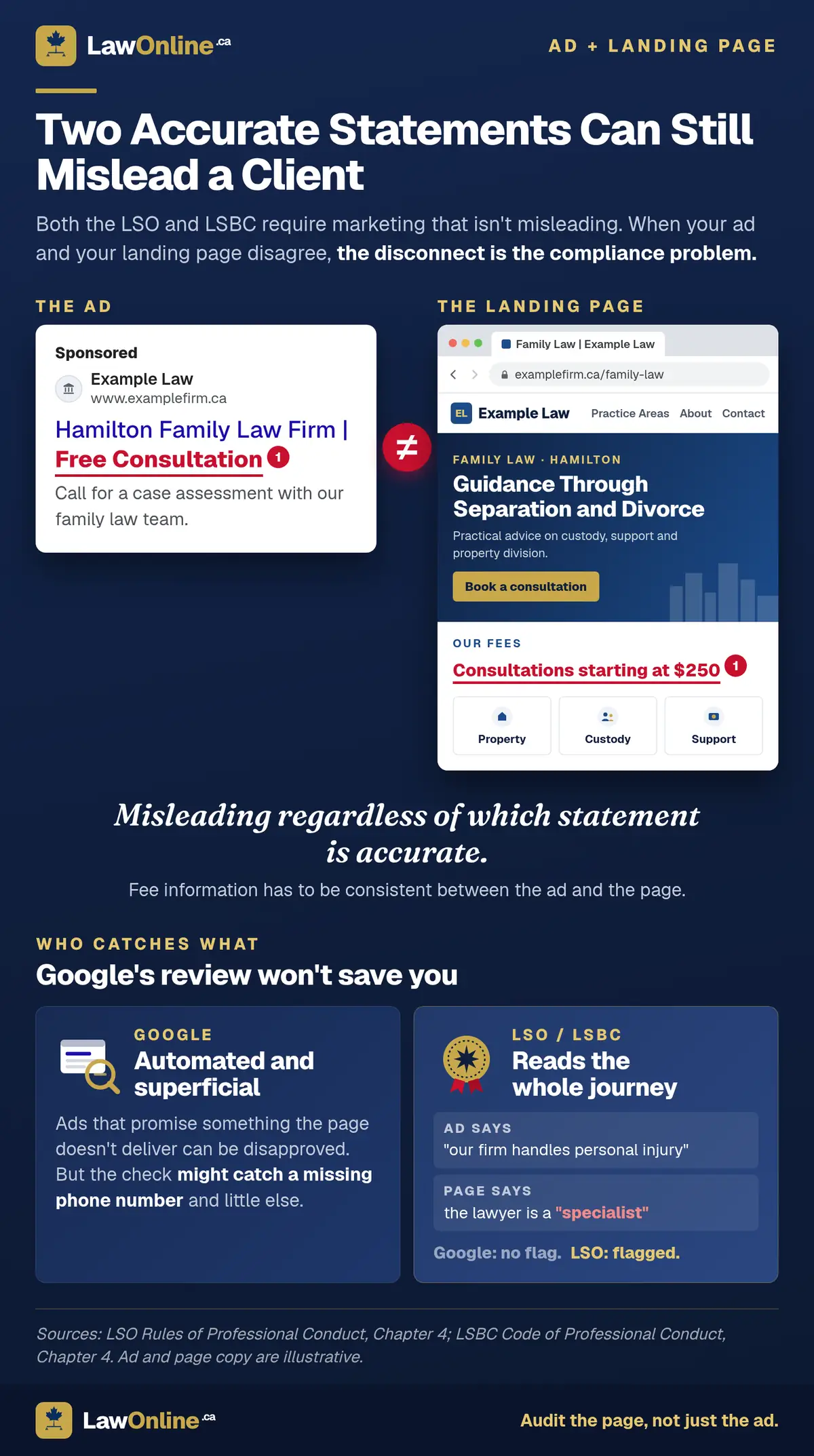
Google itself enforces a version of this through its advertising policies. Ads that promise something the landing page doesn't deliver can be disapproved for "misleading content." But Google's review is automated and superficial. It might catch a missing phone number but won't catch the difference between "our firm handles personal injury" and a landing page that describes the lawyer as a "specialist," which Google wouldn't flag but the LSO would.
There's a practical reason to take landing page quality seriously beyond compliance. Canadian Forum on Civil Justice research found that 33.2% of Canadians went online to seek help with a legal problem, but 37.5% of those who searched said the information they found was not helpful. People clicking on a law firm's Google Ad have likely already waded through vague, generic legal content that didn't answer their question. A compliant landing page that clearly explains what the firm handles, what the first appointment looks like, and what it costs isn't just satisfying the law society. It's standing out from the unhelpful pages that came before it.
Landing Page Compliance Checklist
When running Google Ads, audit your landing pages against the same standards as your ad copy:
- No "specialist," "expert," or equivalent terms unless the lawyer holds an LSO certification (Ontario) or eliminate entirely (BC)
- No superlative claims ("best," "#1," "top-rated") unless objectively verifiable
- Testimonial quotes on the page must meet the same standard as testimonials in your ads
- Fee information must be consistent between the ad and the page
- Practice areas listed must be areas the firm is competent and prepared to handle
- In Ontario, the page should indicate the lawyer is "licensed as a lawyer" per Rule 4.2-1.1
- In BC, non-lawyer personnel listed on the page must have their status clearly indicated per Rule 4.2-8
Where Ontario and BC Rules Differ for Google Ads
Most of the core lawyer advertising rules are the same, but there are specific differences that matter if you're running PPC campaigns in both provinces or if your agency operates across jurisdictions.
| Rule area | Ontario (LSO) | BC (LSBC) |
|---|---|---|
| "Specialist" | Permitted with LSO certification | Prohibited entirely, no certification program |
| Testimonials | Permitted if true, accurate, not misleading | Every element must be verifiable by the lawyer |
| Emotional appeals | Must inform, not manipulate | Explicitly can't exploit vulnerability |
| "Aggressive" | Specifically prohibited by LSO commentary | Falls under general professionalism standard |
| Second opinion marketing | Banned by Rule 4.2-1.2 | No equivalent prohibition |
| Licence disclosure | Must state "licensed as a lawyer" | Must indicate non-lawyer status for team members |
| Notary disclosure | Not applicable | Must disclose lawyer status alongside notary status |
The testimonial difference has the biggest practical impact for Google Ads. An Ontario firm can use a review quote like "Very professional team, made the process easy" in ad copy or on a landing page with relatively low compliance risk. A BC firm using the same quote faces a higher standard because "very professional" is subjective and not independently verifiable.
How to Set Up Compliant Google Ads Campaigns
Running a compliant PPC campaign isn't harder than running a non-compliant one. It just requires awareness of the boundaries. Here's how to structure a campaign that works within the rules.
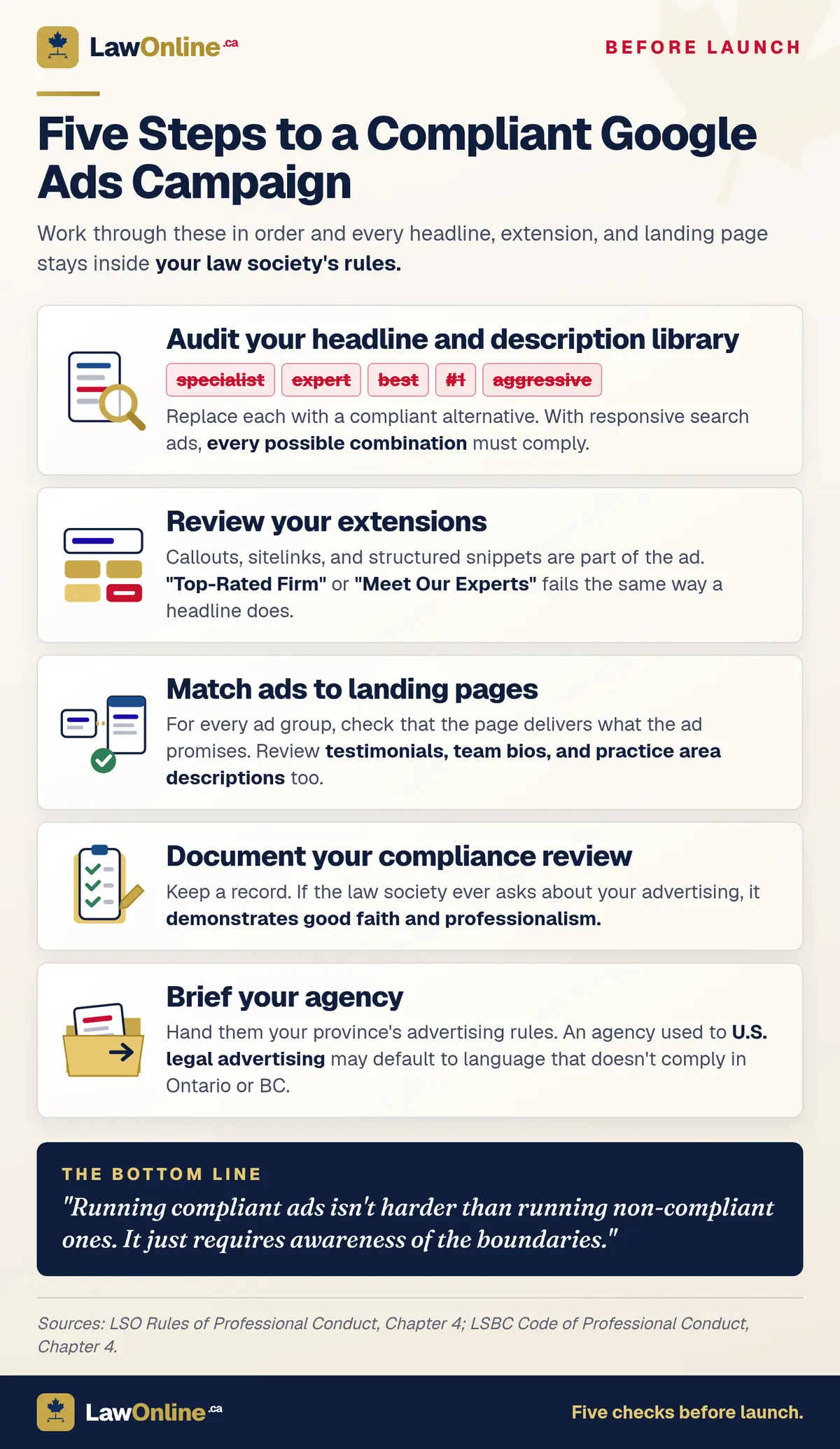
1. Audit Your Headline and Description Library
Before launching, review every headline and description for restricted terms. Search for "specialist," "expert," "best," "#1," "aggressive," and similar language. Replace with compliant alternatives. If you're using responsive search ads, remember that Google will mix headlines, so every possible combination must be compliant.
2. Review Your Extensions
Callout extensions, sitelink extensions, and structured snippets are all part of your ad and subject to the same rules. A callout that says "Top-Rated Firm" or a sitelink titled "Meet Our Experts" creates the same compliance problem as a headline with that language.
3. Match Ads to Landing Pages
For every ad group, verify that the landing page delivers what the ad promises and doesn't introduce restricted language or claims that aren't in the ad. This includes checking testimonial sections, team bios, and practice area descriptions on the landing page.
4. Document Your Compliance Review
Keep a record of your ad copy review. If the law society ever asks about your advertising, having documentation showing that you reviewed your Google Ads for compliance demonstrates good faith and professionalism.
5. Brief Your Agency
If a marketing agency manages your Google Ads, make sure they have a copy of your province's advertising rules. An agency experienced with U.S. legal advertising may default to language that doesn't comply with Ontario or BC standards. For guidance on what to look for in an agency, see our guide on how to choose a law firm marketing agency.
6. Review Retargeting and Email Compliance
Google Ads campaigns often extend beyond search into remarketing display ads and follow-up email sequences, and both carry compliance obligations that Google won't manage for you. The CBA's digital ethics guidelines identify specific risks where digital marketing intersects with solicitor-client confidentiality and Canada's Anti-Spam Legislation (CASL). A remarketing pixel on a criminal defence or family law page can reveal that someone visited that page when a display ad follows them across the web, which raises a confidentiality question if the person shares a device or workspace. Email follow-ups triggered by form submissions need proper CASL consent: an express opt-in, not a pre-checked box or an implied agreement buried in terms of service.
Frequently Asked Questions
Are Google Ads subject to Law Society of Ontario advertising rules?
Yes. The LSO's Rules of Professional Conduct apply to all forms of marketing, including Google Ads. Your headlines, descriptions, extensions, and landing pages must be demonstrably true, accurate, and verifiable. There is no exemption for paid digital advertising.
Can a BC law firm use the word "specialist" in Google Ads?
No. BC has no specialist certification program, so no BC lawyer can use "specialist" or any equivalent term in any marketing, including Google Ads. You can state a preference for practice, such as "Focus: Personal Injury Law," but terms implying formal accreditation are prohibited.
Can I use Google Reviews quotes in my law firm's ad copy?
In Ontario, yes, if the quote is true, accurate, and not misleading. In BC, the verifiability standard means the quote must contain only factual, independently verifiable claims. Subjective praise like "best lawyer" or "great experience" doesn't meet BC's standard.
Do law society rules apply to call-only Google Ads?
Yes. Call-only ads are subject to the same rules as any other form of lawyer advertising. The headline, description, and business name must all comply. No specialist claims, no superlatives, no emotional manipulation.
What happens if my Google Ads violate law society rules?
In Ontario, consequences range from a guidance letter to formal investigation and disciplinary proceedings, including potential fines or licence suspension. In BC, violations can result in a Law Society Tribunal hearing, and the outcome becomes part of the public record. Beyond regulatory consequences, non-compliant ads undermine client trust.
Should my landing page match my Google Ad exactly?
The content doesn't need to be identical, but the promises must be consistent. If your ad says "Free Consultation," your landing page can't say "Consultations starting at $250." Mismatches between ads and landing pages create misleading advertising under both LSO and LSBC rules, and Google may also disapprove the ad.