
Most law firms don't think about hosting until something breaks.
A contact form stops accepting submissions during a long weekend. The site goes down the morning you launch a Google Ads campaign. Or you discover that your clients' intake data has been sitting on a server in Virginia for three years, which raises PIPEDA questions you'd rather not answer.
Law firm website hosting isn't glamorous, but it's the foundation everything else sits on: your speed, your security, your search rankings, and increasingly, your privacy compliance obligations. With 95% of Canadian law firms now using AI and cloud-based practice tools, reliable hosting has become the infrastructure layer everything else depends on. The right host keeps your site fast, your data in Canada, and your intake forms running at 2 a.m. when a personal injury client needs you most. The wrong one quietly costs you clients you'll never know about.
This guide covers what hosting actually means, what law firms specifically need from it, how the major options compare, and what it should cost.
What Does "Hosting" Actually Mean for a Law Firm Website?
Hosting is the service that stores your website's files and serves them to anyone who types in your URL or clicks a Google result. Think of it as renting space on a computer (called a server) that's connected to the internet around the clock.
Lawyers commonly confuse hosting with three related things:
- Your domain name (e.g., smithinjurylaw.ca) is your address. Hosting is the building at that address.
- Your CMS (WordPress, Squarespace, Wix) is the software that manages your content. It runs on the host.
- A CDN (content delivery network) caches copies of your site on servers around the world so visitors load content from a nearby location. It supplements hosting but doesn't replace it.
This distinction matters because when something goes wrong with your site's speed or reliability, the fix depends on which layer the problem lives in. A slow site might need better hosting, a CDN, image compression, or all three. Understanding the difference helps you ask the right questions when something breaks.
What Do Law Firms Need From Hosting That Other Businesses Don't?
Law firms aren't restaurants or retail shops. Your website handles sensitive client information, and your regulatory obligations are stricter than most industries. Here are the law firm website hosting requirements that set your needs apart.
Where Is Your Data Actually Stored?
This is the most important hosting question most law firms never ask.
PIPEDA, Canada's federal privacy law, governs how private-sector organizations collect, use, and disclose personal information. When someone fills out your intake form describing their car accident, their workplace termination, or their custody dispute, that's personal information under the Act.

If your host stores data on US servers, that information may be subject to US law enforcement access under the CLOUD Act, regardless of where your firm is physically located. For a personal injury firm handling medical records and accident details, or a family law firm processing custody affidavits, this isn't theoretical. It's a law firm website compliance question your law society may eventually ask about, and getting your data location right is the first step toward answering it.
Canada's computing infrastructure and web hosting sector generated $14.8 billion in operating revenue in 2022, growing by double-digit percentages year over year. The country has roughly 336 data centres with capacity projected to grow by more than 50% by 2029. Canadian-hosted options exist at every price point, and there's no good reason to default to US infrastructure.
Uptime That Matches When Clients Search
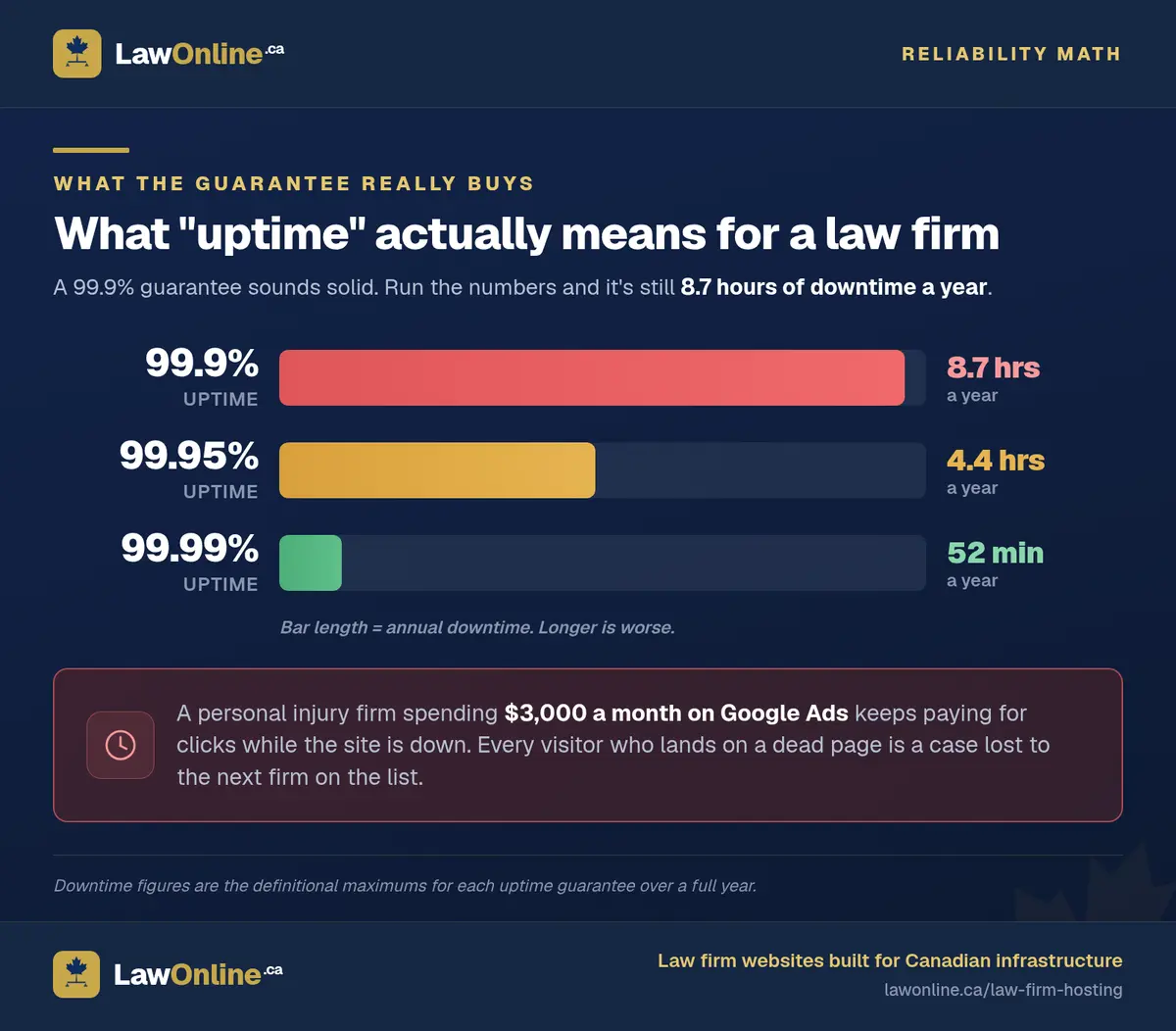
A 99.9% uptime guarantee sounds solid until you run the numbers. That's still roughly 8.7 hours of downtime per year. If those hours fall on a Saturday night when someone just got arrested, or Monday morning when motor vehicle accident victims are searching for a lawyer, you've lost cases to the firm whose site loaded.
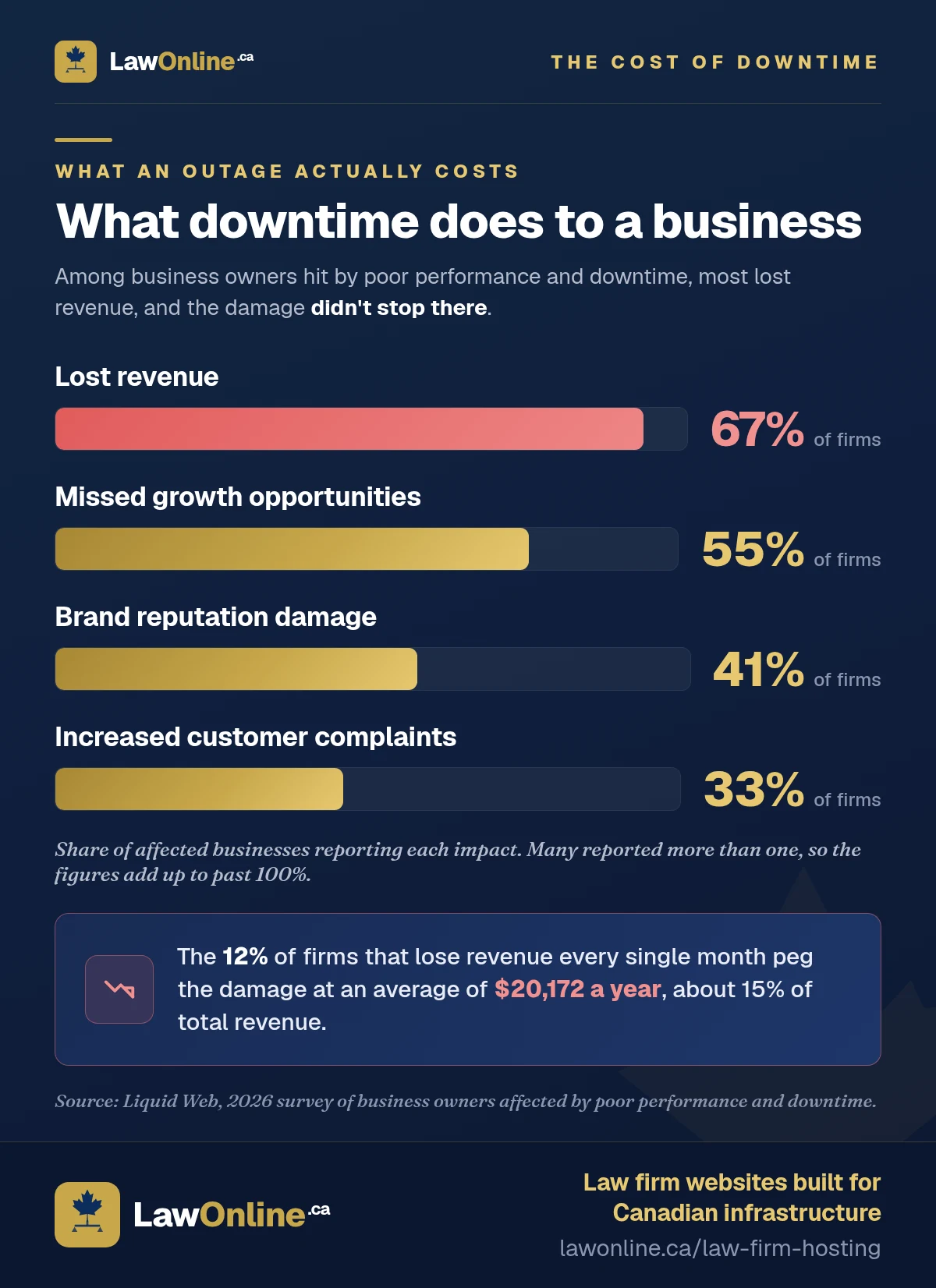
Downtime is more common than most firms assume. An analysis of 1.8 million outage events across 2,700 monitored websites found that 61.4% experienced at least one outage. Most were brief (median duration under two minutes), but the business impact isn't. A 2026 survey of business owners found that among those affected by poor performance and downtime, 67% reported lost revenue, 55% missed growth opportunities, and 41% suffered brand damage. The 12% who reported losing revenue every month estimated an average annual cost of $20,172, about 15% of total revenue.
Canadian firms face upstream infrastructure risk too. When Rogers experienced a nationwide outage in July 2022, businesses across the country lost connectivity for hours, taking down everything from law firm websites to Interac e-transfer and payment services. Your host's uptime guarantee covers the server, not the network between the server and your clients. Hosts with multiple connectivity providers and geographically distributed infrastructure offer better insulation against these cascading failures.
Look for hosts offering 99.95% uptime or higher with financial credits if they miss the target. More importantly, ask what their actual uptime has been over the past 12 months, not just what the marketing page promises.
Form Submission Reliability
Your contact form is your intake pipeline. If a submission fails silently because the server was overloaded or a PHP process timed out, you'll never know that client tried to reach you.
They'll click back and call the next firm on the list.
Reliable hosting for law firms means the server handles form submissions consistently, even during traffic spikes from a new ad campaign or a media mention. It also means form data transmits over TLS (encrypted in transit) and stays secure until you retrieve it.
Email That Actually Reaches Inboxes
When a potential personal injury client submits your intake form and receives an automated confirmation, that email needs to land in their inbox, not their spam folder. Shared hosting environments are notorious for poor email deliverability because you're sharing an IP address with hundreds of other sites. If any of those sites send spam, your firm's email hosting reputation gets flagged by association.
For firms that rely on email for intake follow-ups, this alone can justify a hosting upgrade.
How Do the Main Hosting Types Compare for Law Firms?
Not all hosting is built for the same purpose. Here's how the major options stack up for Canadian law firms.
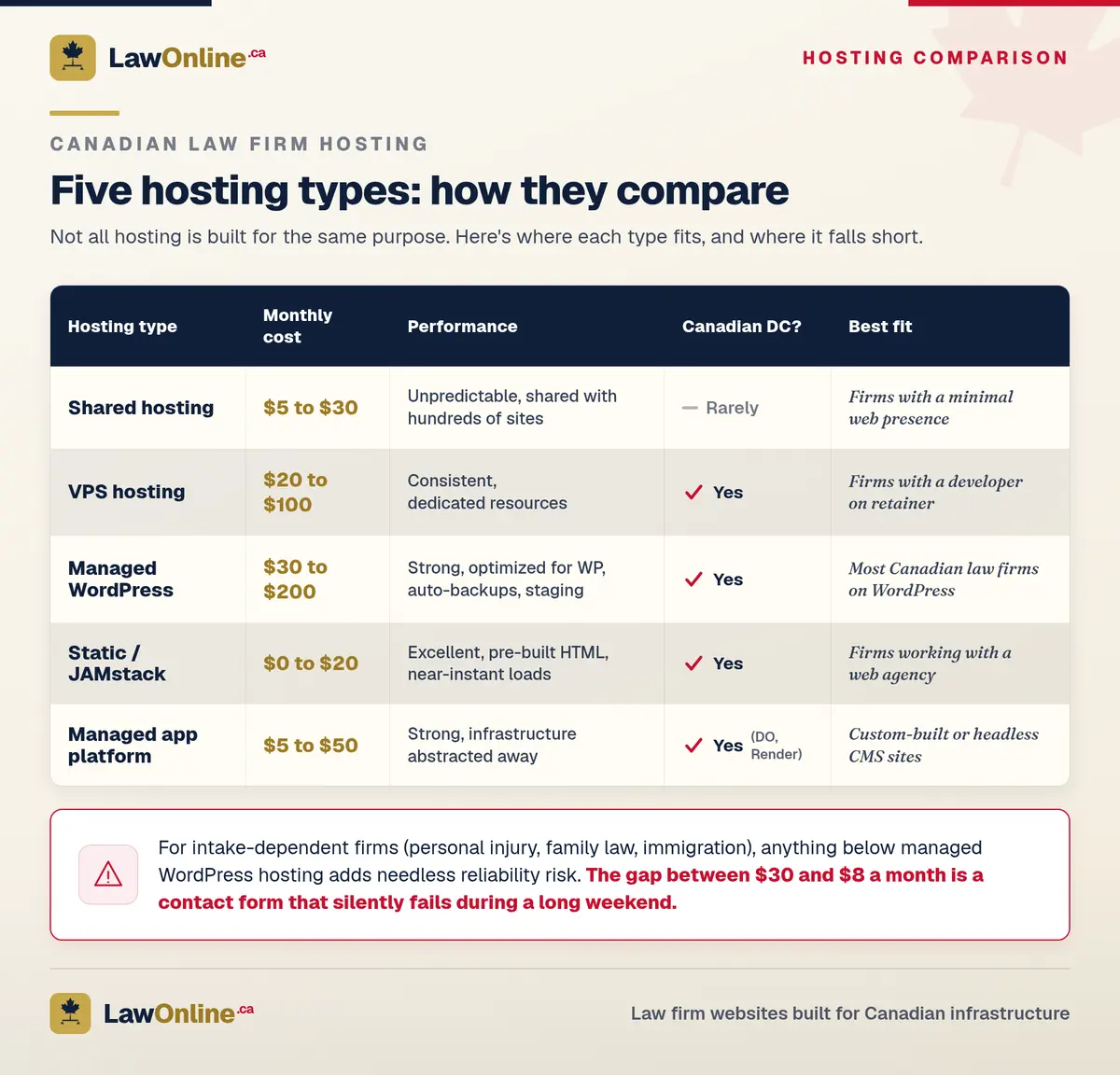
Shared Hosting ($5 to $30/month)
Your site shares server resources with dozens or hundreds of other websites. It's the cheapest option and the easiest to set up.
The problem for law firms: performance is unpredictable. If another site on your server gets a traffic spike, your page speed drops. Email deliverability is poor. Security is only as strong as the weakest site on the server. And you typically have no say over where your data is physically stored.
Shared hosting works for a personal blog. It's a poor fit for a firm that depends on its website for client intake.
VPS Hosting ($20 to $100/month)
A Virtual Private Server gives you dedicated resources on a shared physical machine. You get consistent performance, the ability to choose Canadian data centres, and more control over security configuration.
For law firms, VPS hosting is the minimum viable option for firms that take their web presence seriously. You get predictable speed, configurable security settings, and better email deliverability. The tradeoff is that someone needs to manage the server: your web developer, an IT contractor, or a managed services layer on top.
Managed WordPress Hosting ($30 to $200/month)
Services like Kinsta, WP Engine, and Flywheel handle server management for you. Automatic updates, daily backups, staging environments, and built-in performance optimization are all included. These platforms are built specifically for WordPress sites.
If your firm runs WordPress (most Canadian law firm sites do), managed hosting eliminates the biggest operational risks. Automatic backups mean you won't lose everything if a plugin update breaks your site. Staging environments let your developer test changes before they touch anything clients see.
The downside is cost. A personal injury firm with a straightforward 15-page site might pay $50 to $80/month for hosting that would cost $15 on a self-managed VPS. You're paying for convenience, reliability, and not having to worry about server maintenance.
Static Site / JAMstack Hosting ($0 to $20/month)
Static site generators like Hugo, Eleventy, and Astro produce plain HTML files that can be served from object storage or CDN edges. There's no server-side processing on each request, which means near-instant load times and a dramatically smaller attack surface.
For law firms, this approach delivers exceptional speed and security. There's no WordPress to hack, no PHP vulnerabilities to patch, no database to breach. The tradeoff is that content updates require a build step, which makes this less practical for firms that want to manage their own blog without involving a developer.
For firms working with an agency that handles updates, static hosting is a compelling choice for secure hosting for legal websites. It's the approach we use for the law firm websites we build at LawOnline.ca.
Managed App Platforms ($5 to $50/month)
Cloud hosting platforms like DigitalOcean App Platform, Render, and Railway let you deploy code while they handle the infrastructure. They offer Canadian regions, automatic SSL, and reasonable performance without requiring server administration knowledge.
These work well for custom-built sites or headless CMS setups. They're less relevant for standard WordPress installations but worth knowing about if your agency builds on modern frameworks.
What Does Law Firm Website Hosting Cost in Canada?
Here's a realistic cost breakdown for hosting for law firms in Canada:
| Hosting Type | Monthly Cost | Best For |
|---|---|---|
| Shared hosting | $5 to $30 | Firms with a minimal web presence |
| VPS (self-managed) | $20 to $100 | Firms with a developer on retainer |
| Managed WordPress | $30 to $200 | Most law firms running WordPress |
| Static / JAMstack | $0 to $20 | Firms working with a web agency |
| Managed app platform | $5 to $50 | Custom-built or headless CMS sites |
These figures cover hosting only. They don't include domain registration ($15 to $25/year for .ca domains), SSL certificates (usually free with modern hosts), or CDN services (often included or available free through Cloudflare).
The speed your host delivers has a direct impact on client inquiries. Google's mobile site speed research found that 53% of users abandon a site that takes more than three seconds to load, while the average mobile page still takes 22 seconds to fully load. A peer-reviewed study puts the cost more precisely: each additional second of load time can reduce conversion rates by up to 7%. For a personal injury firm where a single case can be worth tens of thousands of dollars, every second of server delay has a measurable cost.
Here's the math that matters: a personal injury firm spending $3,000/month on Google Ads but running on $8/month shared hosting is undermining its own ad spend. The ads drive traffic to a slow, unreliable site, and potential clients leave before the intake form loads. Spending $50 to $100/month on proper hosting is one of the highest-ROI infrastructure decisions a firm can make.
Is Your Current Host Good Enough?
Run through these questions. If you answer "no" to more than two, it's time to evaluate alternatives.
- Is your site hosted in Canada? Check with your provider or look for "data centre location" in your hosting dashboard.
- Does your host guarantee at least 99.95% uptime? Check your service level agreement or terms of service.
- Can you restore a backup yourself in under 10 minutes? Not just "we do backups," but self-service restoration when you need it.
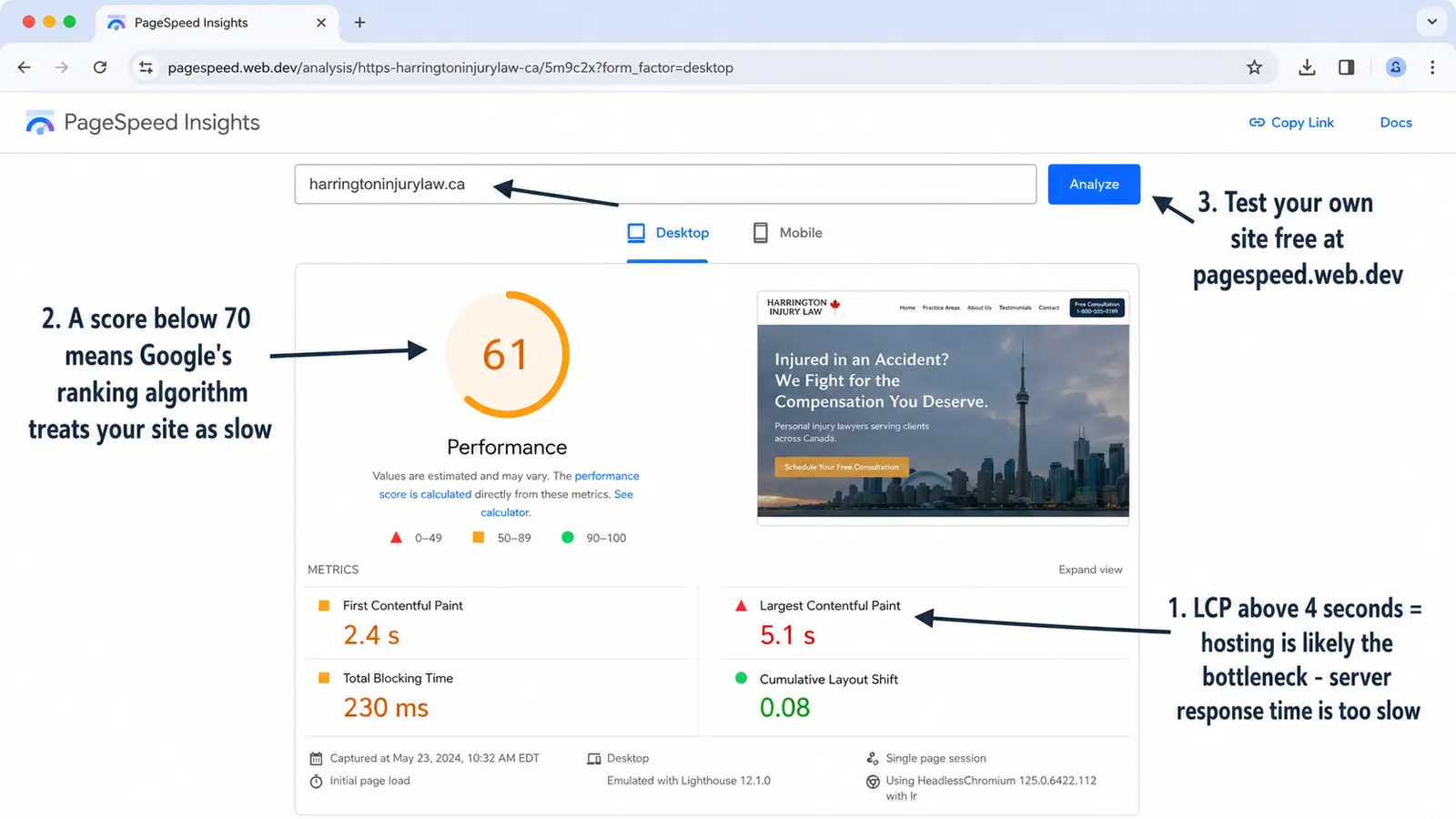
- Does your site load in under 3 seconds on mobile? Test at PageSpeed Insights.
- Are intake form submissions encrypted (HTTPS)? Look for the padlock icon in the browser address bar.
- Do your automated emails consistently reach client inboxes? Test by sending to Gmail, Outlook, and Yahoo accounts.
- Does your host offer staging environments? This lets you test updates before they affect your live site.
- Is the hosting account in your firm's name? If your agency controls the account, you could lose access if the relationship ends.
- Are you on a dedicated or virtual private server (not shared)? Shared hosting means shared risk.
- Do you know where to check your server's status page during an outage? If not, you're flying blind when problems hit.
If you scored 8 or above, your hosting is in good shape. Six or below means it's time for a serious conversation with your web team.

When Should You Migrate Your Hosting?
Most law firms should consider a hosting migration when any of the following are true:
- Your site regularly loads in over 4 seconds on mobile. You've already lost visitors and rankings. Better hosting won't fix everything (you may also need image optimization and caching), but a slow server puts a hard ceiling on how fast your site can be.
- Your data is stored outside Canada and you handle sensitive client information. For firms in practice areas like personal injury, family law, or immigration, this is a compliance gap worth closing.
- Your hosting is bundled with your marketing agency. If leaving your agency means losing your website, that's a dependency worth eliminating. Move hosting to an account your firm controls.
- You've outgrown shared hosting. If you're running Google Ads, publishing content regularly, or seeing more than a few hundred visitors per day, shared hosting will hold you back.
Migration itself is straightforward for an experienced developer. It typically takes a few hours of work plus a brief DNS propagation window. Downtime, when done properly, is measured in minutes rather than hours. Our guide to law firm website migration covers the full process, including how to preserve your SEO rankings during the switch.
What Does LawOnline.ca Recommend?
Best hosting for most Canadian law firms comes down to two paths, depending on how your site is built:
If you're on WordPress: Managed WordPress hosting with a Canadian data centre. It removes the operational burden of server management while keeping your data in Canada and your performance consistent. Budget $50 to $100/month.
If you're building (or rebuilding) with an agency: A static-first or JAMstack approach hosted on Canadian infrastructure. This gives you the best possible speed, the smallest security surface area, and hosting costs under $20/month. It's the model we use when we build websites for law firms, because it lets us deliver fast, secure sites that rank well and cost very little to operate.
Whichever path you choose, make sure the hosting account is in your firm's name, data stays in Canada, and your SEO fundamentals aren't being undermined by slow infrastructure.

Frequently Asked Questions
Does website hosting affect my law firm's Google rankings?
Yes. Page speed is a confirmed Google ranking factor, and your hosting directly determines your server response time, which affects every other speed metric. A personal injury firm on slow shared hosting will rank lower than a comparable firm on faster infrastructure, all else being equal. Google's Core Web Vitals, particularly Largest Contentful Paint (LCP), are heavily influenced by server performance.
Does my law firm need Canadian-hosted servers?
It depends on the type of data your website collects. If your intake forms collect personal information (names, contact details, case descriptions), PIPEDA applies. While PIPEDA doesn't explicitly require Canadian servers, storing personal data on US infrastructure exposes it to foreign law enforcement access. For personal injury firms handling medical information or family law firms processing custody details, Canadian hosting is the safest compliance posture.
What's the difference between hosting and a website builder like Wix or Squarespace?
Website builders like Wix and Squarespace bundle hosting, design tools, and a CMS into one platform. You can't separate them. This is convenient but limiting: you can't move your site to a different host, you have limited control over performance optimization, and your data is stored wherever the platform chooses. For a more detailed comparison, see our breakdown of DIY website builders versus agency-built sites.
How do I find out where my law firm's website is currently hosted?
The simplest method is to ask your web developer or agency. If you don't have one, you can use a free tool like DNS Checker or the command-line tool dig to look up your domain's IP address, then use an IP geolocation tool to see where the server is physically located. Your hosting provider's dashboard should also display your data centre region.
Can I move my law firm's website to a new host without downtime?
With proper planning, yes. The standard approach is to set up the new hosting environment, copy your site files and database, test everything on the new server, then update your DNS records to point to the new host. DNS propagation can take a few hours, but during that window both the old and new servers serve the site. An experienced developer can complete most law firm hosting migrations with zero visible downtime.
How much should a law firm spend on website hosting?
For most Canadian law firms, $50 to $100/month covers reliable managed hosting with Canadian data centres, automatic backups, and decent performance. Firms on static or JAMstack setups can spend significantly less ($5 to $20/month) while getting better speed and security. The key question isn't the dollar amount. It's whether your hosting is costing you clients through slow load times, poor email deliverability, or unreliable uptime.
What's the best hosting for a law firm website in Canada?
Most Canadian law firms do best on managed WordPress hosting with a Canadian data centre, budgeting $50 to $100/month. Providers like Kinsta, WP Engine, and Flywheel handle backups, updates, and performance so you don't have to. Firms building with an agency often benefit from static or JAMstack hosting on Canadian infrastructure, which costs under $20/month and delivers better speed and security with a smaller attack surface.