
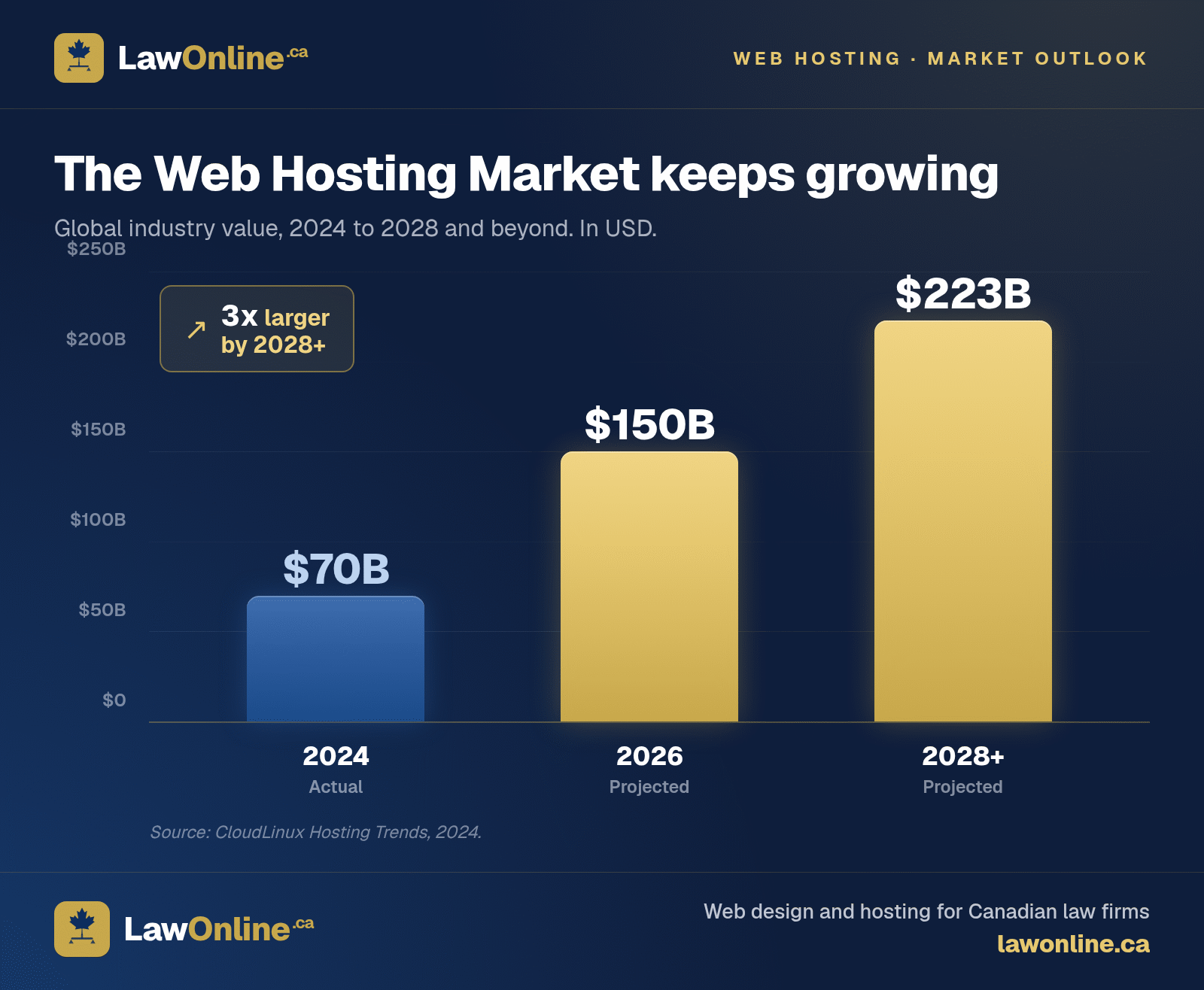
The web hosting industry is worth over $70 billion globally and projected to surpass $150 billion by the end of 2026. With that kind of money on the table, it's no surprise that some agencies structure contracts to make leaving as painful as possible. Across Canada, law firms are locked into web design contracts that charge premium prices for mediocre results. The sites load slowly, have no blog, generate minimal organic traffic, and when the firm finally asks about switching law firm website providers, they discover a clause buried in the contract: they don't own their website. If they leave, they lose everything.
It's a common trap. The Canadian Bar Association has repeatedly flagged technology adoption as a persistent challenge for law firms, and web vendor lock-in is one of the least discussed aspects of that challenge. Many firms stay put simply because the migration process seems too risky.
It doesn't have to be this way. Website migration is a well-understood process. With proper planning, you can switch providers, preserve your SEO rankings, and escape a contract that isn't serving your firm. Here's how.
Red Flags in Your Law Firm's Web Design Contract
Before planning a migration, review your existing contract. Many law firm web design contracts contain terms that would surprise most business owners.
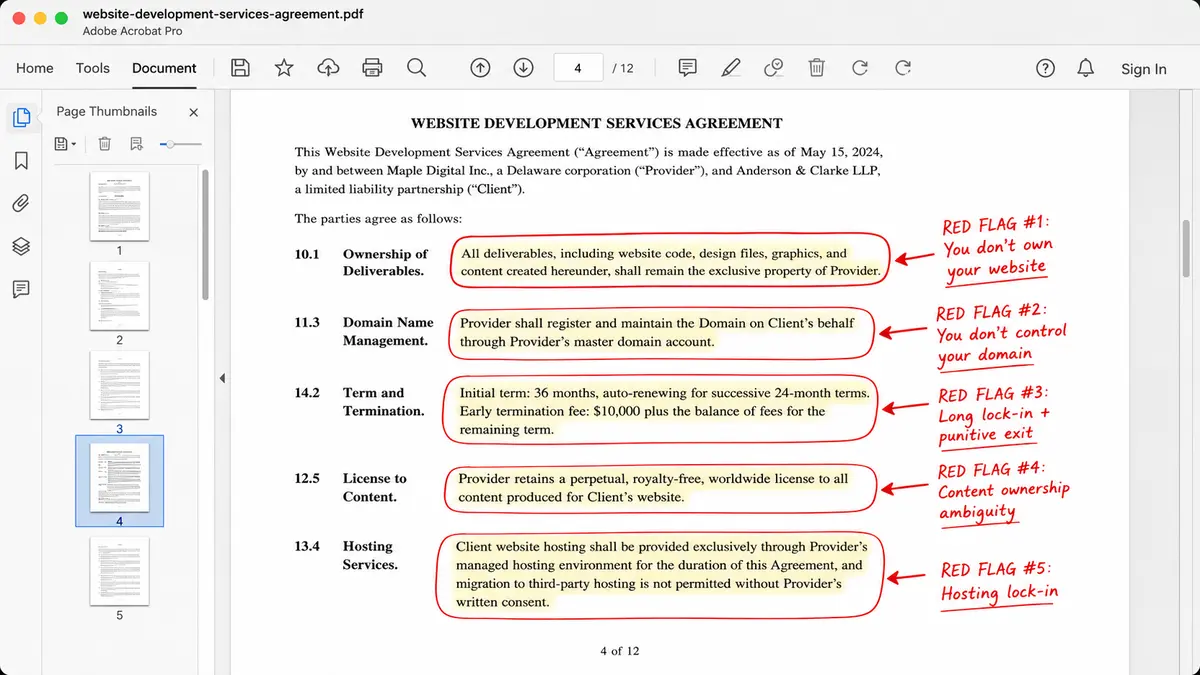
You Don't Own Your Website
This is the biggest red flag. If you can't confidently answer the question "who owns my law firm website?", that's a problem. Some agencies retain ownership of the website design, code, and sometimes even the content. If you leave, you start from scratch.
Check your contract for language about intellectual property, ownership of deliverables, and what happens upon termination. If the contract says the agency owns the site, you need to plan accordingly. Law firm website ownership is something you should clarify before signing any agreement, but if you're already locked in, knowing your position is the first step toward getting out.
You Don't Control Your Domain
Some agencies register your domain name under their own account. If you leave, they control your domain. This gives them extraordinary leverage because your domain carries all your SEO authority, your email routing, and your brand identity.
Verify that your domain is registered in your firm's name, in an account you control. If it isn't, transferring your law firm domain to your own registrar account should be your first priority, regardless of whether you plan to switch providers.
Long Lock-In Periods
Watch for contracts with automatic renewal, lengthy initial terms (two to three years), and steep early termination fees. A 36-month contract with a $10,000 early termination fee is designed to keep you paying, not to keep you happy.
Content Ownership Ambiguity
Who owns the blog posts, practice area pages, and other content on your site? Some contracts give the agency ownership or licensing rights over content they produced, even if you paid for it. If you leave, you may not be able to take your content with you.
Hosting Lock-In
Some agencies host your site on proprietary platforms or their own servers. If you leave, there's no way to simply "move" the site. It must be rebuilt from scratch on a new platform. This is by design. Understanding the differences between WordPress and static site platforms can help you evaluate what kind of hosting lock-in you're dealing with and what alternatives exist.
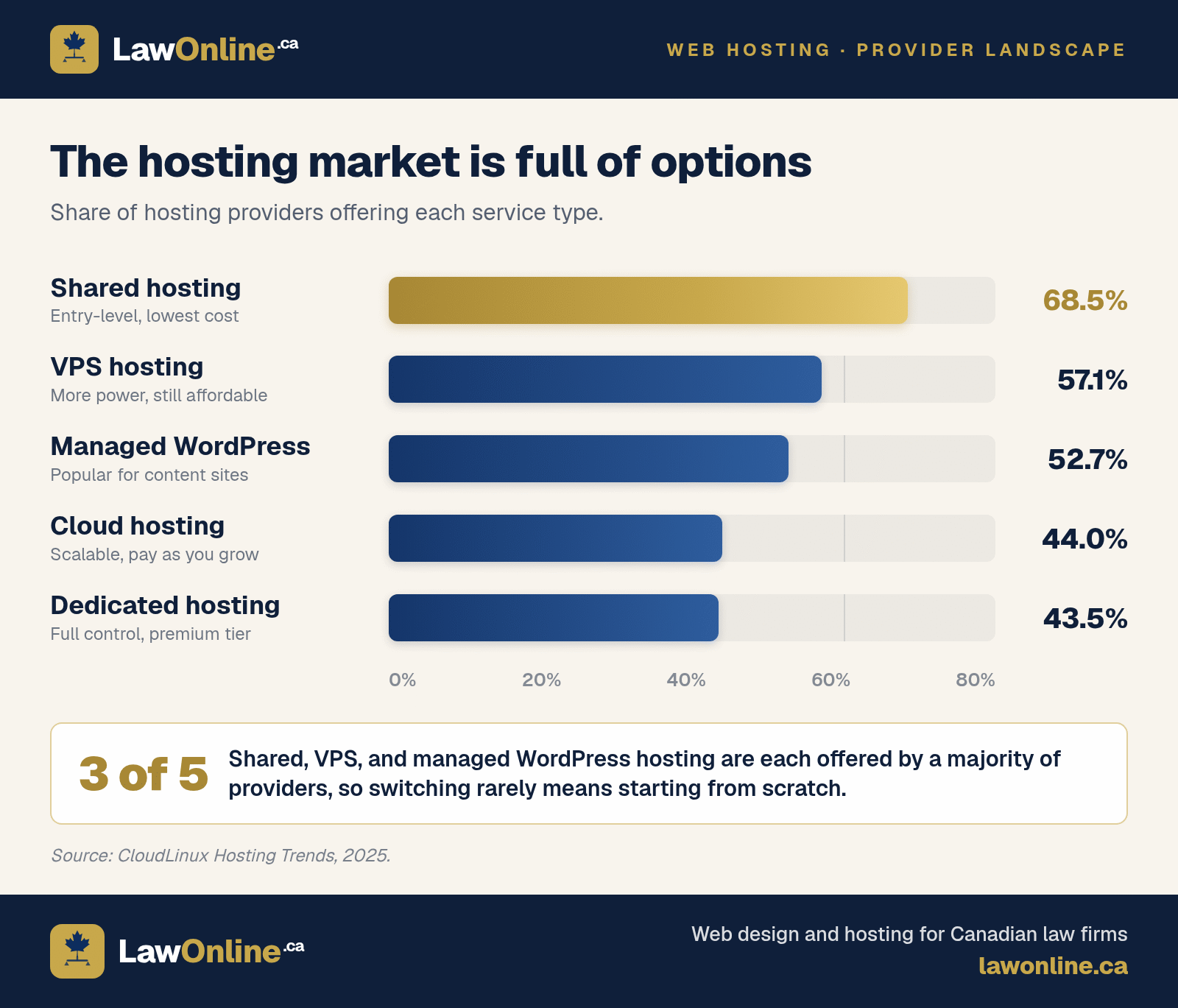
The hosting market offers plenty of alternatives. Over 68% of providers offer shared hosting, 57% offer VPS hosting, and more than half now provide managed WordPress hosting. Cloud hosting sits at 44%. In Canada, reliable hosting for a small to mid-sized law firm typically runs $30 to $200 per month, with shared plans starting as low as $3 and dedicated servers costing $100 to $500 or more. If your current provider charges well above that range with no itemized breakdown, you're paying for lock-in, not infrastructure. Your firm has options, but only if your contract allows you to use them.
What a Fair Contract Looks Like
A fair web contract should include:
- Clear client ownership of the website, content, design, and code
- Domain registered in the client's name
- Month-to-month terms or short contract periods (six to twelve months)
- Reasonable termination provisions with no punitive exit fees
- Full access to hosting, analytics, and all accounts
- A clear transition process if the relationship ends
How to Plan a Law Firm Website Migration
If you've decided to switch, proper planning is essential. A rushed migration can damage your search rankings. A planned one can preserve them entirely.
Step 1: Audit Your Current Site
Before you touch anything, document what you have.
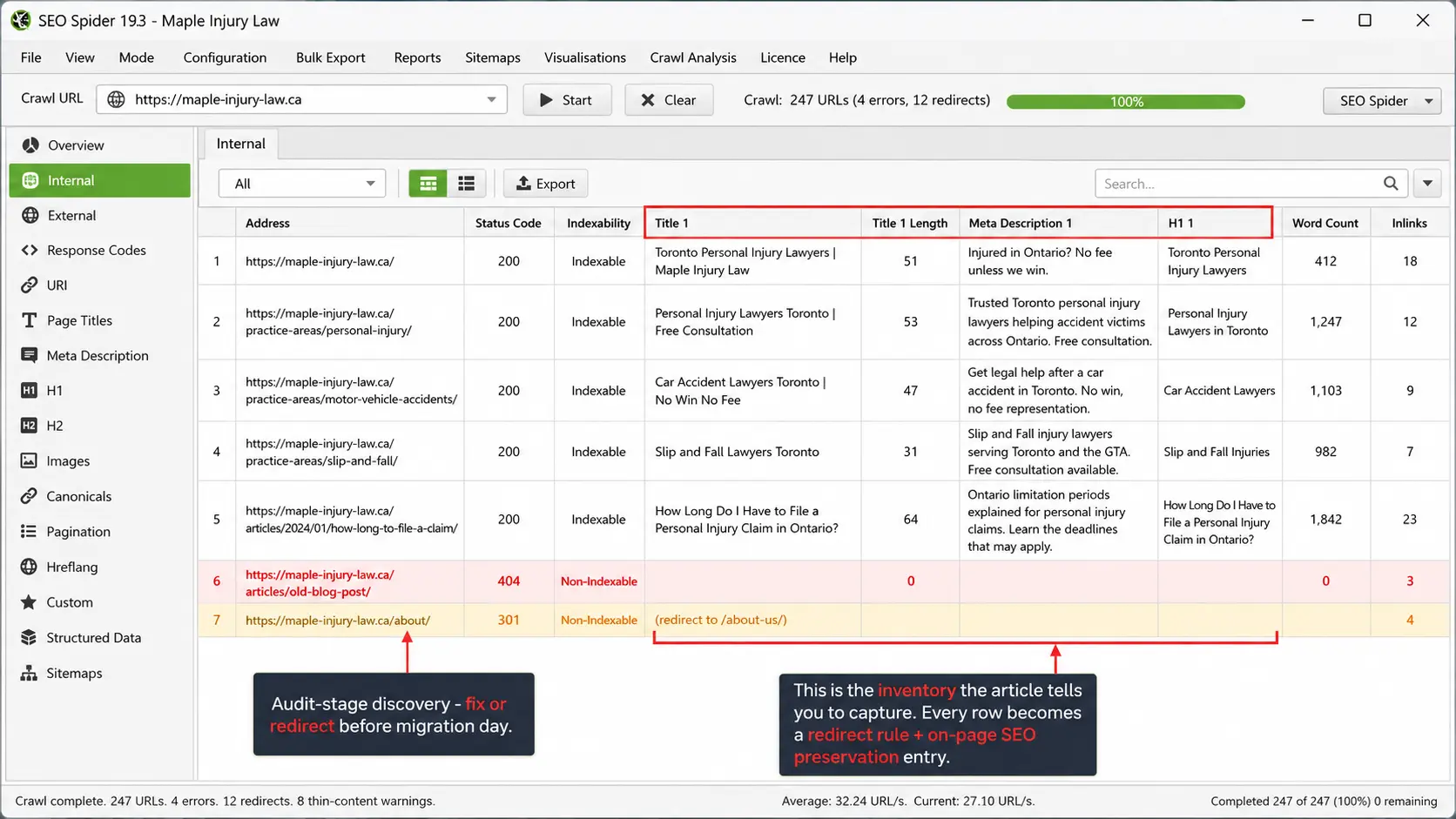
Crawl your site. Use a tool like Screaming Frog or a similar crawler to create a complete inventory of every page, URL, title tag, meta description, and heading on your current site. This inventory is your migration blueprint.
Export your content. Copy all page content, blog posts, and images. If your contract allows it, request a full site export. If it doesn't, manually copy everything. Don't lose content you've paid for.
Document your URL structure. List every URL on your site. This is critical for setting up redirects later.
Check your analytics. Identify your highest-traffic pages, top-performing keywords, and pages that generate the most leads. These pages need the most careful treatment during migration.
Download your Google Search Console data. Export your performance data, coverage reports, and any manual actions. This baseline helps you measure the impact of migration.
Note your E-E-A-T signals. Author bios, credentials, practice area depth, and trust indicators are content quality signals under Google's E-E-A-T standards. Document these so they carry over to the new site.
Step 2: Secure Your Domain
If your domain is under someone else's control, getting it transferred to your own registrar account is the single most important pre-migration step.
Your domain carries your entire online identity: your SEO authority, your email, your brand. Losing control of it can set you back years.
Contact your current provider and request a law firm domain transfer. If they resist, check the CIRA (Canadian Internet Registration Authority) transfer dispute process for .ca domains. For .com domains, ICANN transfer policies require registrars to allow transfers when requested by the registrant.
Step 3: Set Up the New Site Before Switching
Build your new site completely before touching the old one. If you're not sure what the build process involves, our guide to the law firm website design process walks through what to expect. At a minimum, this means:
- All pages are built and content is in place
- All URLs are mapped to the new structure
- Redirect rules are prepared for any URL changes
- The site is tested on a staging environment
- Performance is verified using tools like PageSpeed Insights
- Analytics and Search Console are configured
The goal is to minimize the time between the old site going down and the new site going live. Ideally, the transition is instantaneous.
Step 4: Implement Redirects
If any URLs change during migration (and they usually do), you must set up 301 redirects from every old URL to its new equivalent. This tells search engines that the content has permanently moved and transfers SEO authority to the new URL.
Missing redirects are the number one cause of SEO loss during migration. Every page that existed on the old site should either exist at the same URL on the new site or redirect to its new location.
Common URL changes during migration:
/practice-areas/personal-injury/to/services/personal-injury//articles/2024/01/car-accident-tips/to/articles/car-accident-tips/- Old date-based blog URLs to new slug-only URLs
Map every single one. Don't skip this step.
Step 5: Preserve On-Page SEO Elements
During migration, preserve these elements for every page:
- Title tags
- Meta descriptions
- H1 and H2 heading structure
- Image alt text
- Internal linking structure
- Schema markup
If you're improving these elements during the migration (and you should, if they were weak), make changes carefully. Updating title tags and meta descriptions is fine. Completely rewriting all content simultaneously is risky because Google needs to re-evaluate the new content.
Step 6: Go Live and Monitor
When the new site goes live:
- Verify all redirects are working. Test every one.
- Submit your updated sitemap to Google Search Console.
- Request indexing for your most important pages.
- Monitor Google Search Console daily for the first two weeks. Watch for crawl errors, 404s, and indexing issues.
- Check your organic traffic in analytics. A small dip in the first week or two is normal. A major drop indicates a problem with redirects or content.
Law Firm Website Migration Checklist
Here's a quick-reference summary you can use when planning your migration:
- Review your current contract for ownership, termination, and domain clauses
- Verify your domain is registered in your firm's name
- Crawl your existing site and document every URL
- Export all content, images, and media
- Download Google Search Console and analytics data
- Choose your new platform and provider
- Build the new site completely on a staging environment
- Map every old URL to its new equivalent
- Set up 301 redirects for all URL changes
- Preserve title tags, meta descriptions, and heading structure
- Test the staging site for speed, mobile responsiveness, and functionality
- Go live and submit the updated sitemap to Search Console
- Monitor crawl errors and organic traffic daily for two weeks
How to Preserve Your SEO Rankings During a Law Firm Website Migration
Organic search drives 53% of Canadian law firm website traffic, far ahead of paid search, direct visits, or referrals. With firms investing $1,500 to $10,000 per month in SEO to build that visibility, a botched migration doesn't just hurt rankings. It puts months or years of investment at risk.
Temporary Traffic Dips Are Normal
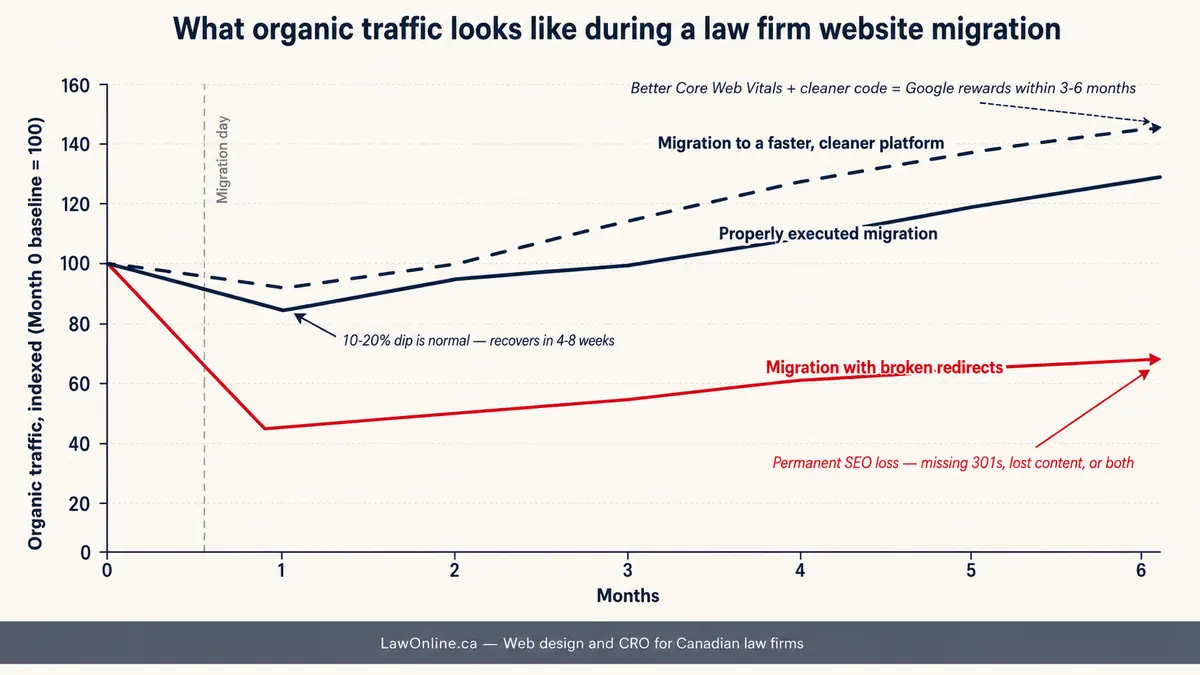
Almost every site migration causes a temporary traffic dip. Google needs time to recrawl and reindex your content at its new URLs. A dip of 10% to 20% in the first two to four weeks is common and usually recovers.
A dip of 50% or more signals a problem. Check your redirects, check for crawl errors in Search Console, and verify that your content is intact.
What Causes Permanent SEO Loss
Permanent ranking loss after migration is almost always caused by one of these mistakes:
- Missing or broken redirects
- Losing content during migration (pages that existed on the old site but not the new one)
- Changing URLs without redirects
- Losing backlinks because the linking sites point to URLs that now 404
- Major changes to page content alongside the URL change
Avoid these mistakes and your rankings should recover, often within four to eight weeks.
When Migration Actually Improves SEO
A properly executed migration to a better platform often improves SEO over time. If your new site is faster, more mobile-friendly, better structured, and has cleaner code, Google will recognize and reward those improvements. Site speed and Core Web Vitals are direct ranking factors, and many older law firm sites fail on all three metrics. This matters more than ever: 91% of hosting industry respondents report increased demand for better website performance, including faster load times, uptime, and reliability.
Many firms see organic traffic increase within three to six months of migrating from an outdated, slow site to a modern, well-optimized one. The migration itself isn't a risk to SEO. Bad execution is.
Escaping a Bad Web Design Contract
Review Termination Clauses
Read your contract's termination section carefully. Look for:
- Required notice periods (30 days, 60 days, 90 days)
- Early termination fees and how they're calculated
- Automatic renewal dates and opt-out windows
- What happens to your website, content, and domain upon termination
In Canada, provincial contract law may offer some protection. Courts in Ontario and other provinces have found certain termination penalties unenforceable when they amount to a windfall rather than a genuine pre-estimate of damages. If your early termination fee seems disproportionate to the actual cost of ending the contract, it's worth having a business lawyer review it.
Negotiate an Exit
Many agencies will negotiate rather than lose a client entirely. If you're unhappy, tell them. Some will reduce fees, release you from the contract, or agree to a shorter wind-down period.
Document everything in writing. Verbal agreements mean nothing when the relationship deteriorates.
Legal Review
If your contract has significant termination penalties or ownership disputes, consult a business lawyer before taking action. The cost of legal advice is far less than the cost of losing your domain or getting sued for breach of contract.
As a law firm, you likely have colleagues who can review the contract. Use that network.
Timing Your Exit
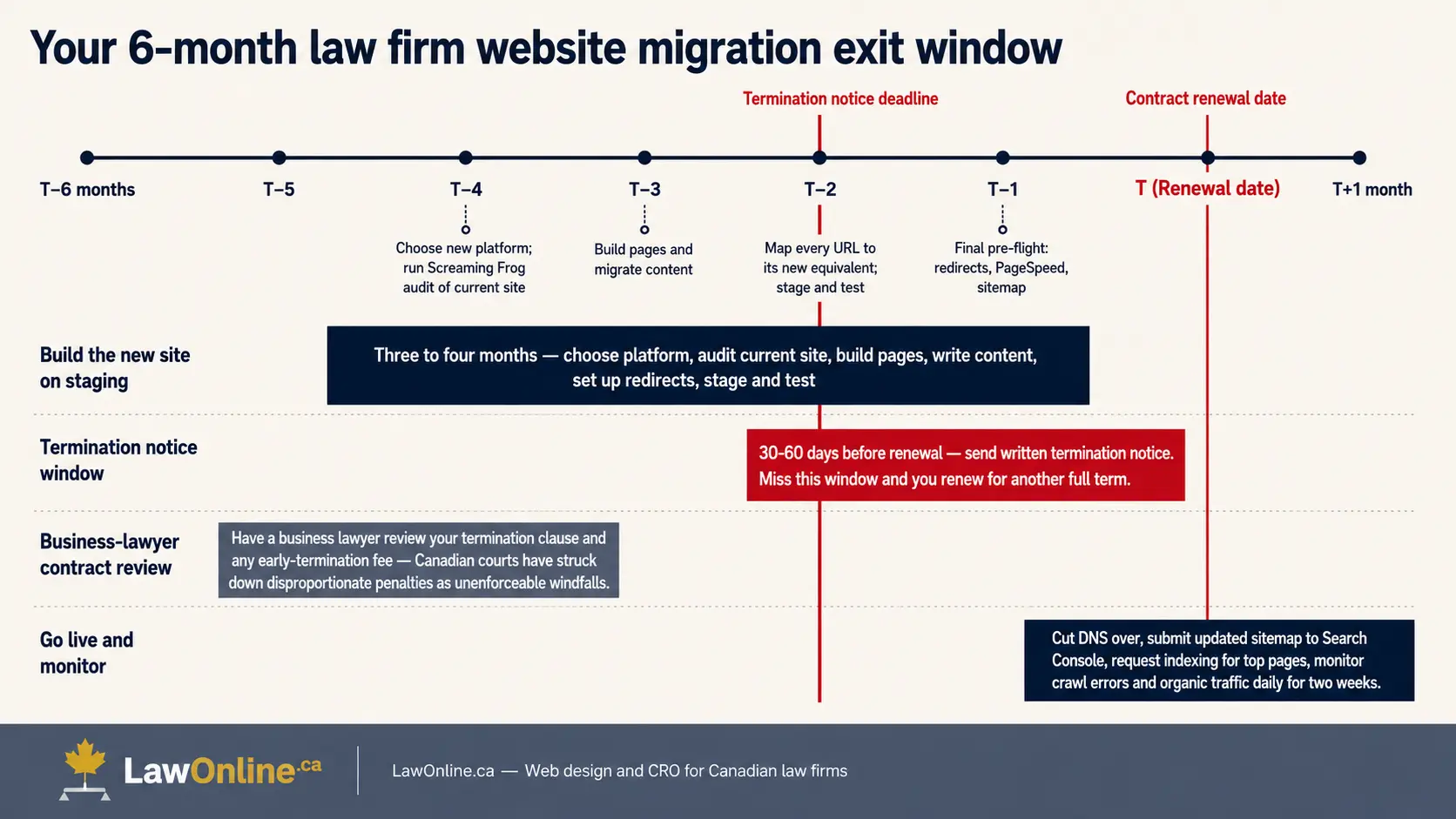
Plan your exit around your contract's renewal date. Understanding your law firm website contract termination options is essential. Most contracts have a window, often 30 to 60 days before renewal, during which you can terminate without penalty. Miss that window and you may be locked in for another full term.
Start planning your new site three to four months before your contract renewal date. This gives you time to build the new site, prepare for migration, and provide proper notice to your current provider.
The Bottom Line
Switching web providers isn't as risky as your current agency wants you to believe. With 65% of hosting providers reporting revenue growth and healthy competition across shared, VPS, WordPress, and cloud hosting, there's no shortage of better law firm hosting options. The risk is in staying with a provider that overcharges and underdelivers.
A well-planned law firm website migration preserves your SEO rankings, improves your site performance, and frees you from a contract that isn't serving your firm. The key is planning: audit your current site, secure your domain, build the new site before switching, implement proper redirects, and monitor closely after launch. If you're deciding between handling the migration yourself or hiring an agency, the right choice depends on your firm's technical capacity and how much is at stake.
Understanding what a law firm website should actually cost can also help you evaluate whether your current provider is charging a fair price or padding the invoice.
Your website is a business asset. You should own it, control it, and have the freedom to work with whoever serves you best.