
Your Website Is Your Most Important Business Development Tool
Seventy-five percent of potential clients visit two to five law firm websites before contacting a firm (FindLaw Consumer Legal Needs Survey, 2023). That is not a typo. Three out of four people looking for a lawyer will compare you side-by-side with your competitors before picking up the phone.
If your site is slow, outdated, or hard to use on a phone, you are losing those comparisons. Silently. You never see the people who left.
Sixty-five percent of law firms report that their website delivers the highest ROI of any marketing channel (Revenue Memo, 2026). That makes sense. Unlike paid ads, which stop working the moment you stop paying, a well-built website compounds value over time. It ranks in search engines, builds trust, and generates inquiries around the clock.
We build websites for Canadian law firms. Not restaurants, not dentists, not e-commerce brands. Law firms. That specialization is why our sites perform the way they do.
What We Build and Why It Works
Every law firm website we deliver includes the following. These are not add-ons or upgrades. They are baseline standards.
Speed That Ranks
Google uses page speed as a direct ranking factor through its Core Web Vitals standards. Seventy-six percent of visitors will leave a website that does not have enough information, and 69% will abandon a site that loads slowly, especially on mobile (iLawyerMarketing). Those are U.S. figures, but the underlying user behaviour applies everywhere. People are impatient. Search engines reward speed.
We consistently score high on Google PageSpeed Insights across our builds. We achieve this through image optimization (WebP/AVIF formats), minimal JavaScript, efficient hosting, and a build process that eliminates unnecessary page weight. A personal injury firm with a fast website will outrank a competitor with better content but a slow site. That is how much speed matters.
Conversion-Focused Design
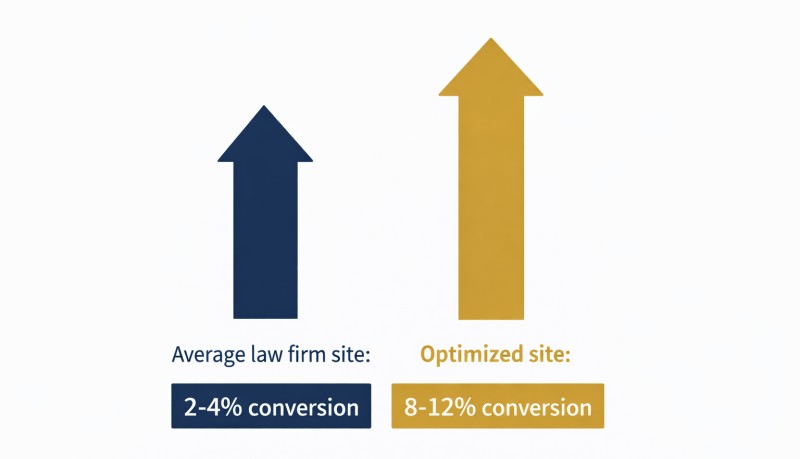
The average law firm website converts 2 to 4% of visitors into consultations. Optimized sites reach 8 to 12% (LegalBrandMarketing, 2026). The difference between those two numbers can mean dozens of additional client inquiries per month for a busy personal injury practice.
Conversion optimization is not guesswork. It is the discipline of placing calls to action where visitors will see them, designing intake forms that are easy to complete on a phone, and structuring pages so the most important information appears first. Every page we build has a clear purpose: get the visitor to contact you.
We put your phone number in the header, make it tap-to-call on mobile, and place contact forms above the fold on every practice area page. These sound like small details. They are not. A personal injury firm in Toronto increased its consultation request rate by 38% after redesigning with this approach.
SEO Architecture from Day One
Ninety-four percent of law firms say search engines are their top channel for brand awareness (Revenue Memo, 2026). Your site's architecture, meaning how pages are structured, linked together, and labelled for search engines, determines how well Google understands what your firm does and where you practise.
We plan site architecture before writing a single line of code. A personal injury firm serving multiple cities needs a main practice area page, then city-specific landing pages with unique content and strategic internal links. A family law firm needs separate pages for divorce, custody, child support, and property division, each targeting the terms potential clients actually search. This structure is not something DIY website builders provide, and it is the foundation of every site we design.
Every site also includes structured data markup (schema.org), telling search engines your firm's name, address, practice areas, hours, and service area in a format they can read directly. Structured data powers rich search results and is increasingly important for AI-generated answers. Most law firm websites do not have it. Ours do.
Mobile-First, Always
Over 60% of legal service searches happen on mobile devices. We design mobile-first, meaning the phone experience is the primary design, not an afterthought. Buttons are easy to tap, text is readable without zooming, and the phone number is always one touch away. If someone involved in a car accident is searching for a personal injury lawyer from a hospital waiting room, your site needs to work perfectly on their phone. No exceptions.
Professional Content Written by Humans
Every word on your website matters. Practice area pages need to explain your services clearly enough that a stressed-out potential client understands what you do, while also signalling relevance to search engines. That is a real skill, and it is not something AI-generated content does well.
All content on our sites is written by human writers who understand Canadian law, legal terminology, and the specific requirements of content marketing for law firms. We do not use AI-generated filler. A prospective client reading your practice area page can tell the difference between something written by someone who understands their situation and something assembled by a machine. So can Google.

CMS vs. Static: Choosing the Right Foundation
One of the first decisions in any law firm website project is whether to use a content management system (CMS) like WordPress or Ghost, or to build a static website. Both approaches have genuine advantages. The right choice depends on how your firm plans to use the site.
Content Management Systems (WordPress, Ghost)
Best for: Firms that want to publish blog posts, update practice area pages, or make content changes without involving a developer.
A CMS gives your team a dashboard where you can edit text, add images, and publish new pages using a visual editor. WordPress powers roughly 40% of the web and has a massive ecosystem of plugins and themes. Ghost is a leaner, more modern alternative that prioritizes content and performance over plugin variety.
Advantages:
- Your staff can update content without technical skills
- Blog publishing is built in
- Large plugin ecosystems for added functionality (WordPress)
- Familiar interface for most users
Trade-offs:
- WordPress sites require regular updates to plugins, themes, and core software. Neglect this and you create security vulnerabilities.
- Plugin bloat can slow performance. Every added plugin is additional code your visitors have to download.
- WordPress is the most targeted CMS for cyberattacks globally. Keeping it secure requires ongoing attention.
- Hosting costs are typically higher because CMS sites need server-side processing.
Static Websites
Best for: Firms that want maximum speed, minimal maintenance, and are comfortable having a developer handle content changes.
Static sites are pre-built HTML files served directly to the browser. There is no database, no login screen, and no software to update. They are inherently faster and more secure than CMS sites because there is simply less that can go wrong.
Advantages:
- Fastest possible page load times
- Virtually no security vulnerabilities (no database to breach, no admin panel to hack)
- Lower hosting costs, sometimes free
- Simpler to maintain long-term
Trade-offs:
- Content changes require a developer or familiarity with code
- No built-in blog editor (content is managed in files, not a dashboard)
- Less intuitive for non-technical staff
We build both. During our initial consultation, we help you decide which approach fits your firm's workflow and goals. If you want to publish weekly blog posts yourself, a CMS makes sense. If you want a fast, set-it-and-forget-it site with updates handled by our team, static is the better choice.
DIY and AI Website Builders: Why They Fall Short
Squarespace, Wix, Webflow, and AI-powered tools like Lovable and Framer AI make it easy to create a visually decent website. For a restaurant or a personal blog, that might be enough. For a law firm competing for high-value clients, it is not.
We wrote an in-depth comparison of DIY law firm websites versus hiring an agency that covers this in detail. Here is the summary.
No SEO architecture. DIY builders let you create pages, but they do not guide you on how to structure them for search engines. Keyword research, internal linking strategy, and site hierarchy are left entirely to you. Most lawyers do not have the training or time to get this right.
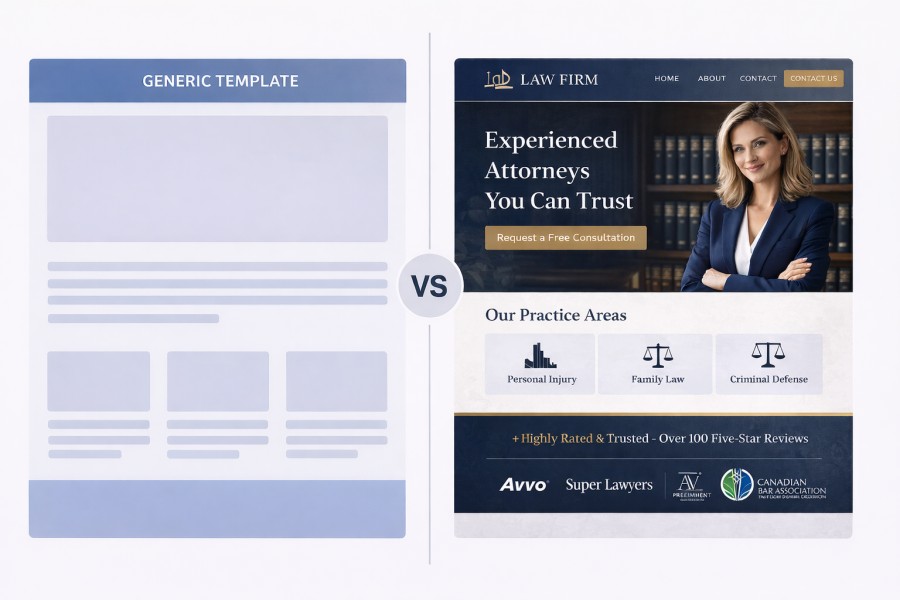
No conversion optimization. Template websites look clean but are not engineered to maximize client inquiries. Call-to-action placement, intake form design, and trust signal positioning require applied expertise and testing. A template does not offer that.
No structured data. DIY sites almost never include the schema markup that tells Google your firm's location, practice areas, and business details. This is a competitive disadvantage in search results and AI-generated answers.
No compliance knowledge. An AI builder does not know the difference between what the Law Society of Ontario allows and what it prohibits. It cannot review your website copy for claims of superiority, misleading testimonials, or fee advertising that violates provincial regulations.
Hidden costs. The upfront savings of a DIY site often disappear when you factor in lost time, missed client inquiries from poor SEO, and the eventual cost of rebuilding the site properly. A personal injury firm in Mississauga spent three weeks fighting DNS issues after trying to migrate a self-built Wix site, and the rankings they lost during the instability cost far more than a professional build would have.
How We Build Your Website: The Process
Building a law firm website is not a weekend project. It is a structured process, and the timeline depends on the scope of the project. Here is how it works.
1. Discovery and Strategy
We start by learning about your firm. What practice areas do you focus on? Which cities do you serve? Who are your main competitors? What does your current online presence look like? This is not a generic intake form. It is a conversation that shapes everything we build.
We also audit your existing website (if you have one), your Google Business Profile, and your competitor landscape. By the end of this phase, we have a clear picture of what your site needs to accomplish and a site map that lays out every page.
2. Content Development
Content and design happen in parallel. While our writers develop your practice area pages, about page, and other key content, our designers shape the layout and visual direction alongside them. The two streams inform each other throughout, so the final design complements the content and vice versa. This parallel approach keeps the project moving without bottlenecks.
Our writers research your practice areas, your jurisdiction, and your target audience. A personal injury page for an Ontario firm references Ontario-specific case types, limitation periods, and procedural details. A family law page addresses the Divorce Act, provincial family law statutes, and the specific concerns clients in your region have. Nothing is generic.
3. Design and Development
Every design is custom, with layouts tailored to your firm's content and brand. You see a full mockup before development begins, and we refine it until you are satisfied.
Development includes everything discussed on this page: speed optimization, mobile responsiveness, structured data, accessibility, and SEO architecture. We build it right the first time.
4. Review and Revision
You review the site on a staging environment. This is a private URL where you can see exactly what the finished product looks like and how it behaves. We typically do two rounds of revisions, though we are flexible. Your feedback is what makes the site yours.
5. Launch and Handover
On launch day, we handle the technical migration: DNS, redirects (so you do not lose existing search rankings), SSL setup, and analytics configuration. We also submit your site to Google Search Console and verify that everything is indexing correctly.
After launch, you own everything. The code, the content, the domain. That matters more than most firms realize until they try to leave an agency that has locked them into a proprietary system. We wrote about website ownership for law firms because it is that important.
Law Society Compliance Built In
Provincial law societies regulate how lawyers advertise their services. In Ontario, the Rules of Professional Conduct, Chapter 4 requires that all marketing be true, accurate, verifiable, and in the best interests of the public. The LSO receives roughly 5,800 complaints per year, with about 4,400 referred for investigation. Advertising violations are among the most preventable reasons a firm ends up on the regulator's radar.
We build compliance into every website from the start. This means:
- No claims of superiority unless backed by objective, verifiable data
- Testimonials reviewed for accuracy and potential to mislead
- Fee advertising that meets provincial standards for clarity and completeness
- Case results presented with proper disclaimers about typical outcomes
- Specialization claims that comply with your province's certification rules
We understand the Ontario advertising rules in detail, and we apply the same rigour for firms in British Columbia, Alberta, and every other province. Your website should help you get clients, not regulatory complaints.
Accessibility and Legal Disclaimers
Every website we build adheres to the Web Content Accessibility Guidelines (WCAG 2.1 AA). This is not optional. In Ontario, the Accessibility for Ontarians with Disabilities Act (AODA) requires that public-facing websites meet accessibility standards. Beyond compliance, accessibility is the right thing to do. A website that works for everyone works better for everyone.
What this looks like in practice:
- Proper heading hierarchy for screen readers
- Sufficient colour contrast ratios
- Alt text on all images
- Keyboard navigation support
- Skip-to-content links
- ARIA labels where needed
We also include the legal disclaimers your site needs. This includes a privacy policy that complies with the Personal Information Protection and Electronic Documents Act (PIPEDA), terms of use, and any practice-specific disclaimers required by your law society or area of practice. These are not afterthoughts. They are part of the build.
What You Will Need to Provide
Building a great website is a partnership. We handle the strategy, design, development, and content, but there are a few things only you can provide. None of this is difficult, and we guide you through every step.
Professional photos. Real photos of your team, your office, and your workspace. They do not need to be magazine-quality, but they need to be real. Stock photos erode trust. A 30-minute session with a local photographer is usually enough.
Your firm's story. What makes your firm different? Why did you start practising? What do clients say about working with you? We ask these questions during discovery and turn your answers into compelling copy. You do not need to write anything yourself.
Practice area details. A list of your practice areas, the cities you serve, and any specializations. If you handle personal injury cases, we need to know whether that includes motor vehicle accidents, slip and falls, medical malpractice, or all of the above. The more specific you are, the better we can target the right clients.
Feedback during review. When we send you the staging site for review, we need your input. Does the tone feel right? Are the practice area descriptions accurate? Is anything missing? Two focused review sessions are typically all it takes.
Access credentials. We will need access to your domain registrar, any existing hosting accounts, and your Google Business Profile. If that sounds complicated, don't worry, we'll walk you through it. We handle the technical setup and return full access to you at project completion.
The Numbers That Matter
Law firm digital marketing is measurable. Here are the benchmarks that should inform your expectations.
The average law firm website converts 2 to 4% of visitors into consultations. Optimized sites reach 8 to 12% (LegalBrandMarketing, 2026). The difference between those numbers represents real clients your firm is either winning or losing.
SEO delivers a 526% return on investment over three years, breaking even at roughly 14 months (Andava Legal Marketing, 2026). That makes your website and its SEO architecture the highest-returning long-term investment in your firm's marketing.
Firms with intake technology (online forms, e-signatures, chat) see 51% more leads and 52% higher revenue (Clio 2024 Legal Trends Report). Firms responding to inquiries within five minutes achieve 300 to 400% higher conversion rates (LawHustle, 2024). These figures are primarily U.S.-based, but the patterns apply across the border. Speed and accessibility win clients.
Meanwhile, 27% of law firms do not respond to online leads at all (Revenue Memo, 2024). If your website has a working contact form and you respond quickly, you are already ahead of more than a quarter of your competition.
Ready to Talk About Your Website?
If you already have a website, we will audit it for free. We review your site's performance, search rankings, and competitor landscape, then deliver a clear report showing exactly where you stand and what to improve. No charge. No obligation.
If you are a solo practitioner launching your practice, or a firm starting fresh without an existing site, we are happy to discuss your options and help you figure out what you need. Same deal: no obligation, no pressure.
Frequently Asked Questions
How much does law firm website design cost in Canada?
Most law firm website projects range from $3,000 to $15,000 for small to mid-size firms. Fully custom builds with advanced features like client portals, multi-language support, or complex practice area architectures can exceed $35,000. The cost depends on the number of pages, custom functionality, and whether you need ongoing content and SEO services alongside the design.
Should my law firm use WordPress or a static website?
It depends on your firm's needs. WordPress or Ghost is ideal for firms that plan to update content frequently, since your staff can edit pages and publish blog posts without touching code. Static websites load faster, cost less to host, and have a smaller attack surface, but require a developer for content changes. During our initial consultation, we help you decide which approach fits your workflow.
Can I build my own law firm website with Wix or Squarespace?
You can, but the result will likely underperform. DIY builders produce functional websites that lack the SEO architecture, conversion optimization, structured data, and Law Society compliance that a legal marketing agency provides. Seventy-five percent of potential clients visit two to five law firm websites before making contact. The site that loads fastest, communicates trust, and makes it easy to reach you wins the inquiry. We covered this topic in detail in our DIY vs. agency comparison.
How long does it take to build a law firm website?
The timeline depends on the scope. A straightforward site for a small firm moves faster than a complex multi-practice build with bilingual requirements or custom integrations. During discovery, we map out the project and give you a realistic timeline before any work begins. Every project includes consultations, content writing, design, development, review rounds, and launch preparation.
Will my website comply with Law Society advertising rules?
Yes. We build every site with provincial Law Society advertising rules in mind. In Ontario, that means full compliance with the LSO's Rules of Professional Conduct, Chapter 4. We apply the same diligence for firms in British Columbia, Alberta, and other provinces. Read our guide to Ontario lawyer advertising rules for details.
Do I own my website after it is built?
With LawOnline.ca, yes. You own the code, the content, and the domain. We do not lock clients into proprietary platforms or hold websites hostage behind ongoing contracts. If you ever decide to move to a different provider, we hand over everything. This is not standard practice across the industry, and it is one of the reasons we emphasize website ownership in every engagement.